





Voicy vs MacWhisper: Which Dictation App Should You Choose in 2026?
TL;DR
Choose Voicy if you want everyday live dictation across Mac, Windows, browser extension, iPhone, and Android, plus file upload transcription when you need it.
Choose MacWhisper if you mainly transcribe recordings on a Mac and want local processing for audio, video, meetings, and system audio.
Best fit for most daily writing: Voicy, because it is built around speaking into the apps and text fields where you already work.
Best fit for local Mac transcription: MacWhisper, because its public site says transcription runs locally on your Mac and the free plan can be enough for lighter file workflows.
Cost note: Voicy is $8.49/month, $82/year, or $260 lifetime. MacWhisper lists a free plan and MacWhisper Pro at EUR 64 per license on its official site. Those are different currencies, so the fairest comparison is plan shape, not a fake converted savings claim.
If you are comparing Voicy vs MacWhisper, start with the workflow. Voicy is a dictation app for writing across many devices and apps. MacWhisper is a Mac-first transcription app that also has dictation features.
Short Verdict
Voicy is the better choice if you want to talk instead of type during the workday: emails, docs, browser fields, notes, messages, forms, and mobile writing. MacWhisper is the better choice if your main job is turning existing recordings into transcripts on a Mac, especially when local processing matters.
The honest answer is that these tools overlap, but they are not the same category. Voicy is broader for daily dictation and cross-device writing. MacWhisper is stronger for private Mac transcription, file handling, meeting capture, subtitles, and local model workflows.

Voicy is built for everyday speech-to-text across desktop, browser, and mobile workflows.
MacWhisper is positioned around local Mac transcription for audio, video, meetings, and private files.
Voicy vs MacWhisper at a Glance
Category | Voicy | MacWhisper | Winner |
|---|---|---|---|
Best for | Everyday professionals who want live dictation plus file transcription across devices. | Mac users who mainly need local transcription for audio, video, meetings, and system audio. | Voicy for daily writing. MacWhisper for Mac transcription. |
Main workflow | Speak into normal work apps and text fields, then upload files when needed. | Drag in files, record meetings, transcribe Mac/system audio, and manage transcripts. | Depends on workflow. |
Platforms | Mac, Windows, browser extension, iPhone, and Android. | Mac app, with iPhone and iPad availability listed by MacWhisper. It is not a Windows or Android app. | Voicy. |
Live dictation | Yes. Voicy is built for live dictation across everyday writing surfaces. | Yes. MacWhisper's site lists system-wide dictation and real-time dictation for messages, notes, and documents. | Voicy for cross-platform daily dictation. |
File transcription | Yes. Voicy supports file upload transcription. | Yes. MacWhisper is heavily focused on file, meeting, video, and system-audio transcription. | MacWhisper for Mac-local file workflows. |
Processing model | Cloud-based transcription. | Local transcription on Mac by default, with Pro options for local and cloud models or external AI services. | MacWhisper for local processing. Voicy for cloud convenience. |
Pricing | $8.49/month, $82/year, or $260 lifetime, with a free trial. | Free plan and MacWhisper Pro at EUR 64 per license on the official pricing page. | MacWhisper for free/local Mac transcription. Voicy for subscription or lifetime cross-platform dictation. |
Best privacy fit | People comfortable with cloud-based speech-to-text under Voicy's terms. | People who want transcription to happen locally on their Mac whenever possible. | MacWhisper. |
When Voicy Is the Better Choice
Voicy makes more sense when your goal is to stop typing during normal work. You are writing emails, filling browser forms, drafting documents, replying in chat, taking notes, or creating first drafts on different devices.
That is different from managing a transcript project. Voicy is strongest when speech-to-text should fade into the background and help you write where you already work.
Voicy is stronger for cross-platform dictation
MacWhisper is Mac-centered. Voicy covers Mac, Windows, browser extension, iPhone, and Android. That matters if you use a Windows work machine, write in web apps all day, or move between desktop and phone.
Good Voicy use cases include:
Drafting emails in email apps or browser-based inboxes.
Writing in documents, CMS fields, notes, forms, and AI tools.
Dictating on Mac at home and Windows at work.
Using speech-to-text on iPhone or Android when you are away from your desk.
Uploading audio files when a recording needs to become text.
Reducing typing load if long keyboard sessions cause pain or fatigue.
Voicy is better if you want one tool for dictation and uploaded files
Voicy supports live dictation and file upload transcription. That combination is useful because work rarely stays in one format. One minute you are speaking a reply into a text box. Later, you may need to transcribe a voice memo, client call, interview, or lecture recording.
If you mainly want to write faster across apps, Voicy is the cleaner fit. If you mainly want a Mac transcript editor with local models, MacWhisper is better suited to that job.
When MacWhisper Is the Better Choice
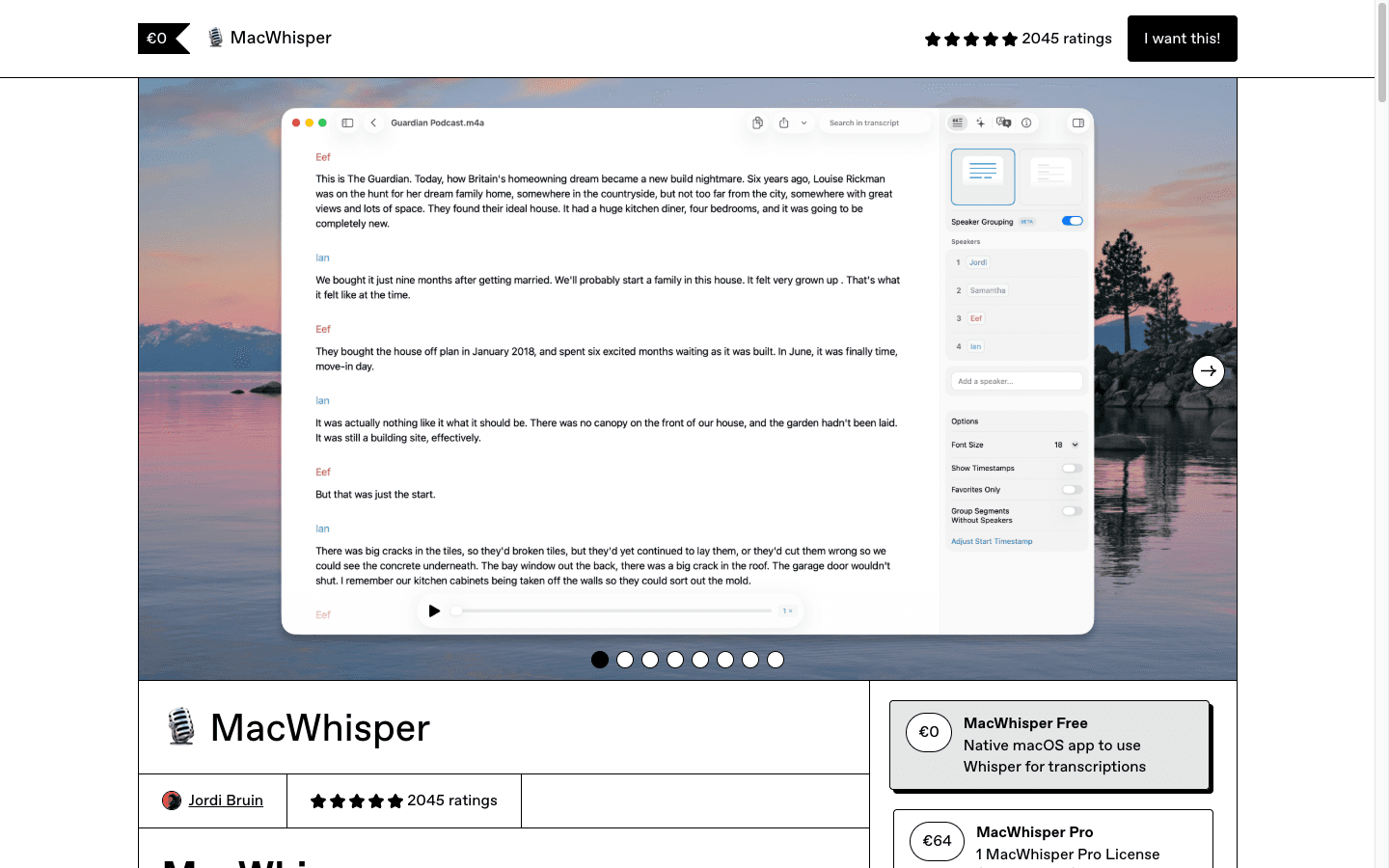
MacWhisper is the better pick when your work starts with existing audio or video. Its official site describes it as an all-in-one Mac app for transcribing lectures, videos, podcasts, private files, online meetings, system audio, and dictation.
Choose MacWhisper if you specifically want:
Local transcription on a Mac.
Drag-and-drop file transcription.
Meeting recording without a meeting bot.
Transcription for audio, video links, subtitles, or system audio.
A transcript editor with export formats such as TXT, Markdown, PDF, HTML, DOCX, SRT, and VTT.
A one-time Pro license instead of a recurring subscription.
The tradeoff is platform scope. MacWhisper is not the obvious choice if you need the same writing workflow on Windows, Android, and browser-heavy work apps. It can do dictation, but its center of gravity is still Mac transcription.
Pricing and Cost Over Time
Voicy costs $8.49 per month, $82 per year, or $260 for lifetime access. Voicy is not fully free, but it offers a free trial.
MacWhisper's official pricing page lists a Free plan at EUR 0/month and MacWhisper Pro as a pay-once license at EUR 64 per license, with lifetime updates. Its Gumroad page also describes Pro as a one-time payment with no subscription.
Cost over time
The fair way to compare cost is to keep each product in its listed currency. Voicy prices are in US dollars. MacWhisper's official page lists pricing in euros. Converting EUR to USD would depend on the exchange rate that day, so this table avoids that.
Time period | Voicy | MacWhisper | Winner |
|---|---|---|---|
Free entry point | Free trial, then paid. | Free plan at EUR 0/month. | MacWhisper for ongoing free Mac transcription. |
12 months on monthly billing | $101.88 ($8.49 x 12). | EUR 64 for Pro if purchased once. | MacWhisper for Mac-only Pro transcription, but currencies differ. |
12 months on annual billing | $82. | EUR 64 for Pro if purchased once. | MacWhisper on one-time Mac Pro pricing, Voicy for broader platform coverage. |
Three years | $246 on annual billing, or $260 lifetime. | EUR 64 for Pro if no paid upgrade or extra license is needed. | MacWhisper if Mac transcription is the whole job. Voicy if cross-platform dictation is the job. |
The price question is not just "which number is lower?" It is "what are you paying for?" MacWhisper is a better bargain if you want a local Mac transcription app. Voicy is the better value if one paid tool needs to cover live dictation plus file transcription across desktop, browser, iPhone, and Android.
Privacy and Cloud Processing
Privacy is the cleanest MacWhisper advantage. MacWhisper's official privacy policy says the app does its functionality on your device and that no audio, text, or other data leaves your device. Its main site also says it uses local models for private files and can process sensitive content locally without data leaving your Mac.
There is one important nuance: MacWhisper Pro also lists support for cloud transcription providers and external AI services. That does not erase its local-first pitch, but it means users should check which feature, model, or integration they enable.
Voicy uses cloud-based transcription. That is the right fit if you want a simple service that works across more devices and web workflows. It is not the right fit if your rule is that audio must never be sent to a cloud service.
User Proof and Community Discussion
Public proof should be handled carefully. Voicy's public homepage shows a visible star rating and user-count proof point. That is useful, but it is not the same as a private testimonial or a controlled benchmark.
MacWhisper has visible public proof too. Its official site includes customer quotes, and its Gumroad page exposes aggregate rating data in structured markup. That supports the basic point that MacWhisper has real adoption, especially among Mac users who work with recordings.
For community research, look for the kind of complaint that matches your own workflow. If people mention file import, export formats, model downloads, local processing, and Mac performance, that is MacWhisper-style feedback. If people mention typing pain, email drafts, browser text fields, mobile dictation, and replacing keyboard time, that is Voicy-style feedback. Do not treat a public forum thread as a lab test. Treat it as a way to spot buyer friction before you test the app yourself.
Which App Is Better for Accessibility and Typing Pain?
Voicy is the better starting point if typing pain shows up during everyday writing. It is made for live dictation across the normal places where work text happens: email, documents, browsers, chat tools, notes, and phones.
MacWhisper can still help, especially if pain comes from manual transcription work. If you spend hours replaying recordings and typing transcripts by hand, a local Mac transcription tool can remove a lot of keyboard time. But if the pain happens while writing fresh text all day, Voicy is usually the more natural fit.
Decision Guide
Choose Voicy if:
You want live dictation plus file upload transcription.
You use Mac, Windows, browser apps, iPhone, and Android.
You want one speech-to-text app for everyday work writing.
You are comfortable with cloud-based transcription.
You want monthly, yearly, and lifetime pricing options.
Choose MacWhisper if:
You mostly transcribe files, meetings, videos, podcasts, or system audio on a Mac.
You want local processing for sensitive audio and transcripts.
You prefer a one-time Pro license over a subscription.
You need transcript editing, subtitle exports, speaker tools, or batch transcription.
You do not need Windows, Android, or browser-extension coverage.
Bottom Line
MacWhisper is excellent when the job is Mac-based transcription. It is especially compelling if privacy and local processing are the deciding factors.
Voicy is the better choice for most people comparing dictation apps. If your work lives across emails, documents, browser fields, chat tools, phone notes, and uploaded files, start with Voicy. It is built for the daily writing workflow, not just the transcript workflow.
FAQs
Is Voicy better than MacWhisper?
Voicy is better if you want live dictation across Mac, Windows, browser, iPhone, and Android, plus file upload transcription. MacWhisper is better if your main need is local transcription on a Mac.
Is MacWhisper better than Voicy for privacy?
MacWhisper is stronger for local privacy because its site says transcription can run on your Mac and no audio or text leaves your device for local workflows. Voicy uses cloud-based transcription, so it is better for people who value cross-platform convenience over local-only processing.
Does Voicy work on Windows?
Yes. Voicy supports Mac, Windows, browser extension, iPhone, and Android.
Does MacWhisper work on Windows?
No public MacWhisper page found during this check lists a Windows app. MacWhisper is positioned as a Mac app, with iPhone and iPad availability also listed.
Can Voicy transcribe audio files?
Yes. Voicy supports file upload transcription in addition to live dictation.
Can MacWhisper do live dictation?
Yes. MacWhisper's site lists system-wide dictation and real-time dictation for messages, notes, and documents. Its broader focus is still Mac transcription for files, meetings, and system audio.
Which is cheaper, Voicy or MacWhisper?
MacWhisper has the lower listed long-term cost for a Mac-only Pro transcription workflow: free plan or EUR 64 once for Pro. Voicy costs $8.49/month, $82/year, or $260 lifetime, and covers more platforms and daily dictation workflows.
Should I choose Voicy or MacWhisper for meetings?
Choose MacWhisper if the meeting workflow is local Mac recording, system audio capture, and transcript export. Choose Voicy if meeting audio is only one part of a broader workflow that also includes live dictation and file upload transcription across devices.
