
















4.9/5

+5000 utilisateurs satisfaits

Avis sur le Chrome Web Store

La meilleure alternative à
la dictée vocale LilySpeech

La meilleure alternative à
la dictée vocale LilySpeech

Logo LilySpeech
Logo LilySpeech

+30 % plus précise (dictée vocale)
Fonctionne dans plus de 50 langues
Compatible avec Mac, Windows 10/11 et votre navigateur

Plus de 99 % de précision dans 50 langues
Ponctuation automatique
Aucun entraînement requis

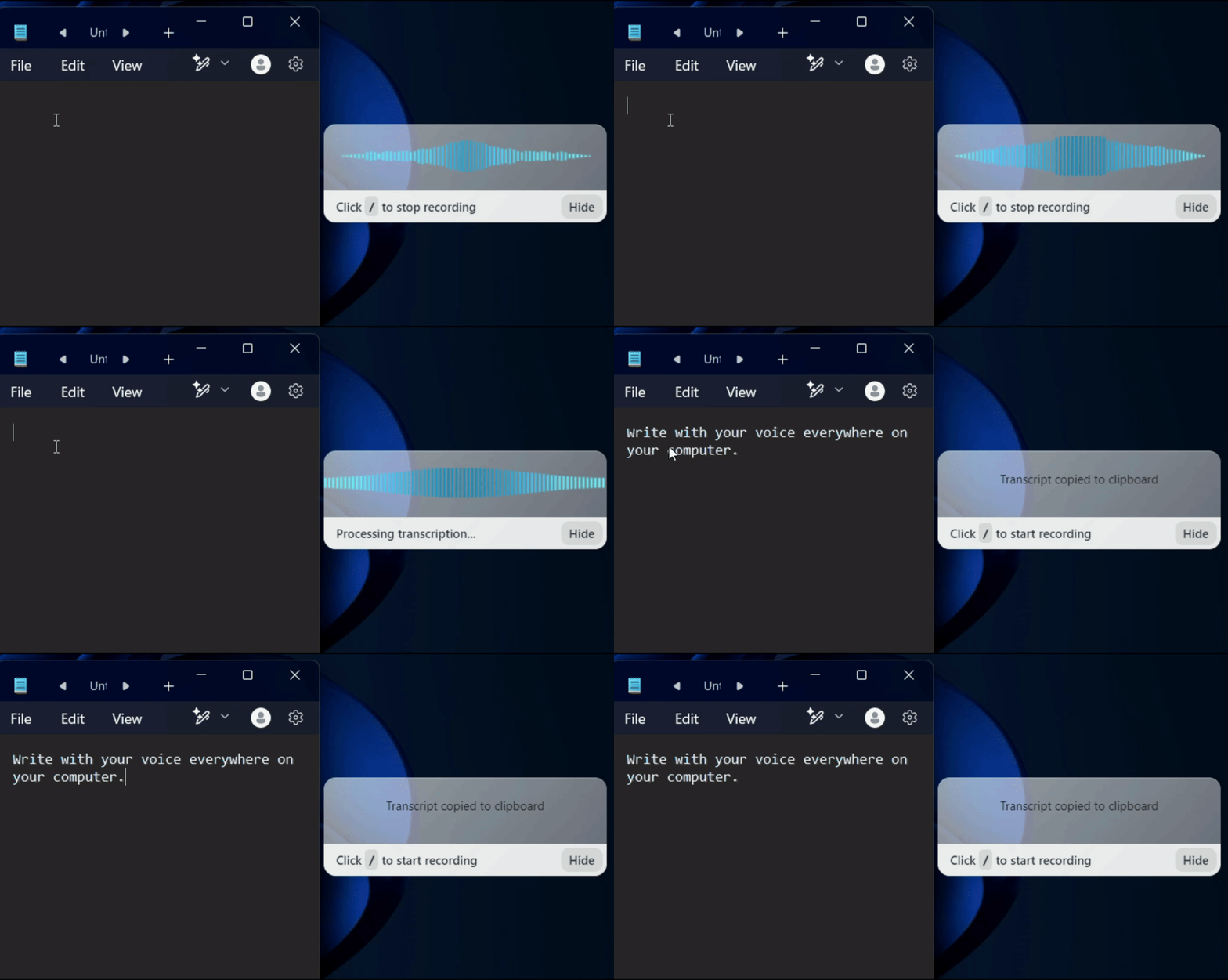
Un gif montrant le fonctionnement de la dictée et de la reconnaissance vocale de Voicy sur un ordinateur Windows

Voicy est une alternative simple à Lilyspeech pour la dictée vocale, respectueuse de votre vie privée

💰 Tarif

Avis

🎯 Précision de la reconnaissance vocale

Vitesse

🌐 Intégration

🤖 Commandes vocales

🔒 Confidentialité

📞 Assistance et contact

Voicy - Dictée et reconnaissance vocale

8,49 $ / mois et 220 $ à vie

4,8/5 (Chrome Web Store)

+99% de précision en 50 langues

Saisie vocale rapide dans le cloud

Toutes les applications et sites web

Commandes et édition par reconnaissance vocale

Protection de la vie privée dès la conception

Téléphone + E-mail

LilySpeech - Reconnaissance et dictée vocale

Gratuit avec publicités, ou 2,49 €/mois

4/5 (Capterra)

+90 %

Rapide, varie selon l'appareil

Toutes les applications et sites web

Commandes de base pour la dictée vocale

Collecte de données sur la version gratuite

E-mail

Image of reviewer

Nicholas Cino

Truly amazing extension. Works wonders and is really fast! Reduces time of writing complex emails by about 80%!

Image of reviewer

CL Cobb

I've tried other products like it, and, so far, Voicy is the most user-friendly, and it really improves my workflow.

Image of reviewer

Pam Lang

This is the tool that I was looking for. It is amazing. I've gotten so lazy about typing anywhere. Thank you, thank you, thank you for this product!

Image of reviewer

Steve Moore

Voicy is an absolute game-changer! This voice-to-text extension delivers exceptional accuracy, capturing my words perfectly every time. The speed is impressive.

Image of reviewer

Victor Rodriguez

Almost instant replies from the creator, great support great app!

Image of reviewer

Crystal Willis

I love Voicy!! The extension and the desktop app have saved me so much time. I have tried several different voice-to-text apps. None of them compares to Voicy!

Image of reviewer

Nicholas Cino

Truly amazing extension. Works wonders and is really fast! Reduces time of writing complex emails by about 80%!

Image of reviewer

CL Cobb

I've tried other products like it, and, so far, Voicy is the most user-friendly, and it really improves my workflow.

Image of reviewer

Pam Lang

This is the tool that I was looking for. It is amazing. I've gotten so lazy about typing anywhere. Thank you, thank you, thank you for this product!

Image of reviewer

Nicholas Cino

Truly amazing extension. Works wonders and is really fast! Reduces time of writing complex emails by about 80%!

Image of reviewer

CL Cobb

I've tried other products like it, and, so far, Voicy is the most user-friendly, and it really improves my workflow.

Image of reviewer

Pam Lang

This is the tool that I was looking for. It is amazing. I've gotten so lazy about typing anywhere. Thank you, thank you, thank you for this product!

Voicy - Speech-to-Text on Every Website | Startup Fame

Works everywhere

Voicy works on all the websites and apps you use daily. This means you can use voice typing to write emails, messages, documents, blog posts, etc.

  • Microsoft Outlook Logo indicating voice dictation on Outlook
  • Microsoft Word Logo indicating microsoft word dictation with Voicy
  • Gmail logo indicating speech to text on Gmail
  • Linkedin logo
  • Substack logo
  • Facebook Messenger logo
  • Notion Logo
  • ChatGPT logo indicating speech to text on chatgpt
  • Claude Logo indicating speech to text on Claude
  • Google Docs Logo
  • Telegram logo
  • Discord Loog
  • Reddit Logo
  • Hubspot Logo
  • EverNote Logo
  • Medium logo indicating speech to text on medium
  • Trello Logo indicating speech to text on trello
  • Asana logo

Privacy First

Nobody sees your transcripts except yourself.
You can read more about our privacy policy here.

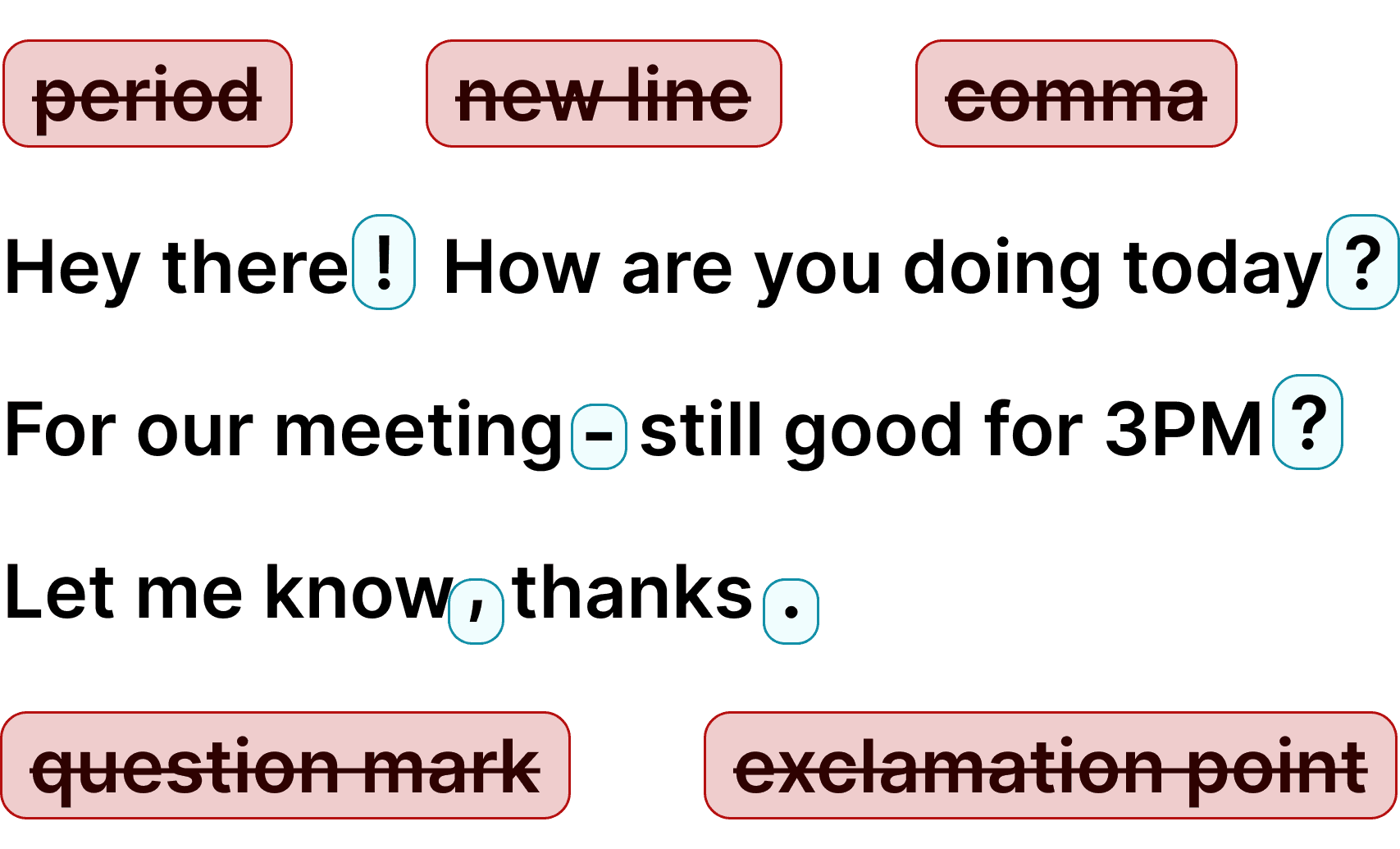
Automatic Punctuation

Voicy automatically adds perfect punctuation to your dictated text. Zero typos, perfect grammar, perfect punctuation.

Image showing a paragraph of text that has been grammar corrected by AI

+50 languages

Voicy gives you over 99% accuracy in more than 50 languages, including speech-to-text in English, German, French, Spanish, Portuguese, Mandarin, etc.

  • 🇵🇹

  • 🇫🇷

  • 🇮🇳

  • 🇷🇺

  • 🇪🇸

  • 🇨🇳

  • 🇩🇪

  • 🇬🇧

  • 🇵🇱

  • 🇰🇷

  • 🇬🇷

  • 🇺🇦

  • 🇸🇦

  • 🇦🇲

  • 🇿🇦

  • 🇮🇷

  • 🇺🇸

  • 🇫🇮

  • 🇱🇺

  • 🇯🇵

  • 🇮🇱

  • 🇸🇪

  • 🇳🇱

  • 🇩🇰

  • 🇨🇿

Works everywhere

This means your voice can write emails, messages, documents, blog posts, etc.

  • Microsoft Outlook Logo indicating voice dictation on Outlook
  • Microsoft Word Logo indicating microsoft word dictation with Voicy
  • Gmail logo indicating speech to text on Gmail
  • Linkedin logo
  • Substack logo
  • Facebook Messenger logo
  • Notion Logo
  • ChatGPT logo indicating speech to text on chatgpt
  • Claude Logo indicating speech to text on Claude
  • Google Docs Logo
  • Telegram logo
  • Discord Loog
  • Reddit Logo
  • Hubspot Logo
  • EverNote Logo
  • Medium logo indicating speech to text on medium
  • Trello Logo indicating speech to text on trello
  • Asana logo

Privacy First

Nobody sees your transcripts except yourself.
You can read more about our privacy policy here.

Automatic Punctuation

Voicy automatically adds perfect punctuation to your dictated text. Zero typos, perfect grammar, perfect punctuation.

Image showing a paragraph of text that has been grammar corrected by AI

+50 languages

Over 99% accuracy in more than 50 languages, including speech to text in English, German, French, Spanish, Portuguese, Mandarin, etc.

  • 🇵🇹

  • 🇫🇷

  • 🇮🇳

  • 🇷🇺

  • 🇪🇸

  • 🇨🇳

  • 🇩🇪

  • 🇬🇧

  • 🇵🇱

  • 🇰🇷

  • 🇬🇷

  • 🇺🇦

  • 🇸🇦

  • 🇦🇲

  • 🇿🇦

  • 🇮🇷

  • 🇺🇸

  • 🇫🇮

  • 🇱🇺

  • 🇯🇵

  • 🇮🇱

  • 🇸🇪

  • 🇳🇱

  • 🇩🇰

  • 🇨🇿

Works everywhere

Voicy works on all the websites and apps you use daily. This means you can use voice typing to write emails, messages, documents, blog posts, etc.

  • Microsoft Outlook Logo indicating voice dictation on Outlook
  • Microsoft Word Logo indicating microsoft word dictation with Voicy
  • Gmail logo indicating speech to text on Gmail
  • Linkedin logo
  • Substack logo
  • Facebook Messenger logo
  • Notion Logo
  • ChatGPT logo indicating speech to text on chatgpt
  • Claude Logo indicating speech to text on Claude
  • Google Docs Logo
  • Telegram logo
  • Discord Loog
  • Reddit Logo
  • Hubspot Logo
  • EverNote Logo
  • Medium logo indicating speech to text on medium
  • Trello Logo indicating speech to text on trello
  • Asana logo

Privacy First

Nobody sees your transcripts except yourself.
You can read more about our privacy policy here.

Automatic Punctuation

Voicy automatically adds perfect punctuation to your dictated text. Zero typos, perfect grammar, perfect punctuation.

Image showing a paragraph of text that has been grammar corrected by AI

+50 languages

Voicy gives you over 99% accuracy in more than 50 languages, including speech-to-text in English, German, French, Spanish, Portuguese, Mandarin, etc.

  • 🇵🇹

  • 🇫🇷

  • 🇮🇳

  • 🇷🇺

  • 🇪🇸

  • 🇨🇳

  • 🇩🇪

  • 🇬🇧

  • 🇵🇱

  • 🇰🇷

  • 🇬🇷

  • 🇺🇦

  • 🇸🇦

  • 🇦🇲

  • 🇿🇦

  • 🇮🇷

  • 🇺🇸

  • 🇫🇮

  • 🇱🇺

  • 🇯🇵

  • 🇮🇱

  • 🇸🇪

  • 🇳🇱

  • 🇩🇰

  • 🇨🇿

Comment utiliser la dictée et reconnaissance vocale de Voicy

Comment utiliser la dictée et reconnaissance vocale de Voicy

Comment utiliser la dictée et reconnaissance vocale de Voicy

Étape 1

Téléchargez l'application de dictée vocale Voicy ici

Téléchargez l'extension gratuite de saisie vocale Voicy ici

Voicy est une application de reconnaissance vocale respectueuse de votre vie privée. Elle intègre la technologie de dictée vocale la plus avancée sur votre ordinateur Windows ou Mac, vous permettant d’utiliser la saisie vocale partout où vous écrivez.
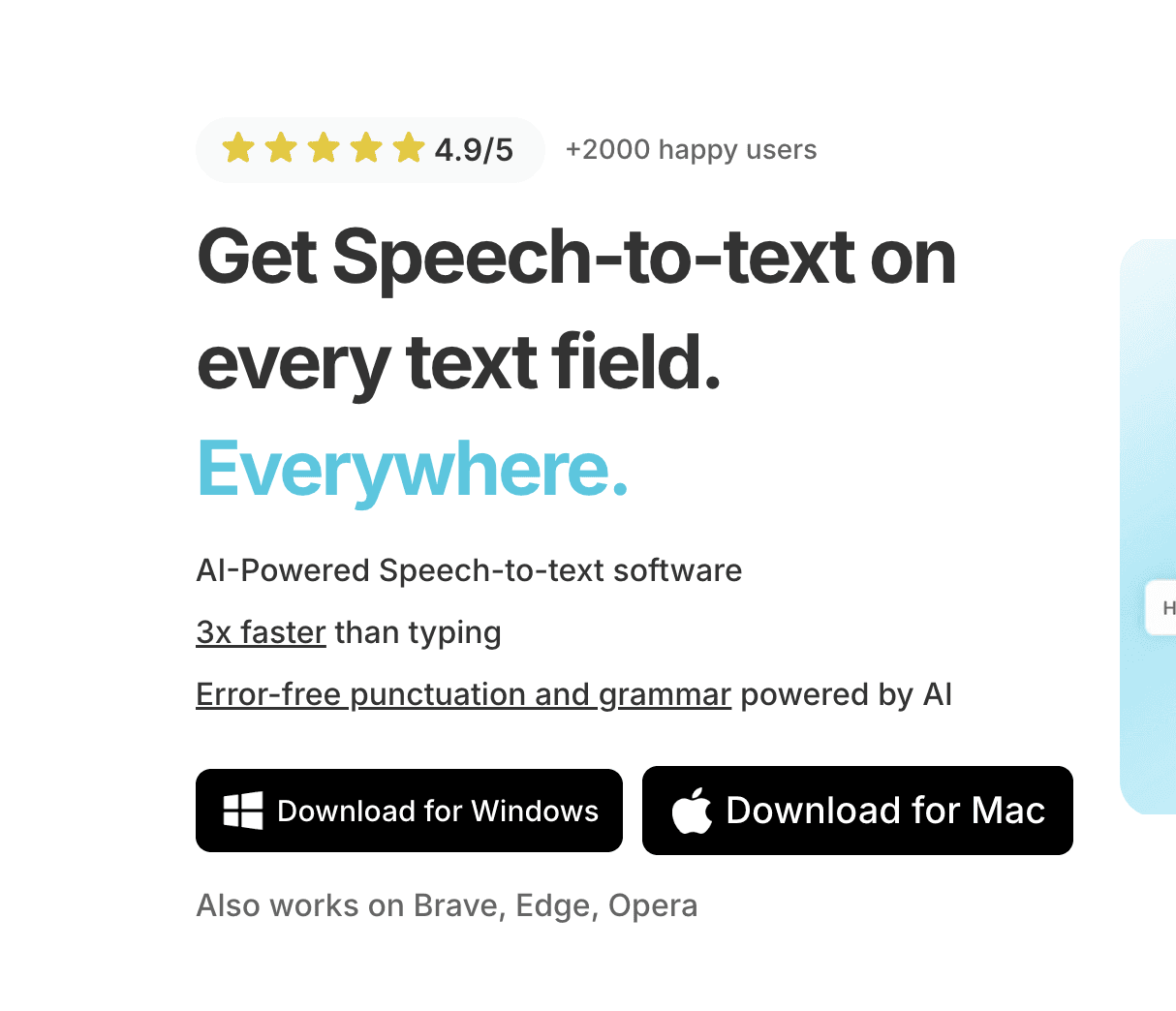
Une capture d'écran de la page de téléchargement de l'application de reconnaissance vocale Windows.

Étape 2

Terminez la configuration (2 minutes)
et sélectionnez votre raccourci de saisie vocale.

Lors de la configuration de Voicy, vous pouvez choisir un raccourci clavier pour lancer et arrêter vos enregistrements. C'est le moyen le plus simple d'utiliser la saisie vocale sur votre ordinateur.

Une capture d'écran de la page de configuration des applications de dictée vocale et de reconnaissance vocale.

Étape 3

Commencer la dictée vocale avec Voicy

Une fois Voicy installé, vous pouvez utiliser la dictée vocale partout sur votre ordinateur. Cela fonctionne dans toutes vos applications ainsi que sur tous les sites internet de votre navigateur !

Un gif montrant le fonctionnement de la dictée et de la reconnaissance vocale de Voicy sur un ordinateur Windows

Alternative à LilySpeech : Pourquoi Voicy est le meilleur choix de dictée vocale en 2025

Alors que Lilyspeech a rendu de fiers services en tant qu'outil pionnier de saisie vocale, Voicy représente la nouvelle génération de logiciels de dictée vocale.

Contrairement à Lilyspeech, qui est limité à Windows et repose sur l'ancienne technologie de reconnaissance vocale de Google Chrome avec des délais de transcription perceptibles, Voicy fonctionne de manière fluide sur Mac, Windows et tous les principaux navigateurs.

Le moteur basé sur l'IA de Voicy fournit des transcriptions instantanées avec ponctuation automatique, correction grammaticale et mise en forme intelligente.

Au-delà de la simple dictée vocale, Voicy propose des fonctionnalités puissantes telles que des commandes vocales ChatGPT intégrées, la traduction de texte et un mode d'édition qui vous permet d'affiner n'importe quel texte par la voix.

La confidentialité est également essentielle : alors que la version gratuite de Lilyspeech collecte des données utilisateur à des fins d'études de marché, Voicy adopte une approche respectueuse de la vie privée, en supprimant immédiatement vos enregistrements et transcriptions de reconnaissance vocale.

Comment Voicy peut-il offrir une reconnaissance vocale si précise à un prix aussi bas ?

Lilyspeech utilise le logiciel de transcription de Google, qui est désormais dépassé par les nouveaux modèles de reconnaissance vocale.

Les dernières avancées en matière d'intelligence artificielle nous permettent aujourd'hui de bénéficier d'une technologie de dictée vocale incroyablement rapide, précise et respectueuse de la vie privée.

Nous sommes en mesure de proposer cette technologie de reconnaissance vocale à un tarif avantageux car nous n'employons pas des centaines de commerciaux, de marketeurs et d'ingénieurs.

Nous préférons rester une structure à taille humaine, maîtriser nos coûts et vous offrir une excellente solution de dictée vocale à un prix juste.
Use cases

Google Docs Logo

Write Google Docs with your Voice

Use Speech-To-Text inside Google Docs to write documents in half the time.

Read More

Gmail Logo

Write emails with dictation in Gmail

Automatic punctuation and formatting help you write perfect emails!

Read More

Microsoft Word Logo

Dictate right in Word - works perfectly

Stuck on that first line to start your doc? Just speak it out and it's there.

Read More

Outlook Logo

Look out, Outlook Voice-to-Text is here!

Voicy works perfectly in all Outlook versions to help you dictate emails.

Read More

Whatsapp Logo

Chat in Whatsapp with Speech to Text

Are you a talker but know that nobody likes voice notes?
Worry not, Voicy's got you!

Read More

Claude/ChatGpt logos

Speech-to-text in Claude and ChatGPT

Give AI the best possible prompt by using your voice. Better input leads to better output!

Read More

Use cases

Google Docs Logo

Write Google Docs with your Voice

Use Speech-To-Text inside Google Docs to write documents in half the time.

Read More

Gmail Logo

Write emails with dictation in Gmail

Automatic punctuation and formatting help you write perfect emails!

Read More

Microsoft Word Logo

Dictate right in Word - works perfectly

Stuck on that first line to start your doc? Just speak it out and it's there.

Read More

Outlook Logo

Look out, Outlook Voice-to-Text is here!

Voicy works perfectly in all Outlook versions to help you dictate emails.

Read More

Whatsapp Logo

Chat in Whatsapp with Speech to Text

Are you a talker but know that nobody likes voice notes?
Worry not, Voicy's got you!

Read More

Claude/ChatGpt logos

Speech-to-text in Claude and ChatGPT

Give AI the best possible prompt by using your voice. Better input leads to better output!

Read More

FAQ

Voicy est-il une bonne alternative à LilySpeech pour la dictée vocale ?

Quelle est la différence entre la dictée vocale de Voicy et de LilySpeech ?

Voyez-vous ce que j'écris avec la dictée vocale Voicy ?

Est-ce que Voicy propose une saisie vocale plus précise que Lilyspeech ?

Qu'est-ce que la reconnaissance vocale ?

Est-ce que Voicy est compatible avec Mac pour la dictée vocale ?