4.9/5

+ de 10 000 utilisateurs satisfaits

Application de dictée vocale par IA
Écrivez avec votre voix. Partout.

  • 3x plus rapide que la saisie vocale ou manuelle

  • Ponctuation automatique et corrections grammaticales

  • Fonctionne dans toutes les applications sur Windows et Mac

La reconnaissance vocale et la saisie vocale dans chaque champ de texte de chaque site Web.

3 fois plus rapide que la saisie au clavier.

Une dictée vocale sans faute de grammaire ni de ponctuation grâce à l'IA.

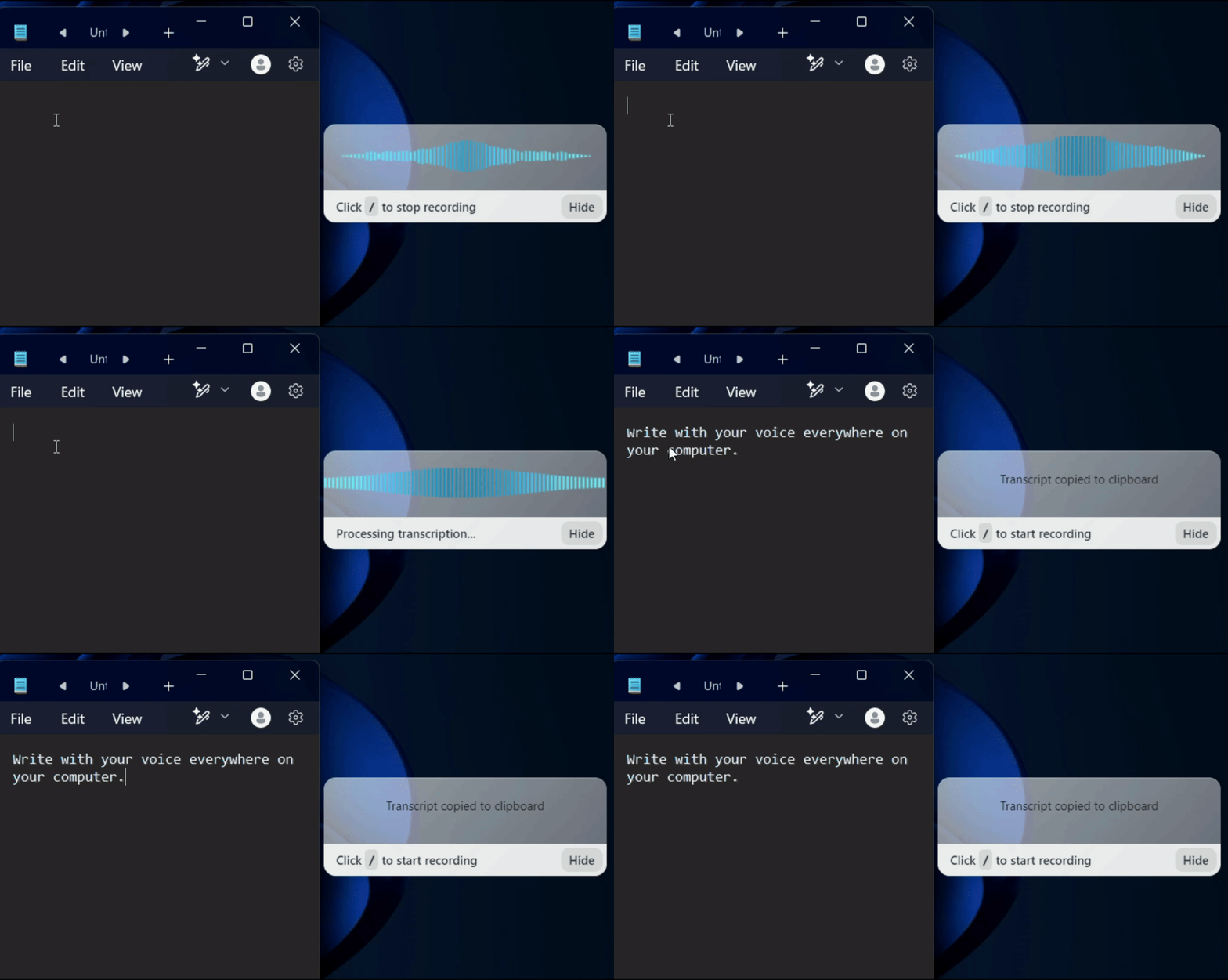
Un GIF montrant l'utilisation de la reconnaissance vocale Voicy sur un site web

On all the websites you use

Microsoft Word Logo indicating microsoft word dictation with Voicy

Word

Microsoft Outlook Logo indicating voice dictation on Outlook

Outlook

Whatsapp logo indicating speech to text on Whatsapp

Whatsapp

Claude Logo indicating speech to text on Claude

Claude

ChatGPT logo indicating speech to text on chatgpt

ChatGPT

Gmail logo indicating speech to text on Gmail

Gmail

Google Docs logo indicating speech to text on Google docs

Docs

And +20,000 more

On all the websites you use

Microsoft Word Logo indicating microsoft word dictation with Voicy

Word

Microsoft Outlook Logo indicating voice dictation on Outlook

Outlook

Whatsapp logo indicating speech to text on Whatsapp

Whatsapp

Claude Logo indicating speech to text on Claude

Claude

ChatGPT logo indicating speech to text on chatgpt

ChatGPT

Gmail logo indicating speech to text on Gmail

Gmail

Google Docs logo indicating speech to text on Google docs

Docs

And +20,000 more

On all the websites you use

Microsoft Word Logo indicating microsoft word dictation with Voicy

Word

Microsoft Outlook Logo indicating voice dictation on Outlook

Outlook

Whatsapp logo indicating speech to text on Whatsapp

Whatsapp

Claude Logo indicating speech to text on Claude

Claude

ChatGPT logo indicating speech to text on chatgpt

ChatGPT

Gmail logo indicating speech to text on Gmail

Gmail

Google Docs logo indicating speech to text on Google docs

Docs

And +20,000 more

See how it works

See how it works

Voicy in action

Image of reviewer

Nicholas Cino

Truly amazing extension. Works wonders and is really fast! Reduces time of writing complex emails by about 80%!

Image of reviewer

CL Cobb

I've tried other products like it, and, so far, Voicy is the most user-friendly, and it really improves my workflow.

Image of reviewer

Pam Lang

This is the tool that I was looking for. It is amazing. I've gotten so lazy about typing anywhere. Thank you, thank you, thank you for this product!

Image of reviewer

Steve Moore

Voicy is an absolute game-changer! This voice-to-text extension delivers exceptional accuracy, capturing my words perfectly every time. The speed is impressive.

Image of reviewer

Victor Rodriguez

Almost instant replies from the creator, great support great app!

Image of reviewer

Crystal Willis

I love Voicy!! The extension and the desktop app have saved me so much time. I have tried several different voice-to-text apps. None of them compares to Voicy!

Image of reviewer

Nicholas Cino

Truly amazing extension. Works wonders and is really fast! Reduces time of writing complex emails by about 80%!

Image of reviewer

CL Cobb

I've tried other products like it, and, so far, Voicy is the most user-friendly, and it really improves my workflow.

Image of reviewer

Pam Lang

This is the tool that I was looking for. It is amazing. I've gotten so lazy about typing anywhere. Thank you, thank you, thank you for this product!

Voicy - Speech-to-Text on Every Website | Startup Fame
Image of reviewer

Nicholas Cino

Truly amazing extension. Works wonders and is really fast! Reduces time of writing complex emails by about 80%!

Image of reviewer

CL Cobb

I've tried other products like it, and, so far, Voicy is the most user-friendly, and it really improves my workflow.

Image of reviewer

Pam Lang

This is the tool that I was looking for. It is amazing. I've gotten so lazy about typing anywhere. Thank you, thank you, thank you for this product!

Works everywhere

Voicy works on all the websites and apps you use daily. This means you can use voice typing to write emails, messages, documents, blog posts, etc.

  • Microsoft Outlook Logo indicating voice dictation on Outlook
  • Microsoft Word Logo indicating microsoft word dictation with Voicy
  • Gmail logo indicating speech to text on Gmail
  • Linkedin logo
  • Substack logo
  • Facebook Messenger logo
  • Notion Logo
  • ChatGPT logo indicating speech to text on chatgpt
  • Claude Logo indicating speech to text on Claude
  • Google Docs Logo
  • Telegram logo
  • Discord Loog
  • Reddit Logo
  • Hubspot Logo
  • EverNote Logo
  • Medium logo indicating speech to text on medium
  • Trello Logo indicating speech to text on trello
  • Asana logo

Privacy First

Nobody sees your transcripts except yourself.
You can read more about our privacy policy here.

Automatic Punctuation

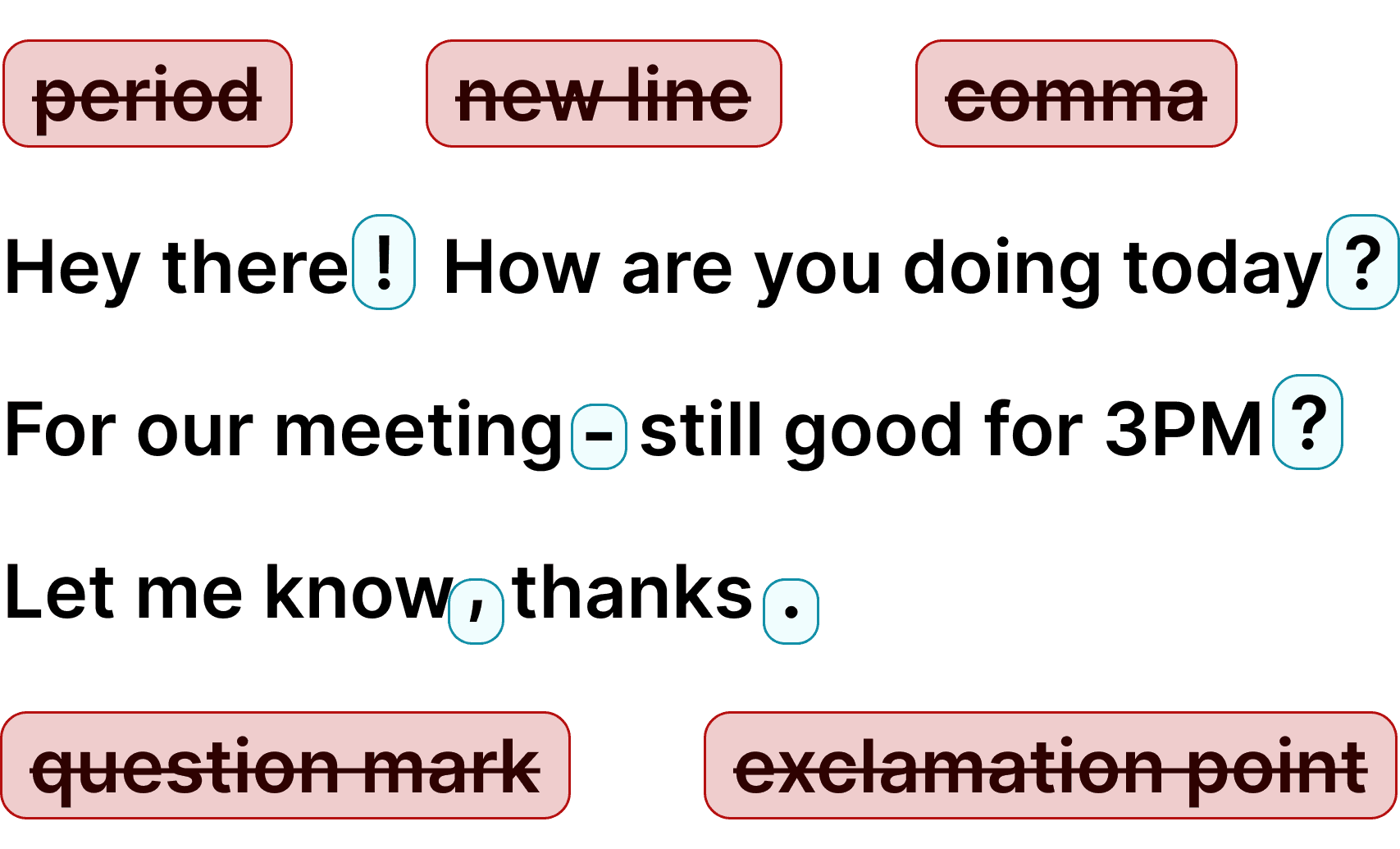
Voicy automatically adds perfect punctuation to your dictated text. Zero typos, perfect grammar, perfect punctuation.

Image showing a paragraph of text that has been grammar corrected by AI

+50 languages

Voicy gives you over 99% accuracy in more than 50 languages, including speech-to-text in English, German, French, Spanish, Portuguese, Mandarin, etc.

  • 🇵🇹

  • 🇫🇷

  • 🇮🇳

  • 🇷🇺

  • 🇪🇸

  • 🇨🇳

  • 🇩🇪

  • 🇬🇧

  • 🇵🇱

  • 🇰🇷

  • 🇬🇷

  • 🇺🇦

  • 🇸🇦

  • 🇦🇲

  • 🇿🇦

  • 🇮🇷

  • 🇺🇸

  • 🇫🇮

  • 🇱🇺

  • 🇯🇵

  • 🇮🇱

  • 🇸🇪

  • 🇳🇱

  • 🇩🇰

  • 🇨🇿

Works everywhere

Voicy works on all the websites and apps you use daily. This means you can use voice typing to write emails, messages, documents, blog posts, etc.

  • Microsoft Outlook Logo indicating voice dictation on Outlook
  • Microsoft Word Logo indicating microsoft word dictation with Voicy
  • Gmail logo indicating speech to text on Gmail
  • Linkedin logo
  • Substack logo
  • Facebook Messenger logo
  • Notion Logo
  • ChatGPT logo indicating speech to text on chatgpt
  • Claude Logo indicating speech to text on Claude
  • Google Docs Logo
  • Telegram logo
  • Discord Loog
  • Reddit Logo
  • Hubspot Logo
  • EverNote Logo
  • Medium logo indicating speech to text on medium
  • Trello Logo indicating speech to text on trello
  • Asana logo

Privacy First

Nobody sees your transcripts except yourself.
You can read more about our privacy policy here.

Automatic Punctuation

Voicy automatically adds perfect punctuation to your dictated text. Zero typos, perfect grammar, perfect punctuation.

Image showing a paragraph of text that has been grammar corrected by AI

+50 languages

Voicy gives you over 99% accuracy in more than 50 languages, including speech-to-text in English, German, French, Spanish, Portuguese, Mandarin, etc.

  • 🇵🇹

  • 🇫🇷

  • 🇮🇳

  • 🇷🇺

  • 🇪🇸

  • 🇨🇳

  • 🇩🇪

  • 🇬🇧

  • 🇵🇱

  • 🇰🇷

  • 🇬🇷

  • 🇺🇦

  • 🇸🇦

  • 🇦🇲

  • 🇿🇦

  • 🇮🇷

  • 🇺🇸

  • 🇫🇮

  • 🇱🇺

  • 🇯🇵

  • 🇮🇱

  • 🇸🇪

  • 🇳🇱

  • 🇩🇰

  • 🇨🇿

Works everywhere

This means your voice can write emails, messages, documents, blog posts, etc.

  • Microsoft Outlook Logo indicating voice dictation on Outlook
  • Microsoft Word Logo indicating microsoft word dictation with Voicy
  • Gmail logo indicating speech to text on Gmail
  • Linkedin logo
  • Substack logo
  • Facebook Messenger logo
  • Notion Logo
  • ChatGPT logo indicating speech to text on chatgpt
  • Claude Logo indicating speech to text on Claude
  • Google Docs Logo
  • Telegram logo
  • Discord Loog
  • Reddit Logo
  • Hubspot Logo
  • EverNote Logo
  • Medium logo indicating speech to text on medium
  • Trello Logo indicating speech to text on trello
  • Asana logo

Privacy First

Nobody sees your transcripts except yourself.
You can read more about our privacy policy here.

Automatic Punctuation

Voicy automatically adds perfect punctuation to your dictated text. Zero typos, perfect grammar, perfect punctuation.

Image showing a paragraph of text that has been grammar corrected by AI

+50 languages

Over 99% accuracy in more than 50 languages, including speech to text in English, German, French, Spanish, Portuguese, Mandarin, etc.

  • 🇵🇹

  • 🇫🇷

  • 🇮🇳

  • 🇷🇺

  • 🇪🇸

  • 🇨🇳

  • 🇩🇪

  • 🇬🇧

  • 🇵🇱

  • 🇰🇷

  • 🇬🇷

  • 🇺🇦

  • 🇸🇦

  • 🇦🇲

  • 🇿🇦

  • 🇮🇷

  • 🇺🇸

  • 🇫🇮

  • 🇱🇺

  • 🇯🇵

  • 🇮🇱

  • 🇸🇪

  • 🇳🇱

  • 🇩🇰

  • 🇨🇿

Comment fonctionne l'application de dictée vocale Voicy

Étape 1

Téléchargez l'application de dictée vocale Voicy ici

Voicy est une application de reconnaissance vocale respectueuse de votre vie privée.

Elle apporte la technologie de dictée vocale la plus avancée à votre ordinateur, tout en garantissant votre sécurité et la confidentialité de vos données.

Étape 2

Finalisez la configuration (2 minutes)
et choisissez votre raccourci de saisie vocale.

Lors de la configuration de Voicy, vous pouvez choisir un raccourci clavier pour lancer et arrêter vos enregistrements.

C'est le moyen le plus simple d'utiliser la dictée vocale sur votre ordinateur.

Un gif montrant comment configurer l'application de reconnaissance vocale Voicy sur Windows

Étape 3

Commencer la dictée vocale avec Voicy

Une fois Voicy installé, vous pouvez utiliser la dictée vocale partout sur votre ordinateur.


Cela inclut toutes vos applications préférées ainsi que tous les sites web de votre navigateur !

Un gif montrant le fonctionnement de la dictée et de la reconnaissance vocale de Voicy sur un ordinateur Windows

Voicy vs reconnaissance vocale native Windows et Apple

FonctionnalitéVoicy⭐ RecommendedDictée vocale AppleSaisie vocale Windows
Précision de la reconnaissance vocalePlus de 99 %Environ 90 %90 %
Ponctuation automatiqueOuiNonNon
Fonctionne dans toutes les applisOuiOuiOui
Assistance rapideOuiNonNon
Assistant d'écriture IAOuiNonNon
Dictée vocale hors ligneNonOuiOui

Privacy FAQs

Voicy is private by design. Here are the answers to your most asked privacy questions.

Can you read what I write with Voicy?

Nobody can read your transcripts or listen to your recordings.

Do you save my recordings and transcripts?

We do not store your transcripts or recordings anywhere in our database.

Where is my dictation stored?

Your transcripts are only stored on your device locally.

Do you use my transcripts for research or to train an AI?

We do not use your recordings to train an AI model or for any other purpose. We do not store your transcripts or recordings at all.

Use cases

Google Docs Logo

Write Google Docs with your Voice

Use Speech-To-Text inside Google Docs to write documents in half the time.

Read More

Gmail Logo

Write emails with dictation in Gmail

Automatic punctuation and formatting help you write perfect emails!

Read More

Microsoft Word Logo

Dictate right in Word - works perfectly

Stuck on that first line to start your doc? Just speak it out and it's there.

Read More

Outlook Logo

Look out, Outlook Voice-to-Text is here!

Voicy works perfectly in all Outlook versions to help you dictate emails.

Read More

Whatsapp Logo

Chat in Whatsapp with Speech to Text

Are you a talker but know that nobody likes voice notes?
Worry not, Voicy's got you!

Read More

Claude/ChatGpt logos

Speech-to-text in Claude and ChatGPT

Give AI the best possible prompt by using your voice. Better input leads to better output!

Read More

Use cases

Google Docs Logo

Write Google Docs with your Voice

Use Speech-To-Text inside Google Docs to write documents in half the time.

Read More

Gmail Logo

Write emails with dictation in Gmail

Automatic punctuation and formatting help you write perfect emails!

Read More

Microsoft Word Logo

Dictate right in Word - works perfectly

Stuck on that first line to start your doc? Just speak it out and it's there.

Read More

Outlook Logo

Look out, Outlook Voice-to-Text is here!

Voicy works perfectly in all Outlook versions to help you dictate emails.

Read More

Whatsapp Logo

Chat in Whatsapp with Speech to Text

Are you a talker but know that nobody likes voice notes?
Worry not, Voicy's got you!

Read More

Claude/ChatGpt logos

Speech-to-text in Claude and ChatGPT

Give AI the best possible prompt by using your voice. Better input leads to better output!

Read More

FAQ

Pourquoi Voicy est-elle la meilleure application de dictée vocale ?

Quelles sont les langues prises en charge par l'application de dictée vocale Voicy ?

Combien coûte l'application de dictée vocale Voicy ?

La dictée vocale est-elle privée ? Conservez-vous mes enregistrements vocaux ?

Comment fonctionne l'application de dictée vocale de Voicy ?

Est-ce que la dictée vocale de Voicy fonctionne à la fois sur Mac et Windows ?

Est-ce que Voicy est meilleur que le logiciel de dictée vocale Dragon ?

Puis-je utiliser Voicy pour la dictée vocale dans Google Docs, Word et pour mes e-mails ?

L'application de dictée vocale Voicy est-elle adaptée aux personnes souffrant de TMS ou d'arthrite ?

Meilleur que la dictée vocale intégrée d'Apple ou de Microsoft

Voicy est une application de dictée vocale boostée par l'IA pour Mac et Windows, qui vous permet d'écrire grâce à la saisie vocale dans n'importe quel logiciel de votre ordinateur. E-mails, Google Docs, Word, Slack, Notion, ChatGPT, Claude — Voicy fonctionne partout. Avec une précision de plus de 99 % et une ponctuation automatique, vos textes issus de la reconnaissance vocale sont impeccables, correctement mis en page et prêts à être envoyés.

Appuyez simplement sur votre raccourci clavier, commencez à parler, et Voicy s'occupe de la saisie vocale pour vous. Notre outil de reconnaissance vocale gère les accents, les termes techniques et le débit de parole rapide bien mieux que n'importe quelle dictée vocale intégrée. Voicy prend en charge plus de 50 langues avec détection automatique, et intègre des commandes d’édition par IA pour réécrire, développer ou traduire votre texte instantanément.

Pourquoi Voicy est la meilleure application de dictée vocale pour Mac et Windows

La dictée vocale d'Apple et la saisie vocale de Windows sont déjà intégrées à votre ordinateur, mais elles présentent de vraies limites. Vous devez dicter la ponctuation à voix haute, la précision chute avec les accents ou un débit de parole rapide, et ces outils ne fonctionnent pas correctement dans toutes les applications. Voicy résout tous ces problèmes grâce à une reconnaissance vocale boostée par l'IA, qui assure une précision de plus de 99 % et ajoute la ponctuation automatiquement.

Contrairement à Dragon (qui coûte plus de +) ou aux outils de dictée vocale gratuits et basiques (qui manquent cruellement de précision), Voicy offre le compromis idéal : une reconnaissance vocale de qualité professionnelle pour seulement .49/mois. Contrairement à d'autres, il fonctionne sur toutes vos applications, sans exception, aussi bien sur Mac que sur Windows. Pour tous ceux qui rédigent beaucoup au quotidien, Voicy est l'application de saisie vocale qui fait réellement gagner du temps.

Comment choisir la meilleure application de dictée vocale

Une bonne application de saisie vocale doit répondre à quatre critères : une excellente précision (plus de 99 % pour éviter les corrections manuelles), la ponctuation automatique (plus besoin de prononcer « virgule »), une compatibilité étendue (pour fonctionner partout, et pas seulement sur un seul logiciel), et la prise en charge de plusieurs langues. Voicy réunit tous ces atouts, tout en y ajoutant des fonctionnalités de correction par IA qu'aucune autre application de dictée vocale ne propose à ce prix.


La vitesse est aussi un argument de taille. La saisie vocale est environ 3 fois plus rapide que la saisie au clavier pour la plupart des utilisateurs. Cela signifie qu'un e-mail de 500 mots ne prend que 2 minutes au lieu de 6. Sur une journée de travail, ce sont des heures de gagnées. De plus, vos mains, vos poignets et vos doigts font une pause bien méritée, évitant la répétition constante des touches du clavier — un réel avantage pour toute personne souffrant de RSI (lésions attribuables au travail répétitif), du canal carpien ou d'arthrite.

Qui utilise les applications de dictée vocale ?

La dictée vocale ne se limite pas à l'accessibilité : c'est un véritable outil de productivité adopté par les rédacteurs, avocats, médecins, étudiants, développeurs et tous ceux qui écrivent beaucoup au quotidien. Les professionnels utilisent la reconnaissance vocale pour rédiger leurs e-mails plus rapidement, concevoir des rapports, prendre des notes de réunion ou encore interagir avec des outils d'intelligence artificielle comme ChatGPT et Claude.

Pour les personnes souffrant de TMS (troubles musculosquelettiques), du canal carpien, d'arthrite ou de fatigue générale liée au clavier, la dictée vocale est devenue indispensable : elle permet de continuer à travailler sans la contrainte physique de la saisie manuelle. De plus, avec l'essor du télétravail et l'augmentation du temps d'écran, la reconnaissance vocale s'impose désormais comme un outil grand public incontournable, et non plus comme une solution de niche.