4.9/5

+ de 10 000 utilisateurs satisfaits

Logiciel de dictée vocale avec IA
Écrivez par la voix. Partout.

Compatible avec toutes les applications sur Mac et Windows.

La reconnaissance vocale et la saisie vocale dans chaque champ de texte de chaque site Web.

3 fois plus rapide que la saisie au clavier.

Une dictée vocale sans faute de grammaire ni de ponctuation grâce à l'IA.

Un GIF montrant l'utilisation de la reconnaissance vocale Voicy sur un site web

On all the websites you use

Microsoft Word Logo indicating microsoft word dictation with Voicy

Word

Microsoft Outlook Logo indicating voice dictation on Outlook

Outlook

Whatsapp logo indicating speech to text on Whatsapp

Whatsapp

Claude Logo indicating speech to text on Claude

Claude

ChatGPT logo indicating speech to text on chatgpt

ChatGPT

Gmail logo indicating speech to text on Gmail

Gmail

Google Docs logo indicating speech to text on Google docs

Docs

And +20,000 more

On all the websites you use

Microsoft Word Logo indicating microsoft word dictation with Voicy

Word

Microsoft Outlook Logo indicating voice dictation on Outlook

Outlook

Whatsapp logo indicating speech to text on Whatsapp

Whatsapp

Claude Logo indicating speech to text on Claude

Claude

ChatGPT logo indicating speech to text on chatgpt

ChatGPT

Gmail logo indicating speech to text on Gmail

Gmail

Google Docs logo indicating speech to text on Google docs

Docs

And +20,000 more

On all the websites you use

Microsoft Word Logo indicating microsoft word dictation with Voicy

Word

Microsoft Outlook Logo indicating voice dictation on Outlook

Outlook

Whatsapp logo indicating speech to text on Whatsapp

Whatsapp

Claude Logo indicating speech to text on Claude

Claude

ChatGPT logo indicating speech to text on chatgpt

ChatGPT

Gmail logo indicating speech to text on Gmail

Gmail

Google Docs logo indicating speech to text on Google docs

Docs

And +20,000 more

See how it works

See how it works

Voicy in action

Comment fonctionne le logiciel de dictée vocale Voicy

Étape 1

Téléchargez l'application de dictée vocale Voicy ici

Voicy est une application de dictée vocale qui respecte votre vie privée.

Elle intègre le logiciel de reconnaissance vocale le plus avancé sur votre ordinateur, tout en garantissant la sécurité et la confidentialité de vos données.

Étape 2

Finaliser la configuration (2 minutes)

Lors de la configuration de Voicy, vous pouvez choisir un raccourci clavier pour lancer et arrêter vos enregistrements.

C'est le moyen le plus simple d'utiliser la dictée vocale sur votre ordinateur.

Un gif montrant comment configurer l'application de reconnaissance vocale Voicy sur Windows

Étape 3

Écrivez n'importe où grâce à la dictée vocale

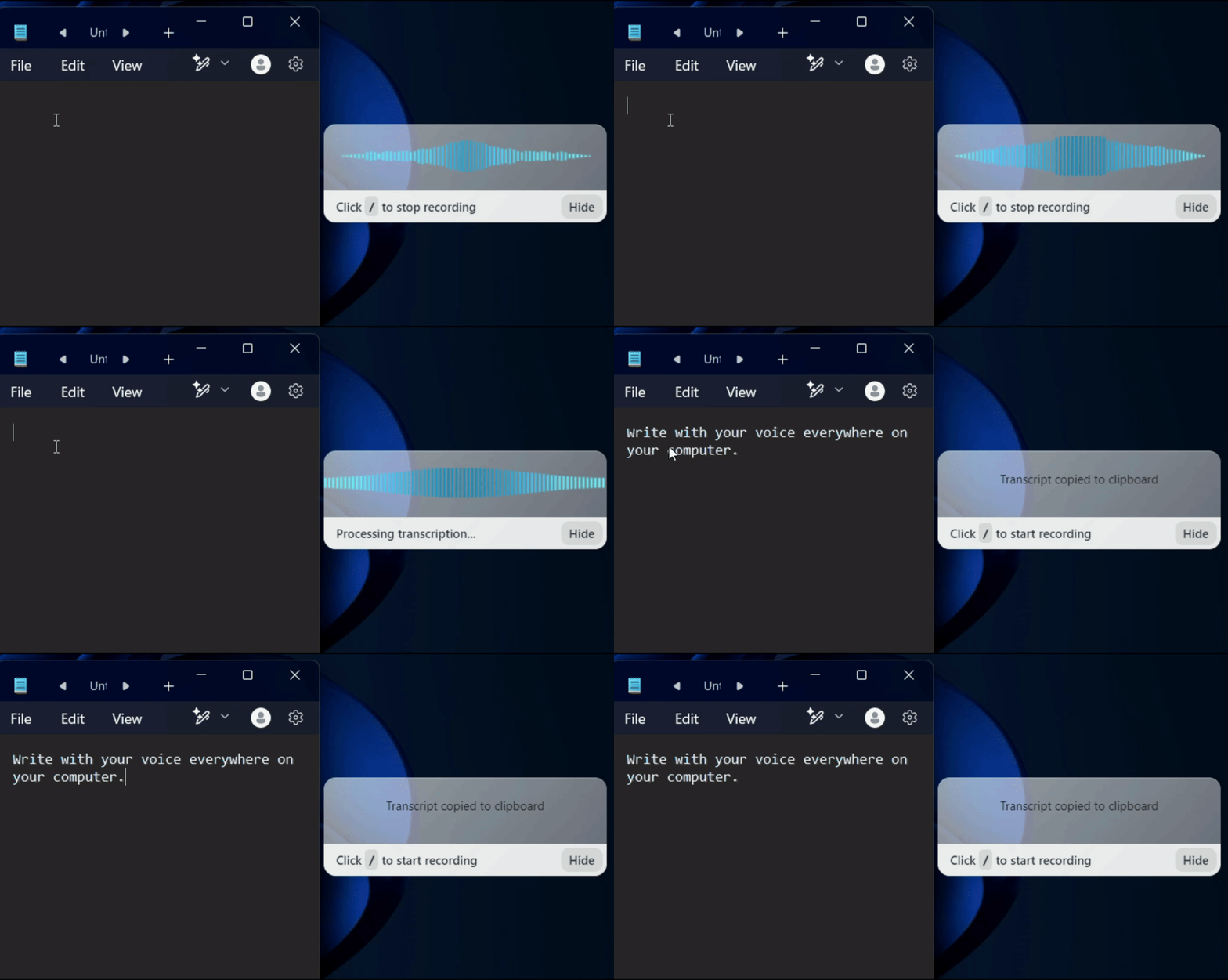
Utilisez Voicy dans Word, Google Docs, Gmail, Slack, Notion ou n'importe quelle autre application. Le même raccourci fonctionne partout. Une fois votre dictée vocale terminée, appuyez de nouveau sur le raccourci pour arrêter la saisie vocale.

Un gif montrant le fonctionnement de la dictée et de la reconnaissance vocale de Voicy sur un ordinateur Windows
Image of reviewer

Nicholas Cino

Truly amazing extension. Works wonders and is really fast! Reduces time of writing complex emails by about 80%!

Image of reviewer

CL Cobb

I've tried other products like it, and, so far, Voicy is the most user-friendly, and it really improves my workflow.

Image of reviewer

Pam Lang

This is the tool that I was looking for. It is amazing. I've gotten so lazy about typing anywhere. Thank you, thank you, thank you for this product!

Image of reviewer

Steve Moore

Voicy is an absolute game-changer! This voice-to-text extension delivers exceptional accuracy, capturing my words perfectly every time. The speed is impressive.

Image of reviewer

Victor Rodriguez

Almost instant replies from the creator, great support great app!

Image of reviewer

Crystal Willis

I love Voicy!! The extension and the desktop app have saved me so much time. I have tried several different voice-to-text apps. None of them compares to Voicy!

Image of reviewer

Nicholas Cino

Truly amazing extension. Works wonders and is really fast! Reduces time of writing complex emails by about 80%!

Image of reviewer

CL Cobb

I've tried other products like it, and, so far, Voicy is the most user-friendly, and it really improves my workflow.

Image of reviewer

Pam Lang

This is the tool that I was looking for. It is amazing. I've gotten so lazy about typing anywhere. Thank you, thank you, thank you for this product!

Voicy - Speech-to-Text on Every Website | Startup Fame
Image of reviewer

Nicholas Cino

Truly amazing extension. Works wonders and is really fast! Reduces time of writing complex emails by about 80%!

Image of reviewer

CL Cobb

I've tried other products like it, and, so far, Voicy is the most user-friendly, and it really improves my workflow.

Image of reviewer

Pam Lang

This is the tool that I was looking for. It is amazing. I've gotten so lazy about typing anywhere. Thank you, thank you, thank you for this product!

Works everywhere

Voicy works on all the websites and apps you use daily. This means you can use voice typing to write emails, messages, documents, blog posts, etc.

  • Microsoft Outlook Logo indicating voice dictation on Outlook
  • Microsoft Word Logo indicating microsoft word dictation with Voicy
  • Gmail logo indicating speech to text on Gmail
  • Linkedin logo
  • Substack logo
  • Facebook Messenger logo
  • Notion Logo
  • ChatGPT logo indicating speech to text on chatgpt
  • Claude Logo indicating speech to text on Claude
  • Google Docs Logo
  • Telegram logo
  • Discord Loog
  • Reddit Logo
  • Hubspot Logo
  • EverNote Logo
  • Medium logo indicating speech to text on medium
  • Trello Logo indicating speech to text on trello
  • Asana logo

Privacy First

Nobody sees your transcripts except yourself.
You can read more about our privacy policy here.

Automatic Punctuation

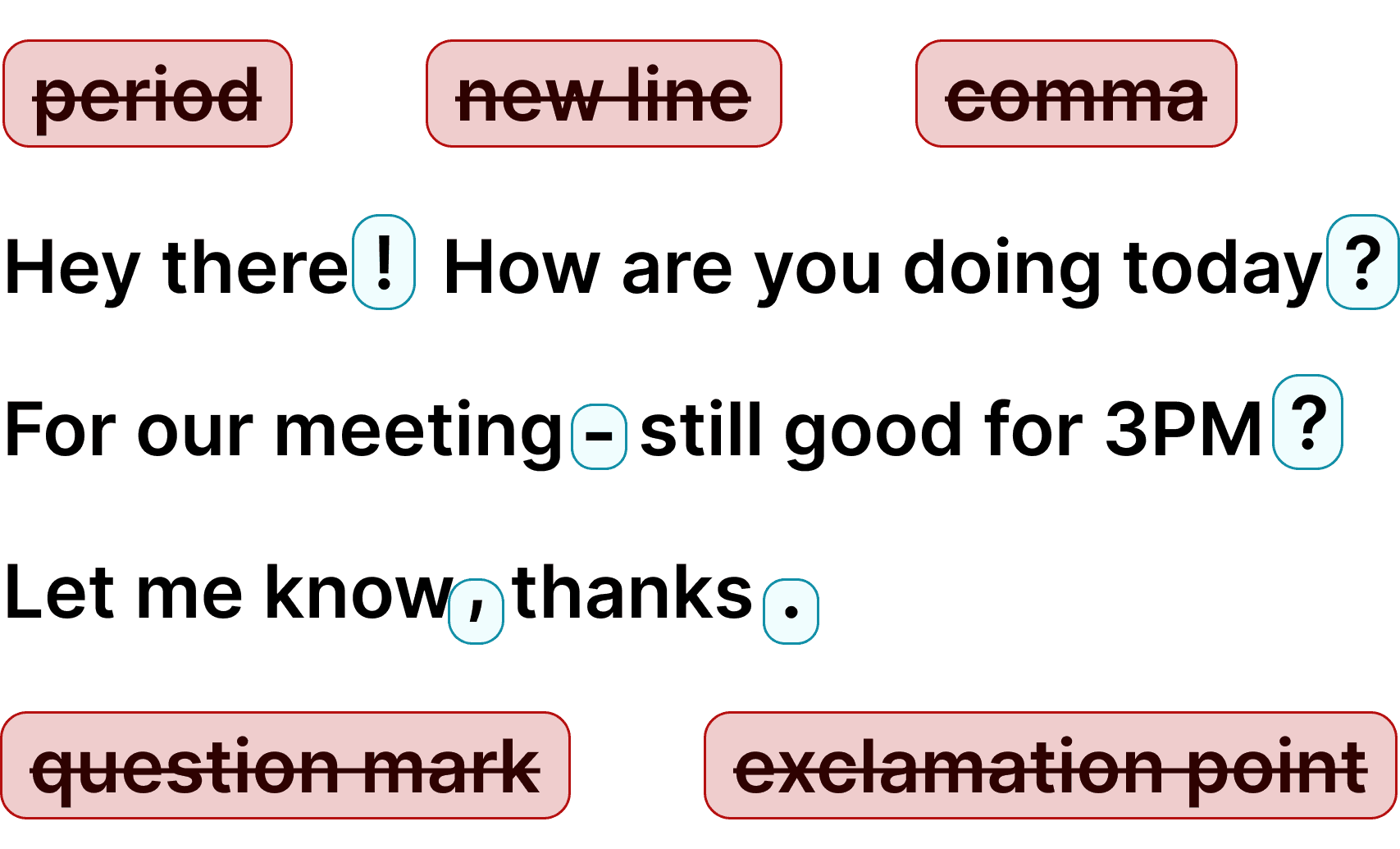
Voicy automatically adds perfect punctuation to your dictated text. Zero typos, perfect grammar, perfect punctuation.

Image showing a paragraph of text that has been grammar corrected by AI

+50 languages

Voicy gives you over 99% accuracy in more than 50 languages, including speech-to-text in English, German, French, Spanish, Portuguese, Mandarin, etc.

  • 🇵🇹

  • 🇫🇷

  • 🇮🇳

  • 🇷🇺

  • 🇪🇸

  • 🇨🇳

  • 🇩🇪

  • 🇬🇧

  • 🇵🇱

  • 🇰🇷

  • 🇬🇷

  • 🇺🇦

  • 🇸🇦

  • 🇦🇲

  • 🇿🇦

  • 🇮🇷

  • 🇺🇸

  • 🇫🇮

  • 🇱🇺

  • 🇯🇵

  • 🇮🇱

  • 🇸🇪

  • 🇳🇱

  • 🇩🇰

  • 🇨🇿

Works everywhere

Voicy works on all the websites and apps you use daily. This means you can use voice typing to write emails, messages, documents, blog posts, etc.

  • Microsoft Outlook Logo indicating voice dictation on Outlook
  • Microsoft Word Logo indicating microsoft word dictation with Voicy
  • Gmail logo indicating speech to text on Gmail
  • Linkedin logo
  • Substack logo
  • Facebook Messenger logo
  • Notion Logo
  • ChatGPT logo indicating speech to text on chatgpt
  • Claude Logo indicating speech to text on Claude
  • Google Docs Logo
  • Telegram logo
  • Discord Loog
  • Reddit Logo
  • Hubspot Logo
  • EverNote Logo
  • Medium logo indicating speech to text on medium
  • Trello Logo indicating speech to text on trello
  • Asana logo

Privacy First

Nobody sees your transcripts except yourself.
You can read more about our privacy policy here.

Automatic Punctuation

Voicy automatically adds perfect punctuation to your dictated text. Zero typos, perfect grammar, perfect punctuation.

Image showing a paragraph of text that has been grammar corrected by AI

+50 languages

Voicy gives you over 99% accuracy in more than 50 languages, including speech-to-text in English, German, French, Spanish, Portuguese, Mandarin, etc.

  • 🇵🇹

  • 🇫🇷

  • 🇮🇳

  • 🇷🇺

  • 🇪🇸

  • 🇨🇳

  • 🇩🇪

  • 🇬🇧

  • 🇵🇱

  • 🇰🇷

  • 🇬🇷

  • 🇺🇦

  • 🇸🇦

  • 🇦🇲

  • 🇿🇦

  • 🇮🇷

  • 🇺🇸

  • 🇫🇮

  • 🇱🇺

  • 🇯🇵

  • 🇮🇱

  • 🇸🇪

  • 🇳🇱

  • 🇩🇰

  • 🇨🇿

Works everywhere

This means your voice can write emails, messages, documents, blog posts, etc.

  • Microsoft Outlook Logo indicating voice dictation on Outlook
  • Microsoft Word Logo indicating microsoft word dictation with Voicy
  • Gmail logo indicating speech to text on Gmail
  • Linkedin logo
  • Substack logo
  • Facebook Messenger logo
  • Notion Logo
  • ChatGPT logo indicating speech to text on chatgpt
  • Claude Logo indicating speech to text on Claude
  • Google Docs Logo
  • Telegram logo
  • Discord Loog
  • Reddit Logo
  • Hubspot Logo
  • EverNote Logo
  • Medium logo indicating speech to text on medium
  • Trello Logo indicating speech to text on trello
  • Asana logo

Privacy First

Nobody sees your transcripts except yourself.
You can read more about our privacy policy here.

Automatic Punctuation

Voicy automatically adds perfect punctuation to your dictated text. Zero typos, perfect grammar, perfect punctuation.

Image showing a paragraph of text that has been grammar corrected by AI

+50 languages

Over 99% accuracy in more than 50 languages, including speech to text in English, German, French, Spanish, Portuguese, Mandarin, etc.

  • 🇵🇹

  • 🇫🇷

  • 🇮🇳

  • 🇷🇺

  • 🇪🇸

  • 🇨🇳

  • 🇩🇪

  • 🇬🇧

  • 🇵🇱

  • 🇰🇷

  • 🇬🇷

  • 🇺🇦

  • 🇸🇦

  • 🇦🇲

  • 🇿🇦

  • 🇮🇷

  • 🇺🇸

  • 🇫🇮

  • 🇱🇺

  • 🇯🇵

  • 🇮🇱

  • 🇸🇪

  • 🇳🇱

  • 🇩🇰

  • 🇨🇿

Voicy vs reconnaissance vocale native Windows et Apple

FonctionnalitéVoicy⭐ RecommendedDictée vocale AppleSaisie vocale Windows
Précision de la reconnaissance vocalePlus de 99 %Environ 90 %90 %
Ponctuation automatiqueOuiNonNon
Fonctionne dans toutes les applisOuiOuiOui
Assistance rapideOuiNonNon
Assistant d'écriture IAOuiNonNon
Dictée vocale hors ligneNonOuiOui

Privacy FAQs

Voicy is private by design. Here are the answers to your most asked privacy questions.

Can you read what I write with Voicy?

Nobody can read your transcripts or listen to your recordings.

Do you save my recordings and transcripts?

We do not store your transcripts or recordings anywhere in our database.

Where is my dictation stored?

Your transcripts are only stored on your device locally.

Do you use my transcripts for research or to train an AI?

We do not use your recordings to train an AI model or for any other purpose. We do not store your transcripts or recordings at all.

Use cases

Google Docs Logo

Write Google Docs with your Voice

Use Speech-To-Text inside Google Docs to write documents in half the time.

Read More

Gmail Logo

Write emails with dictation in Gmail

Automatic punctuation and formatting help you write perfect emails!

Read More

Microsoft Word Logo

Dictate right in Word - works perfectly

Stuck on that first line to start your doc? Just speak it out and it's there.

Read More

Outlook Logo

Look out, Outlook Voice-to-Text is here!

Voicy works perfectly in all Outlook versions to help you dictate emails.

Read More

Whatsapp Logo

Chat in Whatsapp with Speech to Text

Are you a talker but know that nobody likes voice notes?
Worry not, Voicy's got you!

Read More

Claude/ChatGpt logos

Speech-to-text in Claude and ChatGPT

Give AI the best possible prompt by using your voice. Better input leads to better output!

Read More

Use cases

Google Docs Logo

Write Google Docs with your Voice

Use Speech-To-Text inside Google Docs to write documents in half the time.

Read More

Gmail Logo

Write emails with dictation in Gmail

Automatic punctuation and formatting help you write perfect emails!

Read More

Microsoft Word Logo

Dictate right in Word - works perfectly

Stuck on that first line to start your doc? Just speak it out and it's there.

Read More

Outlook Logo

Look out, Outlook Voice-to-Text is here!

Voicy works perfectly in all Outlook versions to help you dictate emails.

Read More

Whatsapp Logo

Chat in Whatsapp with Speech to Text

Are you a talker but know that nobody likes voice notes?
Worry not, Voicy's got you!

Read More

Claude/ChatGpt logos

Speech-to-text in Claude and ChatGPT

Give AI the best possible prompt by using your voice. Better input leads to better output!

Read More

Le meilleur logiciel de dictée vocale pour Mac et Windows

Voicy est un logiciel de dictée vocale compatible avec toutes les applications de votre Mac ou PC Windows. Contrairement à la reconnaissance vocale intégrée d'Apple ou Microsoft, Voicy ajoute automatiquement la ponctuation : plus besoin de prononcer « virgule » ou « point » à voix haute. Grâce à sa détection automatique, il prend en charge plus de 50 langues, vous permettant de passer de l'anglais, l'espagnol ou l'allemand à n'importe quelle autre langue en milieu de phrase. Que ce soit pour rédiger des e-mails, préparer des documents ou échanger sur Slack, Voicy transforme votre saisie vocale en texte avec une précision supérieure à 99 %.

Voicy gère ce que les autres logiciels de dictée vocale ne maîtrisent pas : les accents, le jargon technique, le débit rapide et le multilingue. Il détecte automatiquement votre langue et s'occupe de la ponctuation et de la grammaire sans que vous n'ayez besoin de dicter le moindre mot. Pour les professionnels, les rédacteurs, les étudiants et tous ceux qui passent leur temps à écrire, ce outil de saisie vocale fait gagner un temps précieux au lieu de multiplier les corrections.

Comment Voicy se compare à Dragon et aux autres logiciels de dictée vocale

Depuis des décennies, Dragon NaturallySpeaking est la référence absolue en matière de dictée vocale — mais avec une licence à plus de 300 $, son coût reste élevé. De plus, il fonctionne uniquement sur Windows. De son côté, Apple Dictation est gratuit mais très basique : pas de ponctuation automatique, une précision limitée et de faibles performances dans les applications hors Apple. Voicy est le parfait compromis : un logiciel de reconnaissance vocale d'une précision de plus de 99 % pour seulement 8,49 $/mois, compatible Mac et Windows, et qui fonctionne avec toutes vos applications pour une saisie vocale ultra-efficace.

Si des solutions gratuites de dictée vocale comme la saisie vocale de Google Docs ou la reconnaissance vocale de Windows (Win+H) conviennent pour un usage occasionnel, elles imposent de dicter la ponctuation à voix haute, manquent de précision et ne fonctionnent que dans certaines applications. Voicy, en revanche, est le logiciel de reconnaissance vocale professionnel qui reste accessible à tous les budgets.

À qui s'adresse la dictée vocale ?

Les avocats font de la dictée vocale pour leurs notes de dossiers et leurs mémoires. Les médecins enregistrent leurs observations cliniques. Les écrivains rédigent leurs articles et leurs livres. Les étudiants prennent des notes de cours. Les développeurs documentent leur code. Les équipes de support client écrivent leurs réponses plus rapidement. En réalité, toute personne qui écrit au clavier plus de 30 minutes par jour peut gagner des heures chaque semaine grâce à un logiciel de reconnaissance vocale. La saisie vocale est environ 3 fois plus rapide que la saisie au clavier : un e-mail de 500 mots ne prend que 2 minutes au lieu de 6. Sur une journée complète de travail, cela représente un gain de temps considérable et réduit la fatigue physique de vos mains et de vos poignets.

La dictée vocale est particulièrement bénéfique pour les personnes souffrant de TMS (troubles musculosquelettiques), du canal carpien ou d'arthrose. Elle leur permet de continuer à travailler de manière productive sans la fatigue physique liée à la saisie au clavier. Grâce à l'activation par raccourci clavier de Voicy, plus besoin de chercher des boutons ou des menus : il vous suffit d'appuyer sur votre raccourci pour lancer la reconnaissance vocale. De nombreux utilisateurs témoignent qu'adopter la saisie vocale a totalement éliminé leurs douleurs au poignet, tout en augmentant leur productivité écrite.

FAQ

Qu'est-ce qui fait de Voicy le meilleur logiciel de dictée vocale ?

Quelles langues sont prises en charge par le logiciel de dictée vocale Voicy ?

Quel est le prix du logiciel de dictée vocale Voicy ?

Le logiciel de dictée vocale Voicy est-il privé et sécurisé ?

Est-ce que Voicy fonctionne comme logiciel de dictée vocale sur Mac et Windows ?

Est-ce que Voicy est meilleur que le logiciel de reconnaissance vocale Dragon ?

La reconnaissance vocale peut-elle remplacer totalement la saisie clavier ?

La saisie vocale fonctionne-t-elle avec toutes les applications ?

La reconnaissance vocale est-elle assez précise pour un usage professionnel ?