
Key Takeaways
Dictation vs typing speed: dictation is usually faster for first drafts because most people speak faster than they type.
Typical WPM: a large keyboard study found an average of 52 WPM, while normal speech often sits around 130 to 150 WPM.
Real time savings: after proofreading and small edits, dictation often feels closer to 1.5x to 2.5x faster for emails, notes, outlines, and rough drafts.
Accuracy: modern speech-to-text can be very accurate, but the final result still needs review, especially for names, numbers, technical terms, and anything legal or medical.
Best workflow: dictate the first draft, then type or use AI editing to clean up the final version.
Answer first: Dictation is faster than typing for many writing tasks, but not always by the headline "3x" number. The raw speed advantage is real: people often speak around 130 to 150 words per minute, while average keyboard typing is closer to 52 WPM. The honest comparison is after corrections. If your speech-to-text tool is accurate and you proofread quickly, dictation can save serious time. If you spend half the session fixing errors, typing may still win.
Speed is only part of the story.
Typing gives you precision. Dictation gives you flow. The best choice depends on what you are writing, where you are writing it, and how much cleanup the text needs before it is useful.
This guide compares dictation vs typing speed using WPM, time savings, and accuracy. We will keep the math simple, because nobody needs a productivity article that needs its own spreadsheet.
Dictation vs typing speed: the short answer
Dictation is usually faster for drafting. Typing is usually better for precise editing, coding, formatting, and short bits of text where starting dictation would be overkill.
A useful rule:
Use dictation when you need to get ideas out fast.
Use typing when every character matters.
Use both for most real work: voice for the first pass, keyboard for the final polish.
If you write emails, notes, project updates, reports, outlines, prompts, or meeting follow-ups every day, dictation can remove a lot of typing time. If most of your work is code, formulas, spreadsheets, or dense formatting, keep the keyboard close.
How fast is typing in WPM?
Average typing speed is often quoted around 40 to 60 WPM, depending on the group being measured and the test format.
One of the better sources is a large study from researchers at Aalto University and the University of Cambridge. It looked at 136 million keystrokes from 168,000 volunteers. The average user in that study typed 52 words per minute.
That number is useful, but it is not the whole picture.
A casual typist may be closer to 30 to 45 WPM.
A comfortable office typist may sit around 50 to 70 WPM.
A fast typist can reach 80 to 100+ WPM in a typing test.
Writing from scratch is usually slower than copying a prepared sentence.
That last point matters. A typing test measures input speed. Real writing also includes thinking, choosing words, fixing structure, and deleting sentences you suddenly dislike. Your measured WPM may be 75, but your email-writing WPM may be much lower.
How fast is dictation in WPM?
Dictation speed is usually faster than typing speed, but raw speaking speed is not the same thing as finished writing speed.
Many people speak comfortably around 130 to 150 WPM in normal English conversation. The University of Stanford, University of Washington, and Baidu study on mobile text entry found that speech recognition was 3.0x faster than a smartphone keyboard for English, with a lower English error rate in that controlled test.
That study is important, but it has a catch: it compared speech to mobile keyboard typing, not a full desktop keyboard. So it supports the main idea, speech can be much faster, but it does not mean every desktop writer will instantly write three times faster.
For practical work, think in three layers:
Input method | Typical raw speed | What slows it down |
|---|---|---|
Typing | 40 to 70 WPM for many adults | Thinking time, mistakes, fatigue |
Dictation | 100 to 150 WPM for many speakers | Corrections, punctuation, names, noise |
Dictation plus cleanup | Often still faster than typing | Proofreading and rewriting awkward lines |
The real comparison: raw speed vs finished text
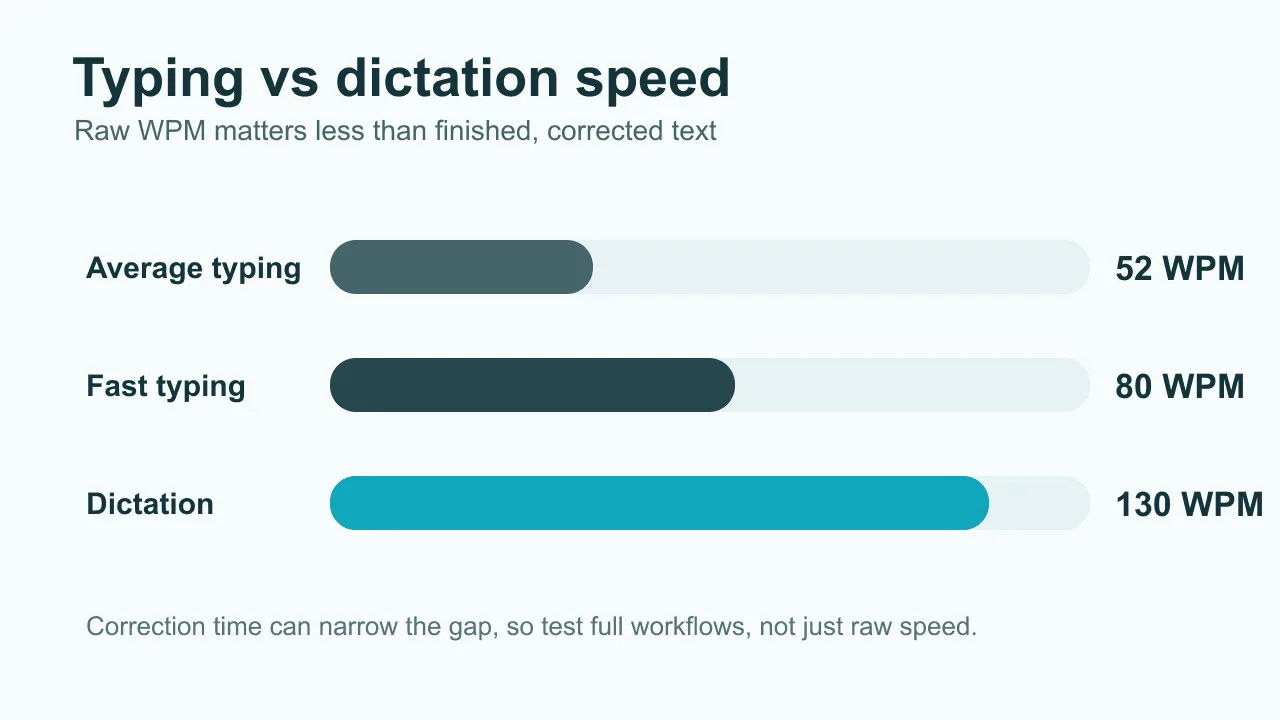
The honest question is not "How fast can you talk?" It is "How long does it take to get usable text?"
Dictation has a correction tax. That tax is the time you spend fixing misheard words, punctuation, formatting, filler words, and sentences that sounded fine out loud but read strangely on screen.
Here is a simple way to estimate it:
Task | Typing at 52 WPM | Dictating at 130 WPM | Dictation with 25% cleanup time |
|---|---|---|---|
250-word email | About 4.8 min | About 1.9 min | About 2.4 min |
750-word report section | About 14.4 min | About 5.8 min | About 7.2 min |
1,500-word draft | About 28.8 min | About 11.5 min | About 14.4 min |
These are not promises. They are planning numbers. If your tool is accurate and your thoughts are already clear, dictation saves more time. If you are figuring out the content as you go, both typing and dictation slow down.
How much time can dictation save?
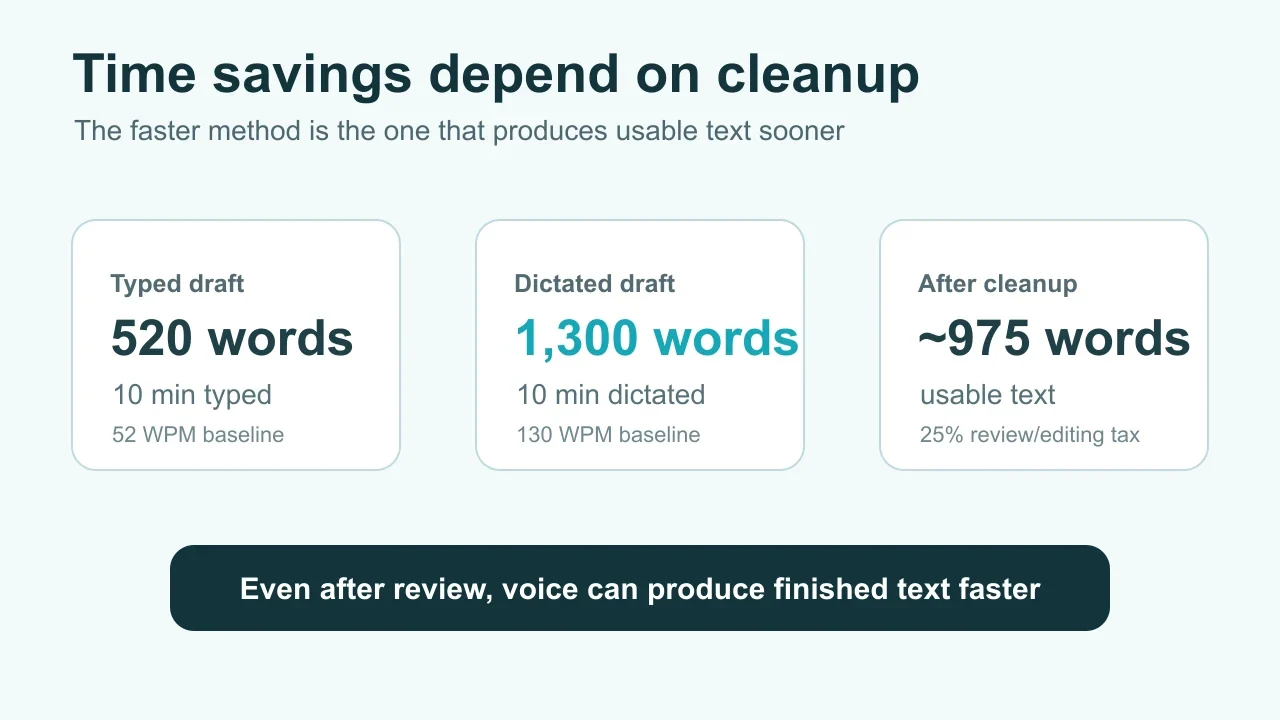
Dictation can save minutes on each writing task. Over a week, that can become hours.
Let us say you write 2,000 words a day across email, notes, docs, and chat. At 52 WPM, the pure typing time is about 38 minutes. At 130 WPM, raw dictation takes about 15 minutes. Add 25% cleanup and the dictation workflow lands near 19 minutes.
That is roughly 19 minutes saved per day.
Across five workdays, that is about 95 minutes. Across a year, even after missed days and messy tasks, the savings can be meaningful.
The bigger benefit is often less visible: dictation keeps up with thought better. You can say the rough version, then shape it. That is why voice works well for first drafts, brainstorming, client notes, and follow-ups.
Is dictation more accurate than typing?
Dictation can be highly accurate, but accuracy depends on the speaker, microphone, background noise, vocabulary, and the speech-to-text system.
The Stanford mobile study found speech recognition was faster and had a lower error rate than smartphone keyboard input for English in that test. That does not mean dictation is always more accurate than careful typing. A focused typist can catch mistakes immediately. Speech-to-text errors can be sneakier because the text may look clean while one word is wrong.
Dictation is most accurate when:
you use a decent microphone
the room is quiet
you speak in complete thoughts
you pause before names, numbers, and unusual terms
you review the final text before sending
For sensitive work, the rule is simple: dictate if it helps, but proofread like the text matters.
When dictation beats typing
Dictation wins when speed, comfort, and flow matter more than character-level precision.
It is especially strong for:
Email drafts: say the reply naturally, then tighten it.
Meeting notes: capture a quick summary while the details are fresh.
Brain dumps: get ideas out before they evaporate.
Reports and outlines: dictate the rough section, then edit for structure.
Hand pain or fatigue: reduce the amount of keyboard time in the day.
If typing is part of why writing feels slow, a voice workflow is worth testing. Voicy is built for that daily workflow: live dictation across apps, file upload transcription, and cloud-based speech-to-text on Mac, Windows, Browser Extension, iOS, and Android, with an optional offline dictation mode in the Mac, Windows, and Linux apps. You can start with the Voicy homepage, or compare broader options in our voice typing app guide.
When typing still wins
Typing wins when precision beats speed.
Use the keyboard for:
code, formulas, and exact syntax
passwords, addresses, and IDs
heavily formatted documents
small edits inside existing text
public or shared spaces where speaking out loud is awkward
This is not a failure of dictation. It is just tool fit. A hammer is useful. You still would not use it to adjust your glasses.
A practical dictation vs typing workflow
The fastest writing setup for most people is not pure dictation. It is a hybrid workflow.
Dictate the rough version. Do not stop every five seconds to fix tiny mistakes.
Use cleanup tools. Let AI editing fix punctuation, filler words, and obvious grammar issues when available.
Read once for meaning. Look for wrong names, numbers, missing context, and weird phrasing.
Type the final edits. The keyboard is still great for small, precise changes.
That workflow gives you the best part of voice input, fast capture, without giving up the control of typing. For more speed ideas, see our guides on how to increase WPM, how to write faster, and voice recognition accuracy.
FAQ
Is dictation faster than typing?
Yes, dictation is usually faster for first drafts. Most people speak faster than they type, so voice input can save time on emails, notes, outlines, and longer drafts. The final speed depends on how much correction the text needs.
What is a good dictation WPM?
A practical dictation pace is often around 100 to 130 WPM for composed writing. Natural speech can be faster, but dictating clearly for usable text is usually slower than casual conversation.
What is average typing speed?
Average keyboard typing speed is often around 40 to 60 WPM. A large Aalto and Cambridge study found an average of 52 WPM across 168,000 volunteers.
Does dictation save time after corrections?
Often, yes. If cleanup takes 10% to 30% of the dictation time, voice input can still be much faster than typing. If cleanup takes almost as long as the dictation itself, the advantage shrinks quickly.
Is dictation accurate enough for work?
Yes, for many work tasks. Use it for drafts, notes, emails, and summaries, then review the text before sending. Be extra careful with names, numbers, technical terms, medical notes, legal language, and client-facing messages.
What is the best way to test dictation vs typing speed?
Pick a real task, not a typing test. Write a 300-word email or note by typing, then write a similar one by dictation. Time both versions, including proofreading. The faster finished version is the one that matters.
Bottom line
Dictation beats typing when you need momentum. Typing beats dictation when you need precision. For most writing-heavy work, the best answer is both.
If your day is full of emails, notes, docs, prompts, and follow-ups, try dictating the first draft and typing the final edits. A tool like Voicy can help because it works across Mac, Windows, Browser Extension, iOS, and Android, supports file upload transcription, and offers a free trial. It is not fully free, and its transcription is cloud-based by default, with offline dictation available on desktop, so check fit for your workflow before using it for sensitive material.