
Key Takeaways
Voice writing means speaking your ideas first, then shaping the transcript into clear writing.
It works best for first drafts, emails, notes, outlines, reports, and moments when typing slows your thinking down.
The best workflow is simple: talk in chunks, transcribe the audio, clean the structure, then edit for tone and detail.
Voicy fits this workflow when you want live dictation and file upload transcription across Mac, Windows, browser extension, iOS, and Android.
What is voice writing?
Voice writing is using speech to create written text. Instead of starting with a keyboard, you talk through your idea, capture it with speech-to-text software, then edit the result into something polished.
For everyday work, voice writing is not court reporting and it is not the same as finding your literary "voice." It is a practical writing method for turning spoken thoughts into emails, notes, briefs, posts, outlines, and drafts you can actually use.
If your brain moves faster than your fingers, voice writing can make the first draft feel less stuck. You get words on the page while the idea is still warm, then you revise with calmer eyes.
That matters because typing often forces you to edit too early. You pause, backspace, fix a sentence, lose the thread, and suddenly the point you wanted to make has wandered off. Speaking first gives you raw material before your inner editor gets loud.
When should you use voice writing?
Use voice writing when the hard part is getting thoughts out, not choosing perfect words. It is especially useful for rough drafts, idea capture, and repeat writing tasks that do not need careful formatting at the start.
Good voice writing tasks include:
Drafting a follow-up email after a call
Talking through a blog outline before writing
Capturing notes after a meeting or client session
Writing a first version of a report section
Recording a voice memo while walking, then turning it into text later
It is weaker for work that needs exact formatting from the first line. Tables, citations, code, and legal phrasing usually need more keyboard editing after the transcript is created.
Voice writing vs dictation vs voice notes
These terms overlap, but they point to slightly different jobs. Dictation is usually the act of speaking text into a field. Voice notes are usually recordings. Voice writing is the larger workflow: speak, transcribe, organize, edit, and publish.
Term | What it usually means | Best use |
|---|---|---|
Voice writing | Speaking ideas and turning them into written drafts | Emails, notes, articles, reports, and first drafts |
Dictation | Speaking words directly into a text field | Live writing in documents, apps, and browser fields |
Voice notes | Recording audio for later review or transcription | Capturing ideas when you are away from your desk |
If you already have a recording, read our guide on how to convert voice notes to text. If you want a broad tool comparison, see our guide to dictation software for writers.
How to turn spoken thoughts into polished writing
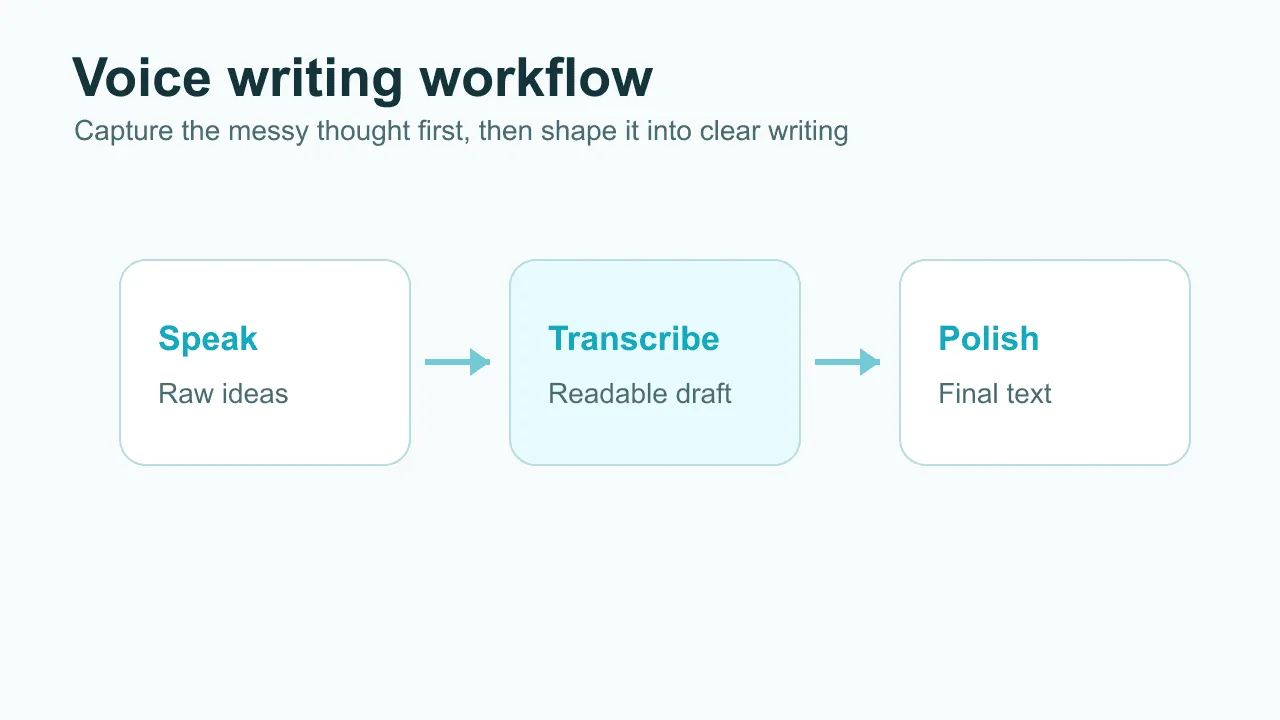
The easiest voice writing workflow has four stages: capture, transcribe, shape, and edit. Do not try to make your spoken draft perfect while you are talking. That usually makes the result worse.
1. Start with one clear outcome
Before you record, decide what the final piece should be. A reply to a customer. A social post. A product note. A paragraph for a report. One clear outcome gives your speech a lane.
A useful prompt is: "I am writing this for [person], and I want them to understand [point]." Say that out loud first if it helps.
2. Speak in chunks, not one long ramble
Short chunks make cleaner drafts. Try 30 to 90 seconds per idea. Pause between sections so the transcript has natural breaks.
If you are drafting an email, speak the opening, stop, then speak the main point, stop, then speak the ask. Your future editing self will be grateful.
3. Transcribe with a tool that fits where you work
Use live dictation when you want text to appear where your cursor is. Use file upload transcription when you already recorded audio on your phone or computer.
Voicy supports both live dictation and uploaded audio transcription. It is cloud-based by default with an offline dictation mode in its Mac, Windows, and Linux apps, has a free trial, and works across Mac, Windows, browser extension, iOS, and Android.
4. Shape the transcript before polishing sentences
First, make the transcript useful. Move the strongest sentence to the top. Delete repeats. Add headings or bullets. Split long blocks into short paragraphs.
Only then polish the wording. If you edit sentence by sentence too early, you can spend ten minutes perfecting a paragraph that should have been deleted.
A simple voice writing template
Use this when you need a clean first draft fast. It works for emails, updates, proposals, and short articles.
Context: "Here is what happened..."
Main point: "The important thing is..."
Details: "There are three things worth noting..."
Decision or ask: "What I need next is..."
Close: "The takeaway is..."
That structure sounds plain because it should. Voice writing works best when the spoken version is boringly clear. The style can come later.
Where Voicy fits in a voice writing workflow
Voicy is most useful at the capture and transcription stages. You can dictate directly into work tools, or upload an audio file when you already recorded a thought on the go.
That makes it practical for people who write in more than one place. You might draft in Google Docs, collect notes in Notion, think through a prompt in ChatGPT, or use Claude for editing. Voicy gives you the text that starts that workflow.
The honest limit: transcription is not the same as final writing. A good speech-to-text tool helps you get clean material onto the page. You still need to choose the point, remove filler, and make the final version sound like you.
Voice writing tips that make the draft cleaner
Small habits make a big difference. You do not need a studio microphone, but you do need a little discipline.
Say the structure out loud: "First point," "second point," and "the ask" are useful markers.
Pause more than feels natural: Pauses help the transcript break into cleaner sentences.
Record one idea per clip: Short recordings are easier to name, review, and reuse.
Keep names and terms simple: Spell out unusual names if the transcript keeps missing them.
Edit after, not during: Stopping every sentence kills the main benefit of voice writing.
Common mistakes with voice writing
Most voice writing problems come from treating speech like finished prose. Spoken language is messy. That is normal.
Mistake 1: Recording without a point
If you start with no target, the transcript will wander. Give yourself a one-sentence brief before you begin.
Mistake 2: Expecting the first transcript to be polished
A transcript is a draft ingredient. It might be accurate and still be poorly organized. Do one structure pass before you worry about tone.
Mistake 3: Talking for too long
Long recordings feel efficient, but they create editing debt. Shorter clips make it easier to find the useful part.
Mistake 4: Using voice writing for the wrong task
Voice writing is great for getting ideas out. It is less great for tiny edits, exact formatting, or anything where one wrong word changes the meaning.
Is voice writing good for people who hate typing?
Yes. Voice writing can help if typing feels slow, painful, boring, or too disconnected from how you think. It is also useful if you deal with wrist pain, repetitive strain, dyslexia, dysgraphia, ADHD, or general blank-page friction.
For a broader accessibility angle, see our guide to hands-free typing software. If pain is the main issue, our voice-to-text guide for carpal tunnel may be more useful.
FAQ
Is voice writing the same as speech to text?
Not exactly. Speech to text is the technology that converts audio into words. Voice writing is the writing workflow built around that technology: speak, transcribe, organize, and edit.
Is voice writing good for professional work?
Yes, if you treat it as a drafting method. It is useful for emails, notes, briefs, outlines, reports, and content drafts. Important work still needs a review pass.
Can I use voice writing from recorded audio?
Yes. Record a voice memo, upload it to a transcription tool, then edit the transcript into a draft. Voicy supports file upload transcription as well as live dictation.
Does Voicy process transcription locally?
Yes, in the Mac, Windows, and Linux apps. Voicy uses cloud transcription by default, which helps with accuracy and cross-platform use, and you can switch on an optional offline dictation mode in settings to dictate without an internet connection. Either way, choose sensitive content workflows thoughtfully.
What is the best way to start voice writing?
Start with one small task, like a follow-up email or a meeting recap. Speak for one minute, transcribe it, then spend five minutes shaping the text. The habit matters more than the first result.
Final take
Voice writing is not magic. It will not turn every ramble into perfect prose. What it can do is remove the first barrier: getting your thoughts out of your head and onto the page.
Once the words exist, you can edit them. That is the real win. For people who think better out loud, a tool like Voicy can turn spoken notes into draft material across the devices and apps where writing already happens.
Try it with one real task today. Not a test sentence. A real email, note, or outline. That is where voice writing starts to make sense.