
Verdict: should you use MacWhisper?
MacWhisper suits Mac users who turn interviews, lectures and videos into usable transcripts. Start with Free for occasional recordings and basic subtitle exports. Pro makes sense when you need batches, automatic speaker labels, richer exports or advanced models and AI tools. Its main limits are hardware demands, proofreading and edition differences: the App Store version lacks system-wide dictation. Buy for the recording work you do, not a promise of perfect transcription.
MacWhisper at a glance
| Buying question | What you get |
|---|---|
| Primary use | Audio/video transcription, transcript editing and export. |
| Platforms | Mac desktop app. Related Whisper Transcription app on iPhone/iPad has separate features and purchases; no Windows or Linux desktop version. |
| Free version | Local transcription, basic dictation in the website edition, TXT and SRT/VTT exports. |
| Pro pricing | €64 once on the official website, including lifetime updates. App Store purchases differ. |
| Offline capabilities | Downloaded local models can transcribe recordings and dictation without internet. |
| Dictation | Shortcut-based input into Mac text fields in the direct-download edition. |
| Meeting transcription | Pro adds meeting recording/detection; supported models also offer real-time meeting transcription. |
MacWhisper Free vs Pro: what are you paying for?
Pro buys a more complete transcription workflow, not just permission to transcribe. Free already covers useful work. In particular, you do not need Pro merely to export subtitles or try basic Mac dictation.
| Feature | Free | Pro |
|---|---|---|
| Speech models | Basic local transcription; not all models are fully available. | Expanded Whisper model access, WhisperKit/Distilled support and Parakeet on M-series Macs. Qwen3-ASR requires an M-series chip and macOS 26. |
| Batch processing | Process individual recordings. | Queue multiple files and export each in several formats; watched folders can automate recurring imports. |
| Speaker recognition | No automatic recognition in the public Free plan. | Automatic speaker labels with compatible local models or supported cloud providers. Local recognition requires an M-series Mac. |
| Exports | TXT text and SRT/VTT subtitles. | Also document formats such as DOCX, PDF, Markdown and HTML, plus custom export options. |
| Dictation | Basic system-wide dictation in the website edition. | Higher-quality model options, grammar improvement and app-specific AI prompts. |
| Meeting workflow | Transcribe an existing recording as a file. | Capture meetings, detect starts/ends and use real-time transcription with supported models. |
| AI features | Not the full AI-provider workflow. | Provider connections for summaries, chat, translation and prompts; local AI options or separately billed cloud services. |
These differences come from the official plan matrix and developer’s current feature list. Model availability changes with the app version; the current storefront does not give a tidy, fixed Free model roster. Check the models available in your installed build rather than buying from an old Tiny/Base-only list.
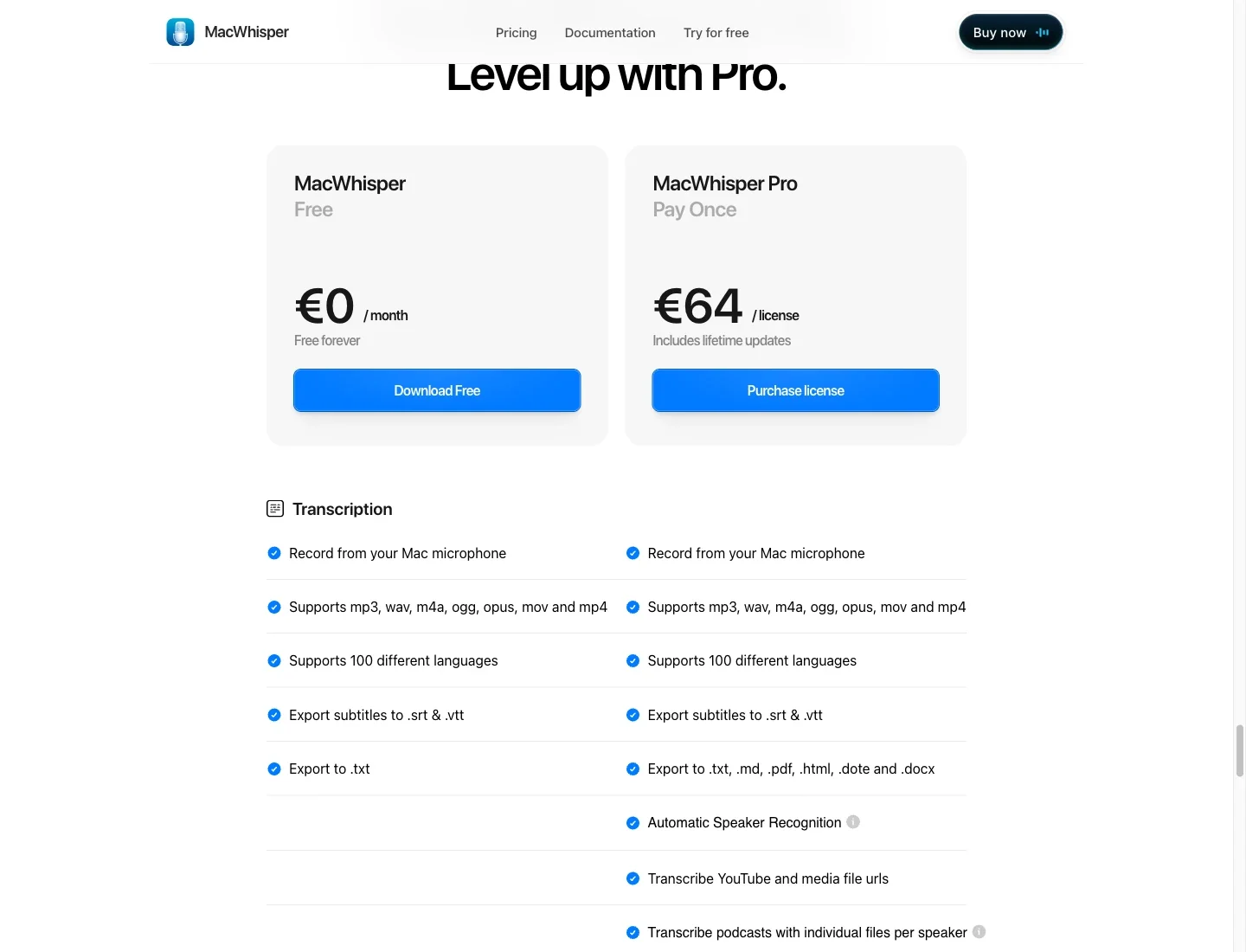
Free is enough if… you occasionally transcribe one lecture, interview or voice memo, its available model handles your audio adequately, and TXT or subtitle files are all you need.
Pro is worth considering if… you regularly process several recordings, need automatic speaker labels or Word-ready exports, or can name an advanced model or AI feature that solves a recurring problem. A queue of ten interviews is a clearer reason to upgrade than “Pro must be more accurate.”
Transcribing recordings: from audio file to usable text
Drag an MP3 interview or MP4 lecture into MacWhisper, choose a model and language, and review the result alongside the audio. Search and synchronized playback help you find a quote without scrubbing through the whole recording.
For a single clean lecture, Free is a sensible starting point. For a season of podcast episodes, Pro’s batch processing lets you queue files and produce text and subtitles together. The batch guide says URL files are not supported by that workflow; download the media first where permitted.
Speaker recognition makes interviews easier to navigate, but labels are a draft. The speaker guide explains how to rename speakers, merge duplicate identities and correct a segment assigned to the wrong person. A label is not proof of who spoke.
Recording meetings: capture the call, then review it
Pro can capture meeting audio on your Mac without adding a bot to the call. For example, you can record a client discussion, then search the transcript for the agreed delivery date rather than relying on handwritten notes.
The website edition can detect supported meeting apps and prompt you to record. It needs microphone and screen-recording permissions. The setup guide excludes FaceTime and warns that automatic recording can fail; keep a permitted backup for an important meeting and obtain any required consent.
The current storefront also lists real-time meeting transcription with compatible WhisperKit and Parakeet models. Do not assume every model supports it. Older help pages describe a record-first, transcribe-afterward flow, so check your installed version before depending on live output.
Dictating into apps: useful even if files are your main job
MacWhisper’s Dictation feature uses a shortcut to insert speech into a Mac text field. That can be enough for a researcher who transcribes interviews and occasionally dictates an email about the findings.
Pro adds AI prompts: for example, turn rough spoken notes into a customer reply, or use different instructions in different apps. Configure an AI provider before expecting that processing to work.
Do not buy another app solely because a review calls MacWhisper “file-first.” Try its included dictation in your actual writing apps. Its limitations become more relevant when you need Windows, Linux or Android, or when its model and prompt choices do not suit your daily writing.
Editing and exporting: choose the deliverable you need
Free’s TXT export is enough to move a lecture transcript into your notes. SRT and VTT exports can supply a first subtitle draft for a video, without upgrading just for subtitles.
Pro becomes more useful when the deliverable is a formatted document or a repeatable production process. A researcher can export DOCX for an editor; a podcast team can export several formats from the same batch. Custom exports and watched folders reduce repeated file-handling work.
Review wording, speaker labels and subtitle timing before delivery. AI cleanup or a summary is not a verbatim transcript: keep the original recording and an unedited copy when exact quotations matter.
Accuracy and performance: what to expect
Recording quality and model choice matter more than the Free or Pro label. Start with a clear recording, then judge how much correction the transcript needs before paying for more model options.
- Clear audio: a clean interview or solo recording is a good starting point for Free. If the transcript needs little correction, there is no accuracy-based reason to upgrade immediately.
- Accents and background noise: a larger model can help with difficult speech, but results vary. Try the hardest section of your own recording. Buying Pro cannot restore words drowned out by noise.
- Names and technical terms: check client names, acronyms and specialist vocabulary. A fluent sentence can still contain the wrong name or number.
- Overlapping speakers: recognizing words and assigning them to people are separate tasks. Speaker labels can need merging or correction, and crosstalk needs careful listening.
- Hardware and speed: larger models use more memory and can take longer to process audio. The developer recommends more than 8 GB RAM for Medium/Large models. Intel Macs can be much slower than M-series Macs; model choice and GPU acceleration also affect processing time.
Before upgrading, test a representative five-minute recording on your Mac. Include a difficult passage and compare both processing time and the time you spend fixing the result. More model choices are useful only if they improve your actual workflow.
Practical limitations to check before paying
Hardware and setup. Allow storage for downloaded models and recordings, and choose a model your Mac can run comfortably alongside your usual apps. Not every Pro model works on every Mac. A license does not remove chip or macOS requirements.
Proofreading. Budget for checking quotes, names, figures and speaker assignments. For legal, medical or publishable material, an automatic transcript is a draft, not a verified record.
Website versus App Store. The website sells MacWhisper, with the €64 one-time Pro license. The App Store sells Whisper Transcription, with its own purchases. According to the edition comparison, the App Store version lacks system-wide dictation and automatic meeting detection, and offers fewer integrated AI providers. A Gumroad license key cannot unlock it. The related iPhone/iPad app has separate rules too.
Extra charges. The Pro purchase covers the app, not unlimited third-party cloud usage. Your own API providers may bill separately; an ordinary chatbot subscription is not the same as API credit. The optional Assistant service has separate subscription terms. Choose your edition and providers before comparing total cost.
Privacy and offline use: follow the whole workflow
Downloaded local speech models can keep transcription on your Mac, including saved-file transcription. But MacWhisper also supports optional cloud recognition and remote AI processing.
Check both steps: cloud recognition sends audio to a provider; a cloud summary or rewrite sends transcript text. Local AI is an option through compatible providers such as Ollama and LM Studio, with their own setup and hardware needs.
Finally, check where recordings and exports are saved. A synced folder or integration can upload a copy even when recognition was local. “Works offline” describes a chosen workflow, not every feature in the app. Our dictation privacy comparison separates these processing and storage decisions.
MacWhisper alternatives: which fits your workflow?
MacWhisper vs Voicy: recordings or everyday writing?
If your priority shifts from reviewing recordings to writing emails, notes and documents across devices, compare Voicy. Both products offer dictation and file transcription; the useful differences are platform coverage, export needs and which tasks can stay offline.
| Buying criterion | MacWhisper | Voicy |
|---|---|---|
| Primary workflow | Recorded audio, transcript editing, meetings and exports on Mac; dictation also included. | Everyday voice input into writing apps; uploaded recordings also supported. |
| Platform coverage | Mac desktop. Related iPhone/iPad App Store product has separate features and purchases. | Mac, Windows, Linux, browser extension, iPhone and Android. |
| Dictation into apps | Yes, in the website edition; absent from the Mac App Store edition. | Yes, through desktop apps and platform-specific mobile/extension input. |
| Uploaded/imported files | Local audio/video transcription; Pro adds batches, speaker recognition and richer exports. | Online audio/video transcription on a paid plan; up to 60 minutes per file, copy or TXT download. |
| Offline availability | Local file transcription and dictation after model download. | Optional desktop dictation on Mac, Windows and Linux after model download; Mac requires macOS 15+. File transcription remains online. |
| AI rewriting | Pro provider-based prompts and cleanup; local or cloud options depend on configuration. | Rewrite Mode for selected text and Custom Modes for new dictation; both need internet. |
| Pricing | Free edition; website Pro €64 once. Cloud services can cost extra. | Free trial, then $8.49/month, $82/year or $260 lifetime. No permanent free plan. |
Voicy’s file guide, offline guide, Rewrite Mode guide and pricing page explain those limits. File support should not be assumed identical across every platform.
MacWhisper is the stronger choice for local recorded-file transcription, subtitles, speaker-labelled interviews and document exports. Its free edition may already cover occasional work, and Pro is sold for €64 once rather than a recurring app subscription.
Voicy has a relevant advantage when you need daily dictation on Windows or Linux as well as Mac, or mobile and browser-extension options. That is a platform and workflow advantage, not evidence that it is faster, more accurate or easier.
Writing is your main task? Try Voicy with a real email or note during its free trial, then compare the corrections and features you actually need.
Two other options worth a quick look
Apple Dictation: start here for occasional voice input on a Mac without another purchase. It is not a replacement for MacWhisper’s recorded-file editing and export workflow.
Superwhisper: consider it if configurable dictation modes and local-model choices are your priority. Read our detailed MacWhisper vs Voicy vs Superwhisper comparison for the full feature breakdown.
Final recommendation: Free, Pro or another app?
- Stay with Free if you handle occasional recordings and are satisfied with the result and TXT/subtitle exports. Keep using it until a specific limit costs you time.
- Upgrade to Pro for regular batches, automatic speaker labels, richer exports or a supported model/AI workflow you need. For Mac-based recording work, those are tangible reasons to pay once.
- Compare Voicy if your main job is writing across devices rather than preparing transcripts. Keep MacWhisper if local files or subtitle editing remain important; you do not have to replace a tool that already does that job well.
FAQs
What is the main difference between MacWhisper Free and Pro?
Free covers basic local transcription, TXT and SRT/VTT exports, and basic dictation in the website edition. Pro adds expanded model access, batches, automatic speaker recognition, richer document exports, meeting features and AI-provider tools. Some features need compatible hardware or separate provider setup.
Is MacWhisper Pro a one-time purchase?
The official website lists Pro at €64 once, including lifetime updates. The App Store edition has separate purchases. Cloud API usage and the optional Assistant subscription are not automatically included in the website license.
Can I use MacWhisper offline without Pro?
Yes. Free can transcribe with its available downloaded local models. Pro expands the models and workflows, but an upgrade is not required merely for offline transcription. Remote AI and cloud recognition still need internet.
Can MacWhisper dictate into other apps?
Yes. The direct-download edition supports shortcut-based dictation into Mac text fields, with basic dictation in Free and advanced model/AI options in Pro. The Mac App Store edition does not include system-wide dictation.
Is Whisper Transcription on the App Store the same purchase?
No. It shares the core transcription product but has separate purchases, fewer integrated AI providers, and no system-wide dictation or automatic meeting detection. A Gumroad MacWhisper license key cannot activate the App Store version.
Will Pro fix inaccurate transcripts?
Pro offers more model choices, which can help with difficult audio, but it cannot guarantee correct words or speaker labels. Noise, accents, overlapping voices and specialist terms still affect results. Compare your own recordings and proofread important details.
Are there additional cloud or AI charges?
There can be. Connected cloud API providers bill under their own terms, and Assistant is a separate optional subscription. Local processing does not create per-minute cloud transcription charges, but uses your Mac’s resources.
 Download for free
 Download for free
 Download for Ubuntu/Debian
 Add to Chrome for free
 Download for free