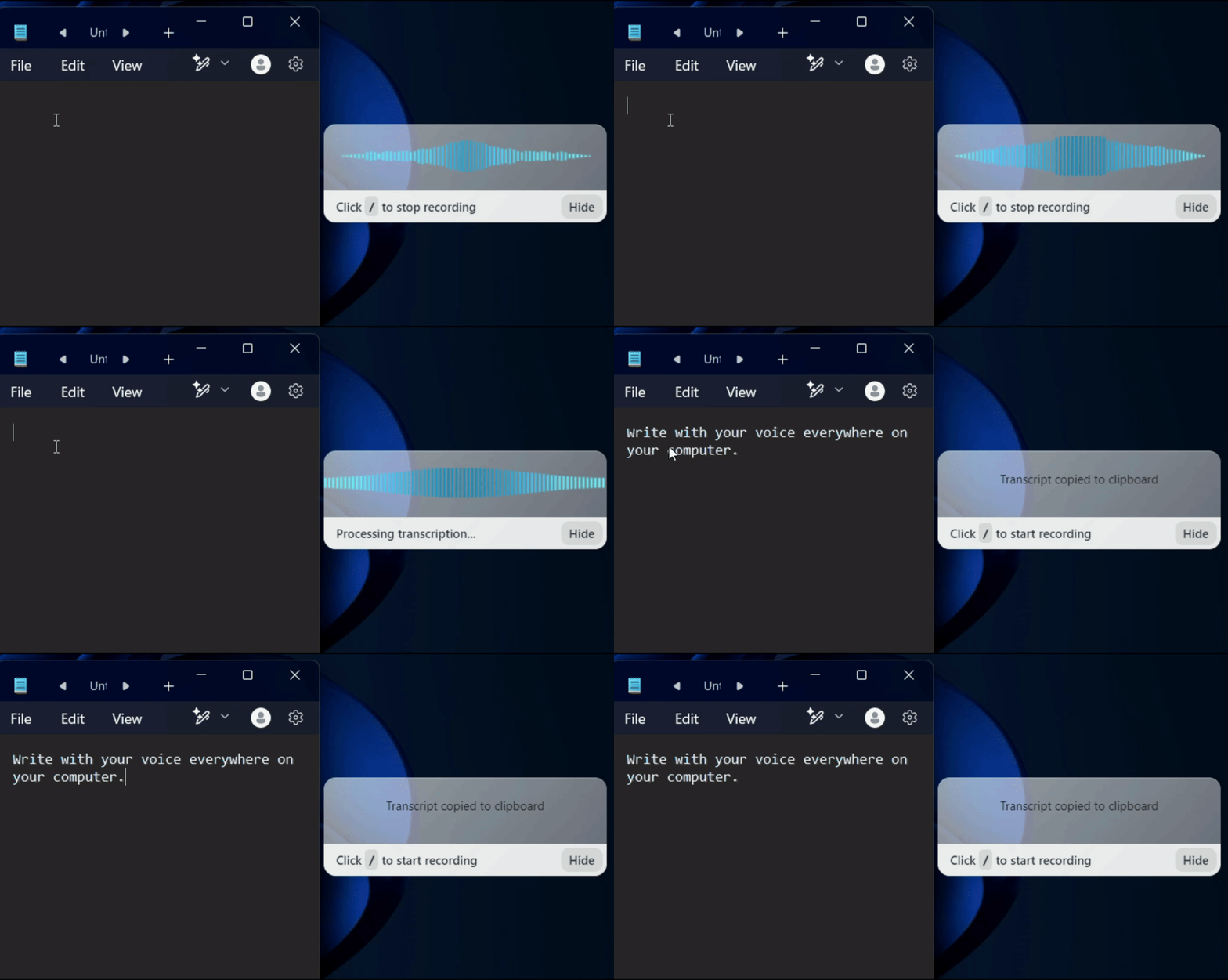

















A gif showing how Voicy's speech to text functionality works on a Windows computer

4.9/5

+9000 happy users

Chrome Store rating

Voice Dictation for Customer Support

  • Speech to Text Desktop App for Customer Support

  • 3x faster than typing

  • Over 99% accuracy in 50+ languages

Voice-to-text everywhere on your Windows computer.
+99 accuracy in over 50 languages.

Automatic punctuation and grammar powered by AI.

A gif showing how Voicy's speech to text functionality works on a Windows computer

On all the apps & websites you use

On all the websites you use

On all the apps & websites you use

Microsoft Word Logo indicating microsoft word dictation with Voicy

Word

Word

Microsoft Outlook Logo indicating voice dictation on Outlook

Outlook

Outlook

Whatsapp logo indicating speech to text on Whatsapp

Whatsapp

Whatsapp

Claude Logo indicating speech to text on Claude

Claude

Claude

ChatGPT logo indicating speech to text on chatgpt

ChatGPT

ChatGPT

Gmail logo indicating speech to text on Gmail

Gmail

Gmail

Google Docs logo indicating speech to text on Google docs

Docs

Docs

And +20,000 more

And +20,000 more

Image of reviewer

Nicholas Cino

Truly amazing extension. Works wonders and is really fast! Reduces time of writing complex emails by about 80%!

Image of reviewer

CL Cobb

I've tried other products like it, and, so far, Voicy is the most user-friendly, and it really improves my workflow.

Image of reviewer

Pam Lang

This is the tool that I was looking for. It is amazing. I've gotten so lazy about typing anywhere. Thank you, thank you, thank you for this product!

Image of reviewer

Steve Moore

Voicy is an absolute game-changer! This voice-to-text extension delivers exceptional accuracy, capturing my words perfectly every time. The speed is impressive.

Image of reviewer

Victor Rodriguez

Almost instant replies from the creator, great support great app!

Image of reviewer

Crystal Willis

I love Voicy!! The extension and the desktop app have saved me so much time. I have tried several different voice-to-text apps. None of them compares to Voicy!

Voicy - Speech-to-Text on Every Website | Startup Fame
Featured on Twelve Tools
Image of reviewer

Nicholas Cino

Truly amazing extension. Works wonders and is really fast! Reduces time of writing complex emails by about 80%!

Image of reviewer

CL Cobb

I've tried other products like it, and, so far, Voicy is the most user-friendly, and it really improves my workflow.

Image of reviewer

Pam Lang

This is the tool that I was looking for. It is amazing. I've gotten so lazy about typing anywhere. Thank you, thank you, thank you for this product!

Image of reviewer

Nicholas Cino

Truly amazing extension. Works wonders and is really fast! Reduces time of writing complex emails by about 80%!

Image of reviewer

CL Cobb

I've tried other products like it, and, so far, Voicy is the most user-friendly, and it really improves my workflow.

Image of reviewer

Pam Lang

This is the tool that I was looking for. It is amazing. I've gotten so lazy about typing anywhere. Thank you, thank you, thank you for this product!

Voicy - Speech-to-Text on Every Website | Startup Fame

Works everywhere

Voicy works on all the websites and apps you use daily. This means you can use voice typing to write emails, messages, documents, blog posts, etc.

  • Microsoft Outlook Logo indicating voice dictation on Outlook
  • Microsoft Word Logo indicating microsoft word dictation with Voicy
  • Gmail logo indicating speech to text on Gmail
  • Linkedin logo
  • Substack logo
  • Facebook Messenger logo
  • Notion Logo
  • ChatGPT logo indicating speech to text on chatgpt
  • Claude Logo indicating speech to text on Claude
  • Google Docs Logo
  • Telegram logo
  • Discord Loog
  • Reddit Logo
  • Hubspot Logo
  • EverNote Logo
  • Medium logo indicating speech to text on medium
  • Trello Logo indicating speech to text on trello
  • Asana logo

Works everywhere

This means your voice can write emails, messages, documents, blog posts, etc.

  • Microsoft Outlook Logo indicating voice dictation on Outlook
  • Microsoft Word Logo indicating microsoft word dictation with Voicy
  • Gmail logo indicating speech to text on Gmail
  • Linkedin logo
  • Substack logo
  • Facebook Messenger logo
  • Notion Logo
  • ChatGPT logo indicating speech to text on chatgpt
  • Claude Logo indicating speech to text on Claude
  • Google Docs Logo
  • Telegram logo
  • Discord Loog
  • Reddit Logo
  • Hubspot Logo
  • EverNote Logo
  • Medium logo indicating speech to text on medium
  • Trello Logo indicating speech to text on trello
  • Asana logo

Privacy First

Nobody sees your transcripts except yourself.
You can read more about our privacy policy here.
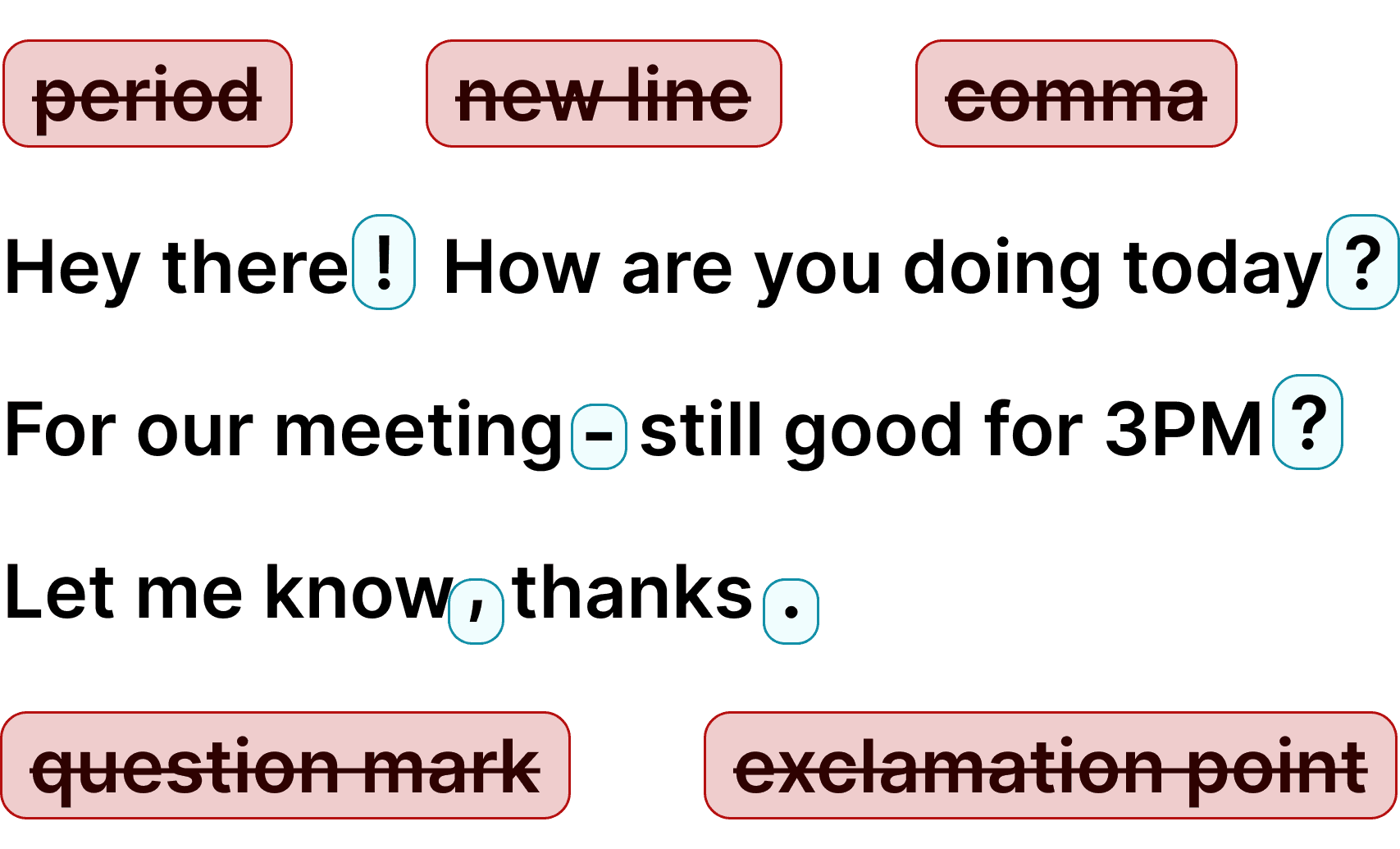
Automatic Punctuation

Voicy automatically adds perfect punctuation to your dictated text. Zero typos, perfect grammar, perfect punctuation.

Image showing a paragraph of text that has been grammar corrected by AI

Automatic Punctuation

Voicy automatically adds perfect punctuation to your dictated text. Zero typos, perfect grammar, perfect punctuation.

Image showing a paragraph of text that has been grammar corrected by AI

+50 languages

Voicy gives you over 99% accuracy in more than 50 languages, including speech-to-text in English, German, French, Spanish, Portuguese, Mandarin, etc.

  • 🇵🇹

  • 🇫🇷

  • 🇮🇳

  • 🇷🇺

  • 🇪🇸

  • 🇨🇳

  • 🇩🇪

  • 🇬🇧

  • 🇵🇱

  • 🇰🇷

  • 🇬🇷

  • 🇺🇦

  • 🇸🇦

  • 🇦🇲

  • 🇿🇦

  • 🇮🇷

  • 🇺🇸

  • 🇫🇮

  • 🇱🇺

  • 🇯🇵

  • 🇮🇱

  • 🇸🇪

  • 🇳🇱

  • 🇩🇰

  • 🇨🇿

+50 languages

Over 99% accuracy in more than 50 languages, including speech to text in English, German, French, Spanish, Portuguese, Mandarin, etc.

  • 🇵🇹

  • 🇫🇷

  • 🇮🇳

  • 🇷🇺

  • 🇪🇸

  • 🇨🇳

  • 🇩🇪

  • 🇬🇧

  • 🇵🇱

  • 🇰🇷

  • 🇬🇷

  • 🇺🇦

  • 🇸🇦

  • 🇦🇲

  • 🇿🇦

  • 🇮🇷

  • 🇺🇸

  • 🇫🇮

  • 🇱🇺

  • 🇯🇵

  • 🇮🇱

  • 🇸🇪

  • 🇳🇱

  • 🇩🇰

  • 🇨🇿

How to use dictation in customer support workflows

How to use dictation in customer support workflows

How to use dictation in customer support workflows

Step 1

Download the Voicy app for Mac or Windows

Download the free Voicy
extension here

Voicy is a privacy-focused dictation app built for professionals who need accuracy and speed. It adds advanced voice-to-text to every application on your computer — from case management systems to legal research platforms.

A screenshot of the Windows Speech-to-Text app download page.

Step 2

Set up your keyboard shortcut (2 minutes)

During setup, choose a keyboard shortcut to start and stop dictation. Press it in any app — your helpdesk, chat, CRM, or email tools — and start speaking.

A gif showing how to set up the Voicy Speech to Text app on Windows

Step 3

Start dictating in any legal application

Once installed, dictate anywhere on your computer. Draft customer replies, internal notes, and follow-ups across your support tools.

A gif showing how Voicy's speech to text functionality works on a Windows computer

Tutorial Video

Tutorial video

The benefits of speech to text for customer support teams

The benefits of speech to text for customer support teams

3x faster
than Typing

3x faster
than Typing

Write customer responses 3x faster

Write customer responses 3x faster

Typing fatigue slows down your daily work and the quality of your responses.


Voice dictation helps with emails, notes, reports, and support chats.


More output in less time means less stress and better accessibility.

Privacy First

Privacy First

Accessibility-friendly and privacy-first

Accessibility-friendly and privacy-first

Teams and accessibility users need tools that are easy, reliable, and respectful of privacy.


Use speech-to-text confidently for every task across the support team.

Works in every app

Works in every app

Works in the apps you already use

Works in the apps you already use

Use Voicy in Google Docs, Word, Notion, LMS portals, email, and browser tools.


One tool across your full workflow.

Voice dictation for customer support teams

Voicy adds speech-to-text across support workflows. Dictate ticket replies, internal notes, follow-ups, and customer messages much faster.

Save hours every week and keep response quality high.
Try it free and see how voice dictation improves support workflows.

Why support teams use voice dictation

Support teams need speed and consistency, not complicated tooling. Modern speech-to-text helps teams move through queues with less typing.

Voicy delivers fast, accurate dictation for support teams across tickets, chat, and email, with no heavy setup and support for Mac and Windows.
Use cases

Google Docs Logo

Handle ticket notes in support tools

Dictate case details and updates directly inside Zendesk, Intercom, or Freshdesk.

Read More

Gmail Logo

Draft customer emails and follow-ups

Write empathetic customer replies faster while keeping your tone clear and professional.

Read More

Microsoft Word Logo

Respond in chat and helpdesk workflows

Dictate polished responses in chat and ticket views with less typing fatigue.

Read More

Outlook Logo

Log CRM notes and internal handoffs

Capture detailed internal notes and handoffs without slowing down queue speed.

Read More

Whatsapp Logo

Take notes during escalations and calls

Capture action items and summaries while handling customer escalations.

Read More

Claude/ChatGpt logos

Use AI assistants for support replies

Speak prompts to ChatGPT or Claude to draft, rewrite, and improve support messages.

Read More

Pricing

Fair pricing policy

Our price will never be more than 20% above our total costs.

4.9/5

+10,000 happy users

Annual

20% off

Pro

For the everyday user

$8.49

/month

Unlimited recording time

Priority support

Get started

LIMITED TIME OFFER

Lifetime

Pay once, use forever

$260

Unlimited recording time

Priority support

Get offer

Voicy for your entire team?

Contact us at [email protected] for custom pricing plans for your team.

Pricing

Fair pricing policy

Our price will never be more than 20% above our total costs.

4.9/5

+10,000 happy users

Annual

20% off

Pro

For the everyday user

$8.49

/month

Unlimited recording time

Priority support

Get started

LIMITED TIME OFFER

Lifetime

Pay once, use forever

$260

Unlimited recording time

Priority support

Get offer

Voicy for your entire team?

Contact us at [email protected] for custom pricing plans for your team.

Pricing

Fair pricing policy

Our price will never be more than 20% above our total costs.

4.9/5

+10,000 happy users

Annual

20% off

Pro

For the everyday user

$8.49

/month

Unlimited recording time

Priority support

Get started

LIMITED TIME OFFER

Lifetime

Pay once, use forever

$260

Unlimited recording time

Priority support

Get offer

Voicy for your entire team?

Contact us at [email protected] for custom pricing plans for your team.

FAQ

How does voice dictation help support teams?

Can I use Voicy in Zendesk, Intercom, and Freshdesk?

Can Voicy help with repetitive support replies?

Will Voicy work in chat and email workflows?

Can Voicy improve response speed and CSAT?

Is Voicy secure for customer-facing communication?

Is there a free trial for support teams?

Does Voicy work on Mac and Windows?