












4.9/5

+2000 happy users

Chrome Store rating

Speech to Text for Carpal Tunnel Syndrome

Speech to Text
for Carpal Tunnel
Syndrome

Goodbye keyboard - instant pain relief
3x faster than typing
Error-free punctuation and grammar powered by AI

Over 99% accuracy in 50 languages
3x faster than typing emails
Automatic punctuation powered by AI

Image of reviewer

Nicholas Cino

Truly amazing extension. Works wonders and is really fast! Reduces time of writing complex emails by about 80%!

Image of reviewer

CL Cobb

I've tried other products like it, and, so far, Voicy is the most user-friendly, and it really improves my workflow.

Image of reviewer

Pam Lang

This is the tool that I was looking for. It is amazing. I've gotten so lazy about typing anywhere. Thank you, thank you, thank you for this product!

Image of reviewer

Steve Moore

Voicy is an absolute game-changer! This voice-to-text extension delivers exceptional accuracy, capturing my words perfectly every time. The speed is impressive.

Image of reviewer

Victor Rodriguez

Almost instant replies from the creator, great support great app!

Image of reviewer

Crystal Willis

I love Voicy!! The extension and the desktop app have saved me so much time. I have tried several different voice-to-text apps. None of them compares to Voicy!

Voicy - Speech-to-Text on Every Website | Startup Fame
Featured on Twelve Tools
Image of reviewer

Nicholas Cino

Truly amazing extension. Works wonders and is really fast! Reduces time of writing complex emails by about 80%!

Image of reviewer

CL Cobb

I've tried other products like it, and, so far, Voicy is the most user-friendly, and it really improves my workflow.

Image of reviewer

Pam Lang

This is the tool that I was looking for. It is amazing. I've gotten so lazy about typing anywhere. Thank you, thank you, thank you for this product!

Voicy - Speech-to-Text on Every Website | Startup Fame
Image of reviewer

Nicholas Cino

Truly amazing extension. Works wonders and is really fast! Reduces time of writing complex emails by about 80%!

Image of reviewer

CL Cobb

I've tried other products like it, and, so far, Voicy is the most user-friendly, and it really improves my workflow.

Image of reviewer

Pam Lang

This is the tool that I was looking for. It is amazing. I've gotten so lazy about typing anywhere. Thank you, thank you, thank you for this product!

On all the websites you use

Microsoft Word Logo indicating microsoft word dictation with Voicy

Word

Microsoft Outlook Logo indicating voice dictation on Outlook

Outlook

Whatsapp logo indicating speech to text on Whatsapp

Whatsapp

Claude Logo indicating speech to text on Claude

Claude

ChatGPT logo indicating speech to text on chatgpt

ChatGPT

Gmail logo indicating speech to text on Gmail

Gmail

Google Docs logo indicating speech to text on Google docs

Docs

And +20,000 more

On all the websites you use

Microsoft Word Logo indicating microsoft word dictation with Voicy

Word

Microsoft Outlook Logo indicating voice dictation on Outlook

Outlook

Whatsapp logo indicating speech to text on Whatsapp

Whatsapp

Claude Logo indicating speech to text on Claude

Claude

ChatGPT logo indicating speech to text on chatgpt

ChatGPT

Gmail logo indicating speech to text on Gmail

Gmail

Google Docs logo indicating speech to text on Google docs

Docs

And +20,000 more

On all the websites you use

Microsoft Word Logo indicating microsoft word dictation with Voicy

Word

Microsoft Outlook Logo indicating voice dictation on Outlook

Outlook

Whatsapp logo indicating speech to text on Whatsapp

Whatsapp

Claude Logo indicating speech to text on Claude

Claude

ChatGPT logo indicating speech to text on chatgpt

ChatGPT

Gmail logo indicating speech to text on Gmail

Gmail

Google Docs logo indicating speech to text on Google docs

Docs

And +20,000 more

Works everywhere

Voicy works on all the websites and apps you use daily. This means you can use voice typing to write emails, messages, documents, blog posts, etc.

  • Microsoft Outlook Logo indicating voice dictation on Outlook
  • Microsoft Word Logo indicating microsoft word dictation with Voicy
  • Gmail logo indicating speech to text on Gmail
  • Linkedin logo
  • Substack logo
  • Facebook Messenger logo
  • Notion Logo
  • ChatGPT logo indicating speech to text on chatgpt
  • Claude Logo indicating speech to text on Claude
  • Google Docs Logo
  • Telegram logo
  • Discord Loog
  • Reddit Logo
  • Hubspot Logo
  • EverNote Logo
  • Medium logo indicating speech to text on medium
  • Trello Logo indicating speech to text on trello
  • Asana logo

Privacy First

Nobody sees your transcripts except yourself.
You can read more about our privacy policy here.

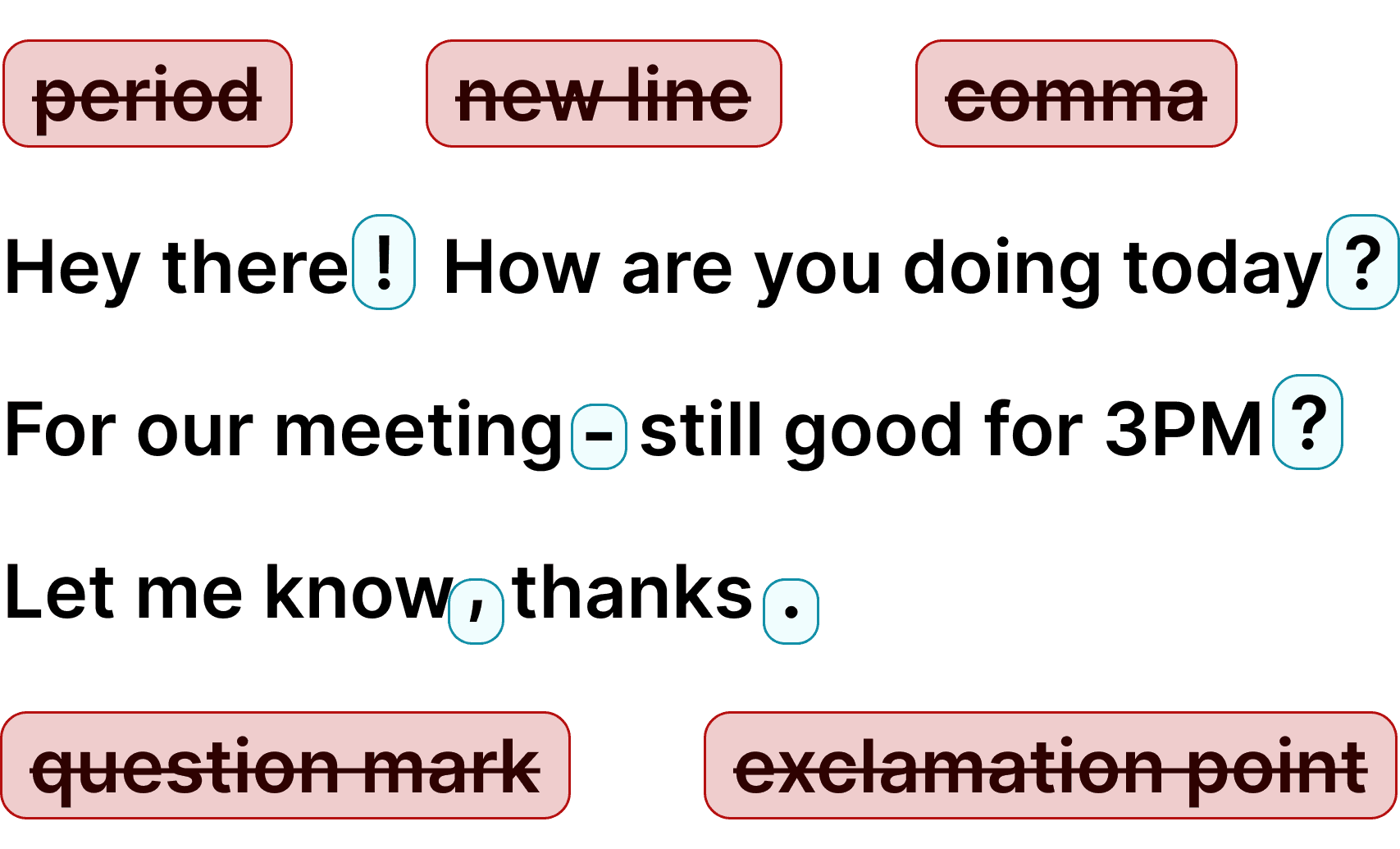
Automatic Punctuation

Voicy automatically adds perfect punctuation to your dictated text. Zero typos, perfect grammar, perfect punctuation.

Image showing a paragraph of text that has been grammar corrected by AI

+50 languages

Voicy gives you over 99% accuracy in more than 50 languages, including speech-to-text in English, German, French, Spanish, Portuguese, Mandarin, etc.

  • 🇵🇹

  • 🇫🇷

  • 🇮🇳

  • 🇷🇺

  • 🇪🇸

  • 🇨🇳

  • 🇩🇪

  • 🇬🇧

  • 🇵🇱

  • 🇰🇷

  • 🇬🇷

  • 🇺🇦

  • 🇸🇦

  • 🇦🇲

  • 🇿🇦

  • 🇮🇷

  • 🇺🇸

  • 🇫🇮

  • 🇱🇺

  • 🇯🇵

  • 🇮🇱

  • 🇸🇪

  • 🇳🇱

  • 🇩🇰

  • 🇨🇿

Works everywhere

Voicy works on all the websites and apps you use daily. This means you can use voice typing to write emails, messages, documents, blog posts, etc.

  • Microsoft Outlook Logo indicating voice dictation on Outlook
  • Microsoft Word Logo indicating microsoft word dictation with Voicy
  • Gmail logo indicating speech to text on Gmail
  • Linkedin logo
  • Substack logo
  • Facebook Messenger logo
  • Notion Logo
  • ChatGPT logo indicating speech to text on chatgpt
  • Claude Logo indicating speech to text on Claude
  • Google Docs Logo
  • Telegram logo
  • Discord Loog
  • Reddit Logo
  • Hubspot Logo
  • EverNote Logo
  • Medium logo indicating speech to text on medium
  • Trello Logo indicating speech to text on trello
  • Asana logo

Privacy First

Nobody sees your transcripts except yourself.
You can read more about our privacy policy here.

Automatic Punctuation

Voicy automatically adds perfect punctuation to your dictated text. Zero typos, perfect grammar, perfect punctuation.

Image showing a paragraph of text that has been grammar corrected by AI

+50 languages

Voicy gives you over 99% accuracy in more than 50 languages, including speech-to-text in English, German, French, Spanish, Portuguese, Mandarin, etc.

  • 🇵🇹

  • 🇫🇷

  • 🇮🇳

  • 🇷🇺

  • 🇪🇸

  • 🇨🇳

  • 🇩🇪

  • 🇬🇧

  • 🇵🇱

  • 🇰🇷

  • 🇬🇷

  • 🇺🇦

  • 🇸🇦

  • 🇦🇲

  • 🇿🇦

  • 🇮🇷

  • 🇺🇸

  • 🇫🇮

  • 🇱🇺

  • 🇯🇵

  • 🇮🇱

  • 🇸🇪

  • 🇳🇱

  • 🇩🇰

  • 🇨🇿

Works everywhere

This means your voice can write emails, messages, documents, blog posts, etc.

  • Microsoft Outlook Logo indicating voice dictation on Outlook
  • Microsoft Word Logo indicating microsoft word dictation with Voicy
  • Gmail logo indicating speech to text on Gmail
  • Linkedin logo
  • Substack logo
  • Facebook Messenger logo
  • Notion Logo
  • ChatGPT logo indicating speech to text on chatgpt
  • Claude Logo indicating speech to text on Claude
  • Google Docs Logo
  • Telegram logo
  • Discord Loog
  • Reddit Logo
  • Hubspot Logo
  • EverNote Logo
  • Medium logo indicating speech to text on medium
  • Trello Logo indicating speech to text on trello
  • Asana logo

Privacy First

Nobody sees your transcripts except yourself.
You can read more about our privacy policy here.

Automatic Punctuation

Voicy automatically adds perfect punctuation to your dictated text. Zero typos, perfect grammar, perfect punctuation.

Image showing a paragraph of text that has been grammar corrected by AI

+50 languages

Over 99% accuracy in more than 50 languages, including speech to text in English, German, French, Spanish, Portuguese, Mandarin, etc.

  • 🇵🇹

  • 🇫🇷

  • 🇮🇳

  • 🇷🇺

  • 🇪🇸

  • 🇨🇳

  • 🇩🇪

  • 🇬🇧

  • 🇵🇱

  • 🇰🇷

  • 🇬🇷

  • 🇺🇦

  • 🇸🇦

  • 🇦🇲

  • 🇿🇦

  • 🇮🇷

  • 🇺🇸

  • 🇫🇮

  • 🇱🇺

  • 🇯🇵

  • 🇮🇱

  • 🇸🇪

  • 🇳🇱

  • 🇩🇰

  • 🇨🇿

How voice typing relieves pain

How voice typing relieves pain

Reduced strain on your fingers and wrist

Reduced strain on your fingers and wrist

By completely cutting out the thousands of keystrokes we make every day, Voicy simply reduces the need to use your fingers and keyboard.
An ergonomic mouse and keyboard are great.
No keyboard is even better.

Check out our deep dive on the benefits of speech-to-text for carpal tunnel syndrome.

White text on blue background, text reads, reduced strain.

Efficiency boost - type 3x faster

Efficiency boost - type 3x faster

Speaking is far faster than typing, especially when your hands hurt. Voicy lets you stay productive and capture ideas quickly without the physical effort that typing requires.

White text on blue background reads: "3x faster than typing."

Faster recovery and better prevention

Faster recovery and better prevention

Limiting typing allows your hands to rest while still enabling you to complete tasks.
This can speed up recovery by preventing overuse of the median nerve.

White text on blue background, text reads, Faster Recovery.

Step 3

Click on the Voicy microphone to start recording

Clicking on the microphone will start the speech-to-text recording for you. Once you are done talking, click on the microphone again to stop. Your dictated text will now show up in Notion.

How voice typing relieves pain.

Reduced strain on your fingers and wrist

By completely cutting out the thousands of keystrokes we make every day, Voicy simply reduces the need to use your fingers and keyboard.
An ergonomic mouse and keyboard are great.
No keyboard is even better.

Check out our deep dive on the benefits of speech-to-text for carpal tunnel syndrome.

White text on blue background, text reads reduce strain.

Efficiency boost

Speaking is far faster than typing, especially when your hands hurt. Voicy lets you stay productive and capture ideas quickly without the physical effort that typing requires.

White text on blue background reads: "3x faster than typing."

Faster recovery and better prevention

Limiting typing allows your hands to rest while still enabling you to complete tasks.
This can speed up recovery by preventing overuse of the median nerve.

White text on blue background, text reads, Faster Recovery.

Voice typing tools as a way to relieve carpal tunnel syndrome pain

Preventing or recovering from carpal tunnel syndrome?

Either way, using your fingers less, is crucial to reduce the strain on your wrist.
Sure, you can get an ergonomic mouse or keyboard, but typing less is much more effective.

And with Voicy, this is all possible

Apart from talk to text functionality, Voicy also gives you access to AI commands everywhere.

If you don't know how to start or formulate anything, simply ask Voicy to do it for you.

Finally, Voicy works in over 50 languages, including Spanish, German, Russian, Hindi, French, Dutch and many more.

Why Voicy's own speech-recognition is ahead of Apple, Google, and Microsoft

Google, Microsoft, and Apple's own voice dictation used to be the leading technology in the market, but it has fallen behind.

Recent advancements in speech-to-text technology have introduced new models that are far faster and more accurate.

These new technologies have not been adopted by Google yet and likely won't be very soon.

Voicy was made for people who want more accurate, automatically formatted, and faster transcriptions than Google's voice dictation. More info here.

The benefits of speech to text for writing

Write at the speed of
thought

Using speech-to-text increases your speed by an average of 2x.
Get your ideas on paper faster.

How do commas work?

Voicy automatically adds perfect commas and punctuation to your transcription.

Natural sounding text

Writing with your voice creates more natural sounding, easier to understand text.
Voicy in action

Voicy in action

Voicy in action

Use cases

Google Docs Logo

Write Google Docs with your Voice

Use Speech-To-Text inside Google Docs to write documents in half the time.

Read More

Gmail Logo

Write emails with dictation in Gmail

Automatic punctuation and formatting help you write perfect emails!

Read More

Microsoft Word Logo

Dictate right in Word - works perfectly

Stuck on that first line to start your doc? Just speak it out and it's there.

Read More

Outlook Logo

Look out, Outlook Voice-to-Text is here!

Voicy works perfectly in all Outlook versions to help you dictate emails.

Read More

Whatsapp Logo

Chat in Whatsapp with Speech to Text

Are you a talker but know that nobody likes voice notes?
Worry not, Voicy's got you!

Read More

Claude/ChatGpt logos

Speech-to-text in Claude and ChatGPT

Give AI the best possible prompt by using your voice. Better input leads to better output!

Read More

Use cases

Google Docs Logo

Write Google Docs with your Voice

Use Speech-To-Text inside Google Docs to write documents in half the time.

Read More

Gmail Logo

Write emails with dictation in Gmail

Automatic punctuation and formatting help you write perfect emails!

Read More

Microsoft Word Logo

Dictate right in Word - works perfectly

Stuck on that first line to start your doc? Just speak it out and it's there.

Read More

Outlook Logo

Look out, Outlook Voice-to-Text is here!

Voicy works perfectly in all Outlook versions to help you dictate emails.

Read More

Whatsapp Logo

Chat in Whatsapp with Speech to Text

Are you a talker but know that nobody likes voice notes?
Worry not, Voicy's got you!

Read More

Claude/ChatGpt logos

Speech-to-text in Claude and ChatGPT

Give AI the best possible prompt by using your voice. Better input leads to better output!

Read More

FAQ

How is Voicy different from Google's Dictation feature?

How much does Voicy cost?

Do you see what I write with Voicy?

How does Voicy's speech to text work in Gmail?

What is speech-to-text?