
































4.9/5

+10,000 happy users

AI-powered dictation software
Write with your voice. Everywhere.

3x faster than typing.

Over 99% accuracy in 50+ languages.

Works in every app on Mac and Windows.

Speech-to-text for every text field on every website.

3x faster than typing.

Error-free punctuation and grammar powered by AI.

A GIF of Voicy speech to text being used on a website

On all the websites you use

Microsoft Word Logo indicating microsoft word dictation with Voicy

Word

Microsoft Outlook Logo indicating voice dictation on Outlook

Outlook

Whatsapp logo indicating speech to text on Whatsapp

Whatsapp

Claude Logo indicating speech to text on Claude

Claude

ChatGPT logo indicating speech to text on chatgpt

ChatGPT

Gmail logo indicating speech to text on Gmail

Gmail

Google Docs logo indicating speech to text on Google docs

Docs

And +20,000 more

On all the websites you use

Microsoft Word Logo indicating microsoft word dictation with Voicy

Word

Microsoft Outlook Logo indicating voice dictation on Outlook

Outlook

Whatsapp logo indicating speech to text on Whatsapp

Whatsapp

Claude Logo indicating speech to text on Claude

Claude

ChatGPT logo indicating speech to text on chatgpt

ChatGPT

Gmail logo indicating speech to text on Gmail

Gmail

Google Docs logo indicating speech to text on Google docs

Docs

And +20,000 more

On all the websites you use

Microsoft Word Logo indicating microsoft word dictation with Voicy

Word

Microsoft Outlook Logo indicating voice dictation on Outlook

Outlook

Whatsapp logo indicating speech to text on Whatsapp

Whatsapp

Claude Logo indicating speech to text on Claude

Claude

ChatGPT logo indicating speech to text on chatgpt

ChatGPT

Gmail logo indicating speech to text on Gmail

Gmail

Google Docs logo indicating speech to text on Google docs

Docs

And +20,000 more

Voicy in action

Voicy in action

Voicy in action

How Voicy Dictation Software Works

Step 1

Download the Voicy app here

Voicy is a privacy-focused dictation app.

It adds the most advanced dictation software to your computer, while keeping your security and privacy in mind.

Step 2

Complete the setup (2-minutes)

During the Voicy setup, you can select a keyboard shortcut to use to start and stop your recordings.

It's the easiest way to use dictation on your computer.

A gif showing how to set up the Voicy Speech to Text app on Windows

Step 3

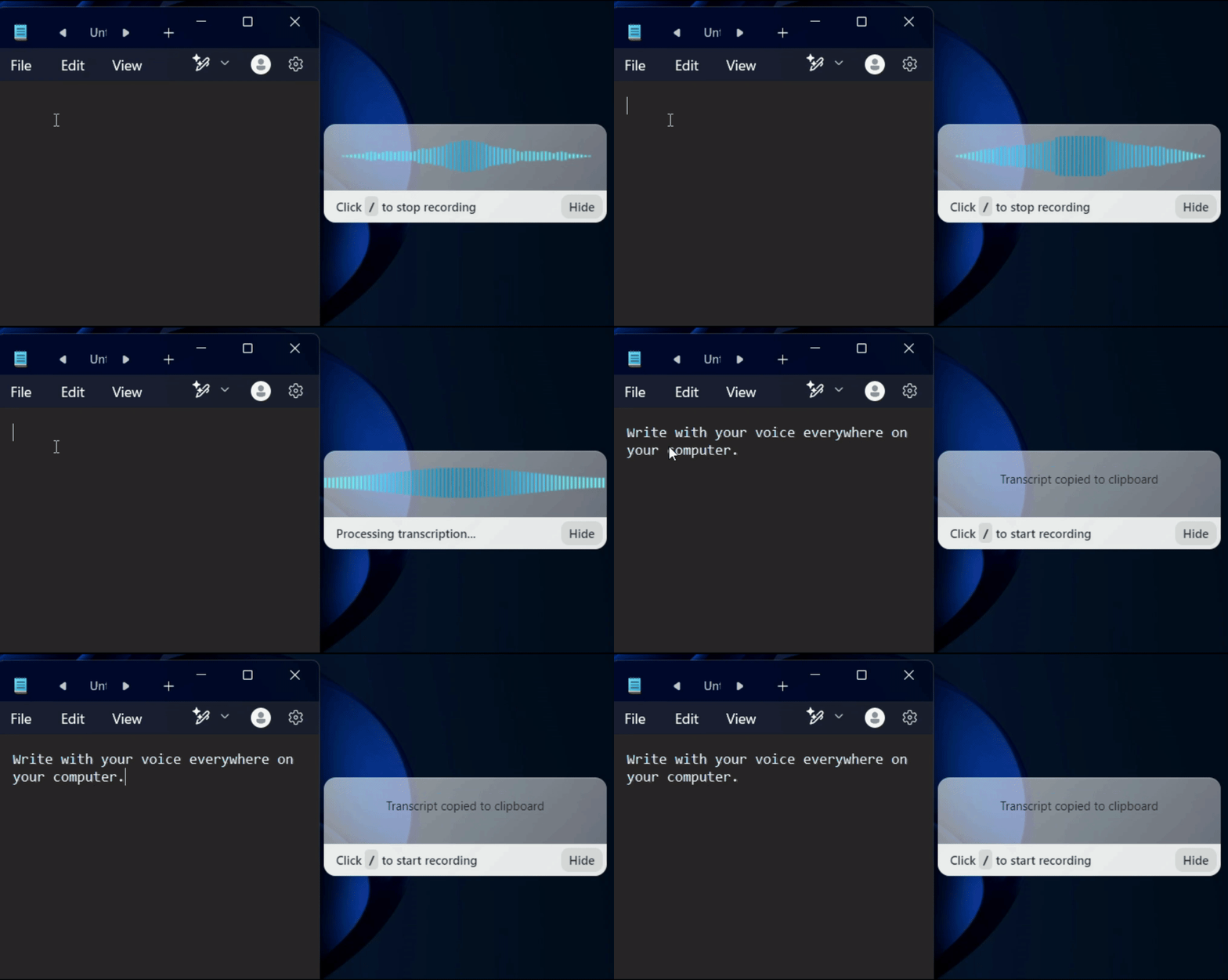
Write anywhere with your voice

Use Voicy in Word, Google Docs, Gmail, Slack, Notion, or any app you use. The same shortcut works everywhere. When you are done, press the shortcut again to stop.

A gif showing how Voicy's speech to text functionality works on a Windows computer
Image of reviewer

Nicholas Cino

Truly amazing extension. Works wonders and is really fast! Reduces time of writing complex emails by about 80%!

Image of reviewer

CL Cobb

I've tried other products like it, and, so far, Voicy is the most user-friendly, and it really improves my workflow.

Image of reviewer

Pam Lang

This is the tool that I was looking for. It is amazing. I've gotten so lazy about typing anywhere. Thank you, thank you, thank you for this product!

Image of reviewer

Steve Moore

Voicy is an absolute game-changer! This voice-to-text extension delivers exceptional accuracy, capturing my words perfectly every time. The speed is impressive.

Image of reviewer

Victor Rodriguez

Almost instant replies from the creator, great support great app!

Image of reviewer

Crystal Willis

I love Voicy!! The extension and the desktop app have saved me so much time. I have tried several different voice-to-text apps. None of them compares to Voicy!

Voicy - Speech-to-Text on Every Website | Startup Fame
Featured on Twelve Tools
Image of reviewer

Nicholas Cino

Truly amazing extension. Works wonders and is really fast! Reduces time of writing complex emails by about 80%!

Image of reviewer

CL Cobb

I've tried other products like it, and, so far, Voicy is the most user-friendly, and it really improves my workflow.

Image of reviewer

Pam Lang

This is the tool that I was looking for. It is amazing. I've gotten so lazy about typing anywhere. Thank you, thank you, thank you for this product!

Voicy - Speech-to-Text on Every Website | Startup Fame
Image of reviewer

Nicholas Cino

Truly amazing extension. Works wonders and is really fast! Reduces time of writing complex emails by about 80%!

Image of reviewer

CL Cobb

I've tried other products like it, and, so far, Voicy is the most user-friendly, and it really improves my workflow.

Image of reviewer

Pam Lang

This is the tool that I was looking for. It is amazing. I've gotten so lazy about typing anywhere. Thank you, thank you, thank you for this product!

Works everywhere

Voicy works on all the websites and apps you use daily. This means you can use voice typing to write emails, messages, documents, blog posts, etc.

  • Microsoft Outlook Logo indicating voice dictation on Outlook
  • Microsoft Word Logo indicating microsoft word dictation with Voicy
  • Gmail logo indicating speech to text on Gmail
  • Linkedin logo
  • Substack logo
  • Facebook Messenger logo
  • Notion Logo
  • ChatGPT logo indicating speech to text on chatgpt
  • Claude Logo indicating speech to text on Claude
  • Google Docs Logo
  • Telegram logo
  • Discord Loog
  • Reddit Logo
  • Hubspot Logo
  • EverNote Logo
  • Medium logo indicating speech to text on medium
  • Trello Logo indicating speech to text on trello
  • Asana logo

Privacy First

Nobody sees your transcripts except yourself.
You can read more about our privacy policy here.

Automatic Punctuation

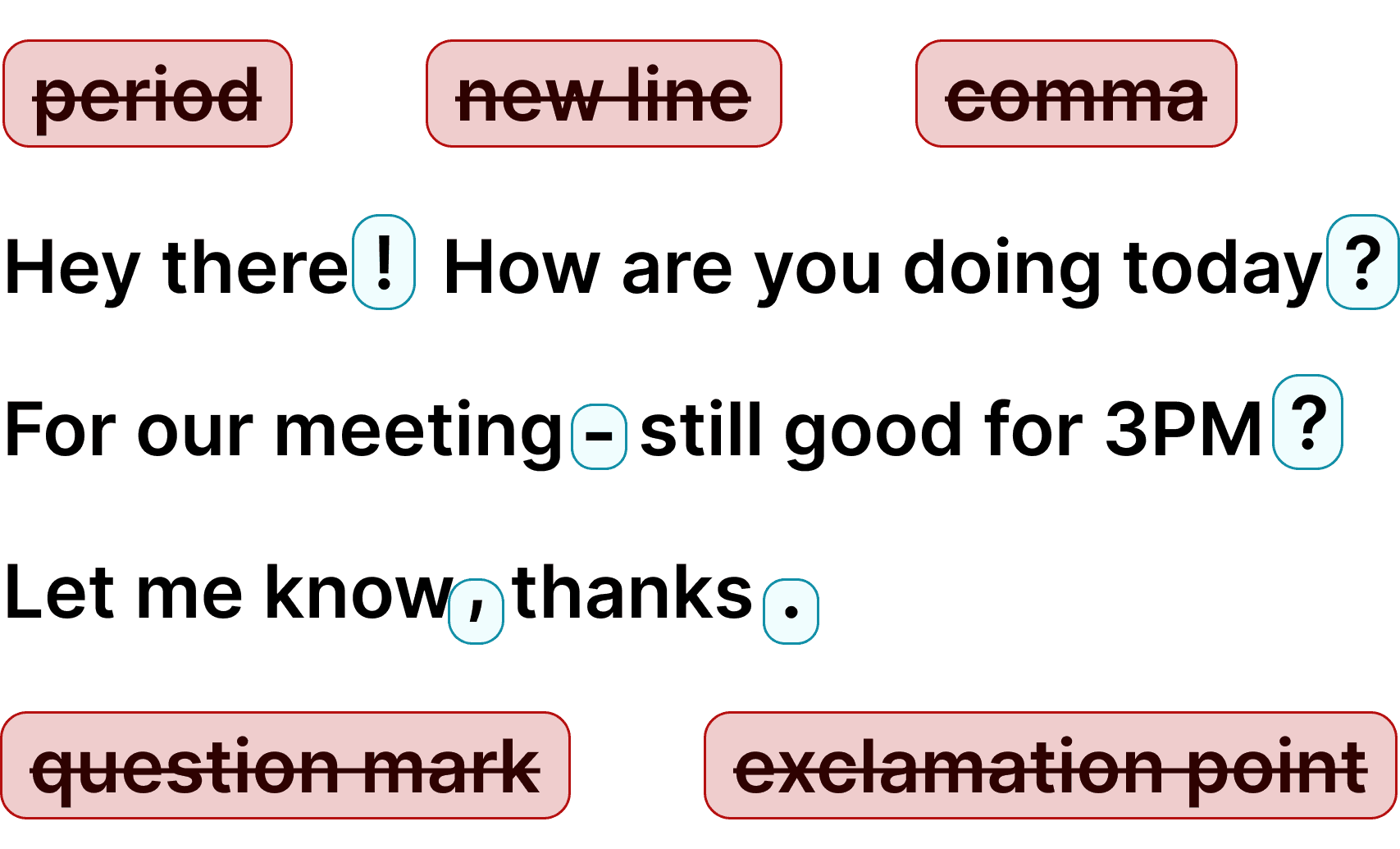
Voicy automatically adds perfect punctuation to your dictated text. Zero typos, perfect grammar, perfect punctuation.

Image showing a paragraph of text that has been grammar corrected by AI

+50 languages

Voicy gives you over 99% accuracy in more than 50 languages, including speech-to-text in English, German, French, Spanish, Portuguese, Mandarin, etc.

  • 🇵🇹

  • 🇫🇷

  • 🇮🇳

  • 🇷🇺

  • 🇪🇸

  • 🇨🇳

  • 🇩🇪

  • 🇬🇧

  • 🇵🇱

  • 🇰🇷

  • 🇬🇷

  • 🇺🇦

  • 🇸🇦

  • 🇦🇲

  • 🇿🇦

  • 🇮🇷

  • 🇺🇸

  • 🇫🇮

  • 🇱🇺

  • 🇯🇵

  • 🇮🇱

  • 🇸🇪

  • 🇳🇱

  • 🇩🇰

  • 🇨🇿

Works everywhere

Voicy works on all the websites and apps you use daily. This means you can use voice typing to write emails, messages, documents, blog posts, etc.

  • Microsoft Outlook Logo indicating voice dictation on Outlook
  • Microsoft Word Logo indicating microsoft word dictation with Voicy
  • Gmail logo indicating speech to text on Gmail
  • Linkedin logo
  • Substack logo
  • Facebook Messenger logo
  • Notion Logo
  • ChatGPT logo indicating speech to text on chatgpt
  • Claude Logo indicating speech to text on Claude
  • Google Docs Logo
  • Telegram logo
  • Discord Loog
  • Reddit Logo
  • Hubspot Logo
  • EverNote Logo
  • Medium logo indicating speech to text on medium
  • Trello Logo indicating speech to text on trello
  • Asana logo

Privacy First

Nobody sees your transcripts except yourself.
You can read more about our privacy policy here.

Automatic Punctuation

Voicy automatically adds perfect punctuation to your dictated text. Zero typos, perfect grammar, perfect punctuation.

Image showing a paragraph of text that has been grammar corrected by AI

+50 languages

Voicy gives you over 99% accuracy in more than 50 languages, including speech-to-text in English, German, French, Spanish, Portuguese, Mandarin, etc.

  • 🇵🇹

  • 🇫🇷

  • 🇮🇳

  • 🇷🇺

  • 🇪🇸

  • 🇨🇳

  • 🇩🇪

  • 🇬🇧

  • 🇵🇱

  • 🇰🇷

  • 🇬🇷

  • 🇺🇦

  • 🇸🇦

  • 🇦🇲

  • 🇿🇦

  • 🇮🇷

  • 🇺🇸

  • 🇫🇮

  • 🇱🇺

  • 🇯🇵

  • 🇮🇱

  • 🇸🇪

  • 🇳🇱

  • 🇩🇰

  • 🇨🇿

Works everywhere

This means your voice can write emails, messages, documents, blog posts, etc.

  • Microsoft Outlook Logo indicating voice dictation on Outlook
  • Microsoft Word Logo indicating microsoft word dictation with Voicy
  • Gmail logo indicating speech to text on Gmail
  • Linkedin logo
  • Substack logo
  • Facebook Messenger logo
  • Notion Logo
  • ChatGPT logo indicating speech to text on chatgpt
  • Claude Logo indicating speech to text on Claude
  • Google Docs Logo
  • Telegram logo
  • Discord Loog
  • Reddit Logo
  • Hubspot Logo
  • EverNote Logo
  • Medium logo indicating speech to text on medium
  • Trello Logo indicating speech to text on trello
  • Asana logo

Privacy First

Nobody sees your transcripts except yourself.
You can read more about our privacy policy here.

Automatic Punctuation

Voicy automatically adds perfect punctuation to your dictated text. Zero typos, perfect grammar, perfect punctuation.

Image showing a paragraph of text that has been grammar corrected by AI

+50 languages

Over 99% accuracy in more than 50 languages, including speech to text in English, German, French, Spanish, Portuguese, Mandarin, etc.

  • 🇵🇹

  • 🇫🇷

  • 🇮🇳

  • 🇷🇺

  • 🇪🇸

  • 🇨🇳

  • 🇩🇪

  • 🇬🇧

  • 🇵🇱

  • 🇰🇷

  • 🇬🇷

  • 🇺🇦

  • 🇸🇦

  • 🇦🇲

  • 🇿🇦

  • 🇮🇷

  • 🇺🇸

  • 🇫🇮

  • 🇱🇺

  • 🇯🇵

  • 🇮🇱

  • 🇸🇪

  • 🇳🇱

  • 🇩🇰

  • 🇨🇿

Voicy vs Windows vs Apple native speech recognition

FeatureVoicy⭐ RecommendedApple DictationWindows Dictation
Accuracy99%+~90%90%
Auto punctuation
Works in any app
Fast Support
AI writing assistant
Offline mode

Privacy FAQs

Voicy is private by design. Here are the answers to your most asked privacy questions.

Can you read what I write with Voicy?

Nobody can read your transcripts or listen to your recordings.

Do you save my recordings and transcripts?

We do not store your transcripts or recordings anywhere in our database.

Where is my dictation stored?

Your transcripts are only stored on your device locally.

Do you use my transcripts for research or to train an AI?

We do not use your recordings to train an AI model or for any other purpose. We do not store your transcripts or recordings at all.

Use cases

Google Docs Logo

Write Google Docs with your Voice

Use Speech-To-Text inside Google Docs to write documents in half the time.

Read More

Gmail Logo

Write emails with dictation in Gmail

Automatic punctuation and formatting help you write perfect emails!

Read More

Microsoft Word Logo

Dictate right in Word - works perfectly

Stuck on that first line to start your doc? Just speak it out and it's there.

Read More

Outlook Logo

Look out, Outlook Voice-to-Text is here!

Voicy works perfectly in all Outlook versions to help you dictate emails.

Read More

Whatsapp Logo

Chat in Whatsapp with Speech to Text

Are you a talker but know that nobody likes voice notes?
Worry not, Voicy's got you!

Read More

Claude/ChatGpt logos

Speech-to-text in Claude and ChatGPT

Give AI the best possible prompt by using your voice. Better input leads to better output!

Read More

Use cases

Google Docs Logo

Write Google Docs with your Voice

Use Speech-To-Text inside Google Docs to write documents in half the time.

Read More

Gmail Logo

Write emails with dictation in Gmail

Automatic punctuation and formatting help you write perfect emails!

Read More

Microsoft Word Logo

Dictate right in Word - works perfectly

Stuck on that first line to start your doc? Just speak it out and it's there.

Read More

Outlook Logo

Look out, Outlook Voice-to-Text is here!

Voicy works perfectly in all Outlook versions to help you dictate emails.

Read More

Whatsapp Logo

Chat in Whatsapp with Speech to Text

Are you a talker but know that nobody likes voice notes?
Worry not, Voicy's got you!

Read More

Claude/ChatGpt logos

Speech-to-text in Claude and ChatGPT

Give AI the best possible prompt by using your voice. Better input leads to better output!

Read More

The best dictation software for Mac and Windows

Voicy is dictation software that works in every app on your Mac or Windows computer. Unlike built-in speech recognition from Apple or Microsoft, Voicy adds punctuation automatically — no more saying "comma" or "period" out loud. It supports over 50 languages with automatic detection, so you can switch between English, Spanish, German, or any language mid-sentence. Whether you're writing emails, drafting documents, or chatting in Slack, Voicy turns your voice into text with over 99% accuracy.

Voicy handles what other dictation software can't: accents, technical terminology, fast speech, and multiple languages. It detects your language automatically and adds commas, periods, and grammar without you saying a word. For professionals, writers, students, and anyone who types extensively, it's dictation software that actually saves time instead of creating more editing work.

How Voicy compares to Dragon and other dictation software

Dragon NaturallySpeaking has been the gold standard in dictation software for decades — but at $300+ per license, it's expensive. And it only works on Windows. Apple Dictation is free but basic — no automatic punctuation, limited accuracy, and poor performance in non-Apple apps. Voicy hits the sweet spot: 99%+ accuracy at $8.49/month, works on both Mac and Windows, and runs in every app.

Free dictation software options like Google Docs voice typing or Windows Voice Typing (Win+H) work for casual use, but they require you to say punctuation out loud, have lower accuracy, and only work in specific apps. Voicy is the professional-grade dictation software that doesn't require a professional-grade budget.

Who needs dictation software?

Lawyers dictate case notes and briefs. Doctors record patient observations. Writers draft articles and books. Students take lecture notes. Developers document code. Customer support teams write responses faster. Anyone who types more than 30 minutes a day can save hours each week with dictation software. Voice typing is roughly 3x faster than keyboard typing — a 500-word email takes 2 minutes instead of 6. Over a full workday, that adds up to significant time savings and less physical strain on your hands and wrists.

People with RSI, carpal tunnel, or arthritis especially benefit from dictation software. It lets them continue working productively without the physical strain of typing. Voicy's keyboard shortcut activation means you never have to reach for buttons or menus — just press your shortcut and start talking. Many users report that switching to voice dictation eliminated their wrist pain entirely while actually increasing their writing output.

FAQ

What makes Voicy the best dictation software?

What languages does Voicy dictation software support?

How much does Voicy dictation software cost?

Is Voicy dictation software private and secure?

Does Voicy work as dictation software for Mac and Windows?

Is Voicy better than Dragon dictation software?

Can dictation software replace typing completely?

Does dictation software work in every app?

Is dictation software accurate enough for professional use?