




Voicy
Try for free
Voicy
Try for free
4.9/5
+5000 happy users
AI Speech-to-Text App
Say goodbye to your keyboard.
AI Speech to Text is here.
Start for free
Over 99% accuracy in 50 languages.
Automatic punctuation and formatting - powered by AI.
Works in every app, everywhere.
Speech-to-text for every text field on every website.
3x faster than typing.
Error-free punctuation and grammar powered by AI.






See how it works
See how it works
See how it works

CL Cobb
I've tried other products like it, and, so far, Voicy is the most user-friendly, and it really improves my workflow.

Pam Lang
This is the tool that I was looking for. It is amazing. I've gotten so lazy about typing anywhere. Thank you, thank you, thank you for this product!

Steve Moore
Voicy is an absolute game-changer! This voice-to-text extension delivers exceptional accuracy, capturing my words perfectly every time. The speed is impressive.

Victor Rodriguez
Almost instant replies from the creator, great support great app!

Crystal Willis
I love Voicy!! The extension and the desktop app have saved me so much time. I have tried several different voice-to-text apps. None of them compares to Voicy!
CL Cobb
I've tried other products like it, and, so far, Voicy is the most user-friendly, and it really improves my workflow.
Pam Lang
This is the tool that I was looking for. It is amazing. I've gotten so lazy about typing anywhere. Thank you, thank you, thank you for this product!
CL Cobb
I've tried other products like it, and, so far, Voicy is the most user-friendly, and it really improves my workflow.
Pam Lang
This is the tool that I was looking for. It is amazing. I've gotten so lazy about typing anywhere. Thank you, thank you, thank you for this product!


How AI Speech to Text Works in Voicy
Step 1
Download the Voicy app here
Voicy is a privacy-focused speech-to-text app.
It adds the most advanced dictation technology to your computer, while keeping your security and privacy in mind.
Step 2
Complete the setup (2-minutes)
and select your keyboard shortcut.
During the Voicy setup, you can select a keyboard shortcut to use to start and stop your recordings.
It's the easiest way to use dictation on your computer.

Step 3
Start dictating to Voicy
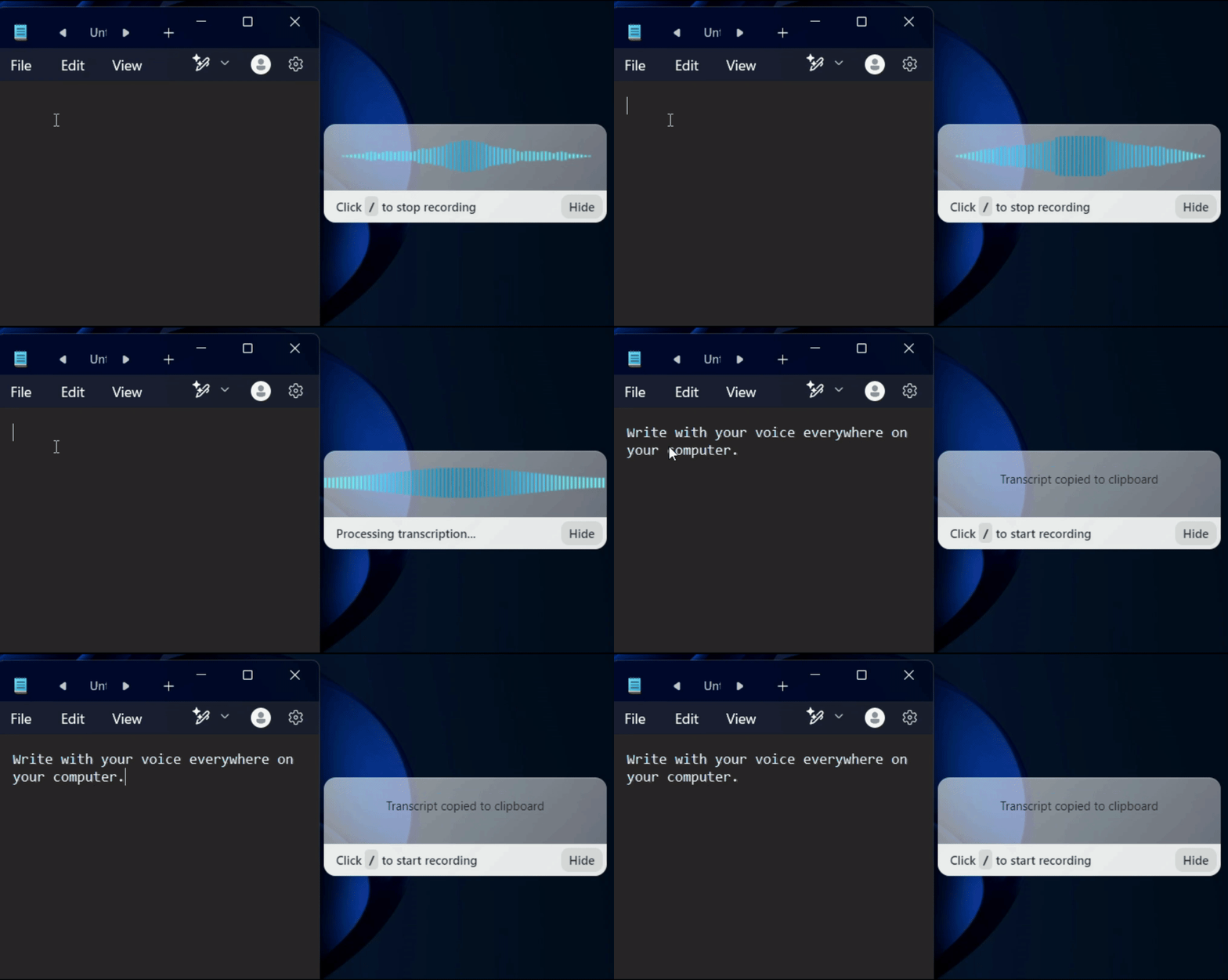
Once Voicy is installed, you can use talk to text everywhere on your computer.
This includes all of your favourite apps and every website in your browser too!
Works everywhere
Voicy works on all the websites and apps you use daily. This means you can use voice typing to write emails, messages, documents, blog posts, etc.












Privacy First
Nobody sees your transcripts except yourself.
You can read more about our privacy policy here.
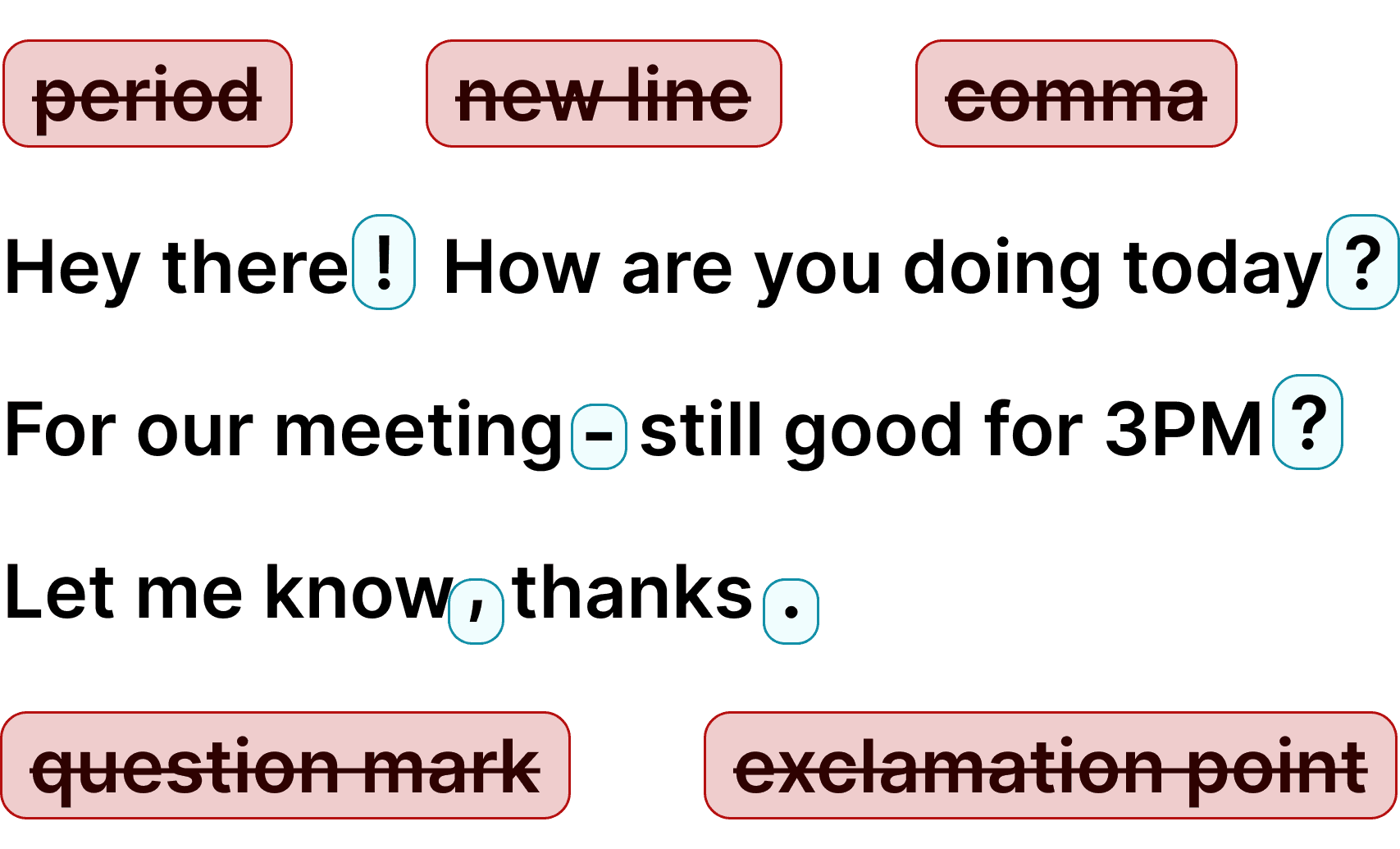
Automatic Punctuation
Voicy automatically adds perfect punctuation to your dictated text. Zero typos, perfect grammar, perfect punctuation.
+50 languages
Voicy gives you over 99% accuracy in more than 50 languages, including speech-to-text in English, German, French, Spanish, Portuguese, Mandarin, etc.
🇵🇹
🇫🇷
🇮🇳
🇷🇺
🇪🇸
🇨🇳
🇩🇪
🇬🇧
🇵🇱
🇰🇷
🇬🇷
🇺🇦
🇸🇦
🇦🇲
🇿🇦
🇮🇷
🇺🇸
🇫🇮
🇱🇺
🇯🇵
🇮🇱
🇸🇪
🇳🇱
🇩🇰
🇨🇿
Works everywhere
This means your voice can write emails, messages, documents, blog posts, etc.
Privacy First
Nobody sees your transcripts except yourself.
You can read more about our privacy policy here.
Automatic Punctuation
Voicy automatically adds perfect punctuation to your dictated text. Zero typos, perfect grammar, perfect punctuation.
+50 languages
Over 99% accuracy in more than 50 languages, including speech to text in English, German, French, Spanish, Portuguese, Mandarin, etc.
🇵🇹
🇫🇷
🇮🇳
🇷🇺
🇪🇸
🇨🇳
🇩🇪
🇬🇧
🇵🇱
🇰🇷
🇬🇷
🇺🇦
🇸🇦
🇦🇲
🇿🇦
🇮🇷
🇺🇸
🇫🇮
🇱🇺
🇯🇵
🇮🇱
🇸🇪
🇳🇱
🇩🇰
🇨🇿
Works everywhere
Voicy works on all the websites and apps you use daily. This means you can use voice typing to write emails, messages, documents, blog posts, etc.
Privacy First
Nobody sees your transcripts except yourself.
You can read more about our privacy policy here.
Automatic Punctuation
Voicy automatically adds perfect punctuation to your dictated text. Zero typos, perfect grammar, perfect punctuation.
+50 languages
Voicy gives you over 99% accuracy in more than 50 languages, including speech-to-text in English, German, French, Spanish, Portuguese, Mandarin, etc.
🇵🇹
🇫🇷
🇮🇳
🇷🇺
🇪🇸
🇨🇳
🇩🇪
🇬🇧
🇵🇱
🇰🇷
🇬🇷
🇺🇦
🇸🇦
🇦🇲
🇿🇦
🇮🇷
🇺🇸
🇫🇮
🇱🇺
🇯🇵
🇮🇱
🇸🇪
🇳🇱
🇩🇰
🇨🇿
Voicy on Mobile
Never use Apple's or Android's annoying dictation again. Perfect dictation, 4x faster than typing.
99% accuracy in 50 languages
Works in every app on Android & iOS
Automatic formatting and punctuation


Where people dictate with Voicy
Voice-typing Emails





& more
Dictate emails in every email app with Voicy.
Write emails up to 4x faster with your voice thanks to:
99% accuracy in 50 languages
Automatic punctuation + formatting
AI rewriting for professional emails


Dictating Documents





& more
Speech-to-text for all your documents, notes, and writings.
Get your thoughts on paper faster with:
Near-perfect accuracy in 50 languages
AI rewriting & editing
Automatic cleanups and punctuation
Speech-to-text in all chats
(Humans or AI)






& more
Whether you're chatting with friends on WhatsApp, your colleagues on Slack or Teams, or your favorite AI on ChatGPT, Gemini, Claude, etc., dictate your messages with Voicy.
99% accurate in 50 languages
Lightning-fast dictation
AI rewriting & editing

Talk to your terminal, or code in your IDE




& more
Use dictation in your TUI for commands, Claude Code, or Codex. Or voice-type in your favorite IDE for some fun coding (the vibe is optional)
Works in all terminals and IDEs
Write longer & better prompts in half the time
Understands coding terminology
Voicy on Mobile
Never use Apple's or Android's annoying dictation again. Perfect dictation, 4x faster than typing.
99% accuracy in 50 languages
Works in every app on Android & iOS
Automatic formatting and punctuation


Where people dictate with Voicy
Voice-typing Emails
Dictate emails in every email app with Voicy.
Write emails up to 4x faster with your voice thanks to:
99% accuracy in 50 languages
Automatic punctuation + formatting
AI rewriting for professional emails
Start for free
Dictating Documents
Speech-to-text for all your documents, notes, and writings.
Get your thoughts on paper faster with:
99% accuracy in 50 languages.
AI rewriting & editing.
Automatic punctuation + formatting.
Speech-to-text in all chats
(Humans or AI)
Chat with friends on WhatsApp, your team on Slack or Teams, or an AI on ChatGPT, Gemini, Claude, etc.
No need for a keyboard.
99% accurate in 50 languages
Lightning-fast dictation
AI rewriting & editing

Talk to your terminal, or code in your IDE
Use dictation in your TUI for commands, Claude Code, or Codex. Or voice-type in your favorite IDE for some fun coding (the vibe is optional)
Works in all terminals and IDEs.
Write longer & better prompts in half the time.
Understands coding terminology.
Try for free
Voicy on Mobile
Never use Apple's or Android's annoying dictation again. Perfect dictation, 4x faster than typing.
99% accuracy in 50 languages
Works in every app on Android & iOS
Automatic formatting and punctuation
Where people dictate with Voicy
Voice-typing Emails
& more
Dictate emails in every email app with Voicy.
Write emails up to 4x faster with your voice thanks to:
99% accuracy in 50 languages
Automatic punctuation + formatting
AI rewriting for professional emails
Dictating Documents
& more
Speech-to-text for all your documents, notes, and writings.
Get your thoughts on paper faster with:
Near-perfect accuracy in 50 languages
AI rewriting & editing
Automatic cleanups and punctuation
Speech-to-text in all chats
(Humans or AI)
& more
Whether you're chatting with friends on WhatsApp, your colleagues on Slack or Teams, or your favorite AI on ChatGPT, Gemini, Claude, etc., dictate your messages with Voicy.
99% accurate in 50 languages
Lightning-fast dictation
AI rewriting & editing
Talk to your terminal, or code in your IDE
& more
Use dictation in your TUI for commands, Claude Code, or Codex. Or voice-type in your favorite IDE for some fun coding (the vibe is optional)
Works in all terminals and IDEs
Write longer & better prompts in half the time
Understands coding terminology
Use cases
Write Google Docs with your Voice
Use Speech-To-Text inside Google Docs to write documents in half the time.
Read More
Write emails with dictation in Gmail
Automatic punctuation and formatting help you write perfect emails!
Read More
Dictate right in Word - works perfectly
Stuck on that first line to start your doc? Just speak it out and it's there.
Read More
Look out, Outlook Voice-to-Text is here!
Voicy works perfectly in all Outlook versions to help you dictate emails.
Read More

Chat in Whatsapp with Speech to Text
Are you a talker but know that nobody likes voice notes?
Worry not, Voicy's got you!
Read More

Speech-to-text in Claude and ChatGPT
Give AI the best possible prompt by using your voice. Better input leads to better output!
Read More
Use cases
Write Google Docs with your Voice
Use Speech-To-Text inside Google Docs to write documents in half the time.
Read More
Write emails with dictation in Gmail
Automatic punctuation and formatting help you write perfect emails!
Read More
Dictate right in Word - works perfectly
Stuck on that first line to start your doc? Just speak it out and it's there.
Read More
Look out, Outlook Voice-to-Text is here!
Voicy works perfectly in all Outlook versions to help you dictate emails.
Read More
Chat in Whatsapp with Speech to Text
Are you a talker but know that nobody likes voice notes?
Worry not, Voicy's got you!
Read More
Speech-to-text in Claude and ChatGPT
Give AI the best possible prompt by using your voice. Better input leads to better output!
Read More
Pricing
Fair pricing policy
Our price will never be more than 20% above our total costs.
4.9/5
+10,000 happy users
Free trial
See if you like Voicy
30 minutes free recording time
Full access to all features
Start for free. No credit card required.
Pricing
Fair pricing policy
Our price will never be more than 20% above our total costs.
4.9/5
+10,000 happy users
Free trial
See if you like Voicy
30 minutes free recording time
Full access to all features
Start for free. No credit card required.
Pricing
Fair pricing policy
Our price will never be more than 20% above our total costs.
4.9/5
+10,000 happy users
Free trial
See if you like Voicy
30 minutes free recording time
Full access to all features
Start for free. No credit card required.
FAQ
What makes Voicy the best AI speech to text software?
What languages does Voicy support?
How much does the Voicy AI speech to text app cost?
Is Voicy dictation software private and secure?
Does Voicy work as dictation software for Mac and Windows?
Is Voicy better than Dragon dictation software?
Can dictation software replace typing completely?
Does dictation software work in every app?
Is dictation software accurate enough for professional use?