

Last updated: October 22, 2026
The short answer
Plan the switch before you renew—not after Dragon access ends. Save the words, reusable text and command habits your work depends on, then test a replacement while Dragon is still available.
For emails, notes and documents, we recommend Voicy. For hands-free editing, navigation or complex macros, evaluate Dragon Professional 16. The right choice depends on how you finish a task, not just how you dictate it.
Dragon Professional Anywhere end-of-life dates
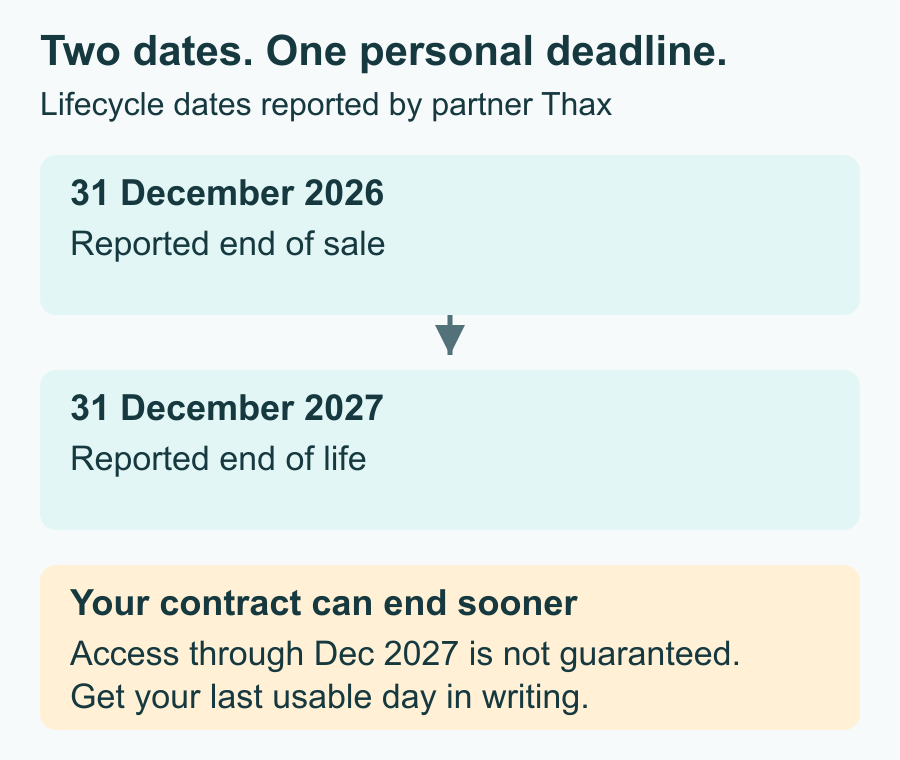
Date note, checked October 22, 2026: Nuance partner Thax reports December 31, 2026 for end of sale and December 31, 2027 for end of life. Nuance's public DPA page still presents the product without a retirement notice. These are partner-reported dates, not a public Nuance announcement.
End of sale concerns buying or renewing; end of life is the final lifecycle date. Your own subscription can end sooner. Plan around the last usable day your reseller confirms, rather than treating December 2027 as time you have already paid for.
Map your Dragon setup before you move
The most useful migration file is a short list of what you cannot work without. Start with a recent email, report and recurring task. Note the names Dragon gets right, the blocks of text you insert and the commands you use without thinking.
Voicy can replace everyday text dictation on Windows, Mac and Linux. It does not automatically import Dragon files, trained profiles or macros. You will rebuild selected vocabulary and repeated text, and change how you edit.
1. Rebuild only the words you need
Prioritize terms that are both frequent and misheard. A large vocabulary export is a useful archive, but not a to-do list. Start with current client names, colleagues, product names and specialist terms that appear in your work every week.
Dictate a few normal sentences before adding anything. If Voicy already recognizes a word correctly, leave it out. For example, a rare surname that appears in every client update deserves space before an old project name you have not used in two years.
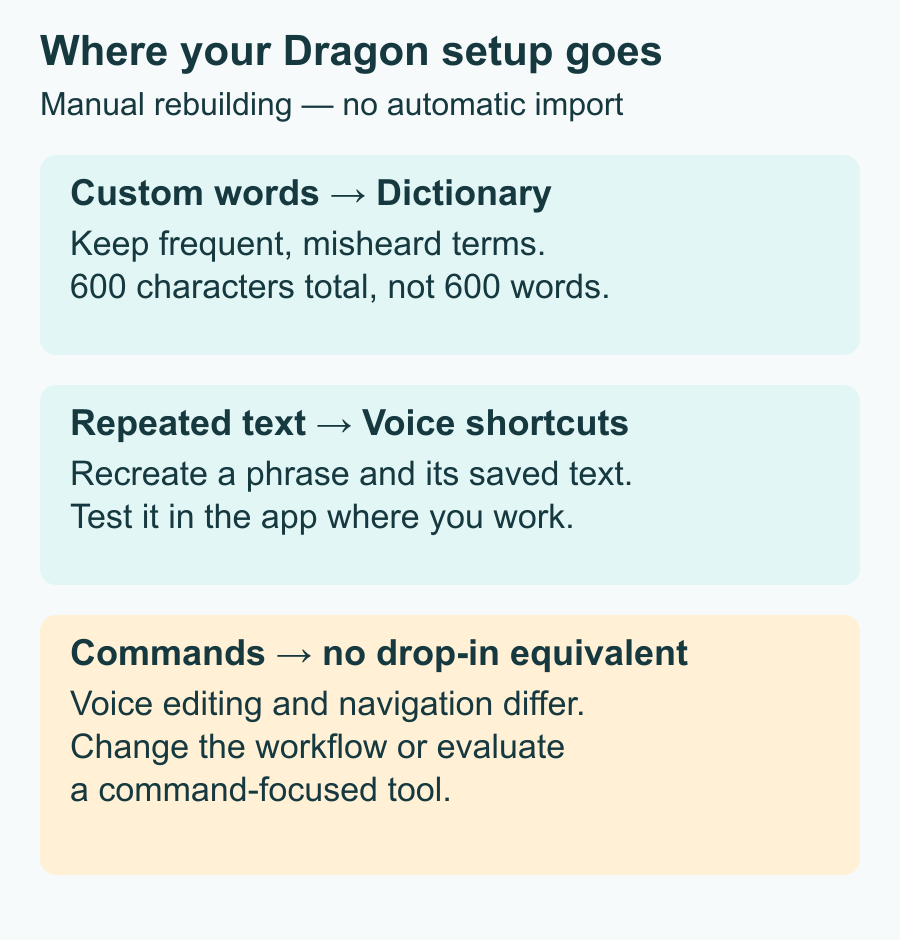
Voicy's Dictionary has a 600-character total limit, including letters, spaces and separators. That is characters, not 600 words. Add a small set of troublesome terms, test them in context and remove entries you no longer need. Keep the full Dragon export separately so you can refer to it later.
Use Dictionary for recognition, not for expanding long phrases. If saying “my email” should insert your full address, that belongs in Voice shortcuts. Important names still need a final check in the finished document.
2. Turn repeated text into Voice shortcuts
Rebuild your most-used auto-texts as Voice shortcuts. These replace a spoken phrase with text you have saved. Begin with a sign-off, a standard reply and one recurring paragraph, rather than trying to recreate every old template at once.
- Open Voice shortcuts and choose + Add voice shortcut.
- Save a distinctive spoken phrase, such as “insert meeting follow-up,” with its replacement text.
- Try the phrase in your usual application and check the inserted text.
Keep the approved wording and line breaks. Avoid triggers you often say in ordinary sentences, and check that the surrounding paragraph still reads correctly.
A saved address or several lines of boilerplate is a good fit. A Dragon macro that also opens a window, moves between fields or runs a series of actions is not. Keep those command workflows on a separate list. Saved Voice shortcuts also work in Offline mode.
3. Check the commands you cannot lose
Voicy has no equivalent to Dragon's voice editing and navigation system. If your day depends on commands such as “select that” or “scratch that,” do not treat the switch as a simple vocabulary migration. You will normally select, correct and navigate with your keyboard or mouse.
Spoken punctuation is a different matter. Turn on Punctuation commands in Settings if you want to say “comma” or “new paragraph.” You can also speak naturally and let Voicy add punctuation. Try the method you use now before changing a familiar habit.
Rewrite Mode can change selected text using an instruction, but it requires text selection, a shortcut and internet access. It is not a replacement for hands-free Dragon control. Review rewritten text, especially names, figures and wording that must remain exact.
If keyboard or mouse editing is not a workable option for you, evaluate Dragon Professional 16 before committing to Voicy. Ask for a demonstration using your essential commands, not just a successful dictation sample.
4. Finish real tasks before cancelling
Judge the finished task, not the first clean sentence. Use the same microphone, computer and applications you use for work. Dictate an email with names and dates, a longer document, and a note containing specialist terms. Then correct each one and count how much work that takes.
Try your rebuilt shortcuts inside real documents. Check paragraph breaks, punctuation, numbers and whether text lands in the intended field. If you work through a remote desktop or specialist business application, have IT test that exact setup.
For offline work, download the model first and follow the Offline mode guide. Normal offline dictation runs on your computer. AI rewriting and file transcription are separate online features, so test the features you intend to use rather than assuming the whole app works without internet.
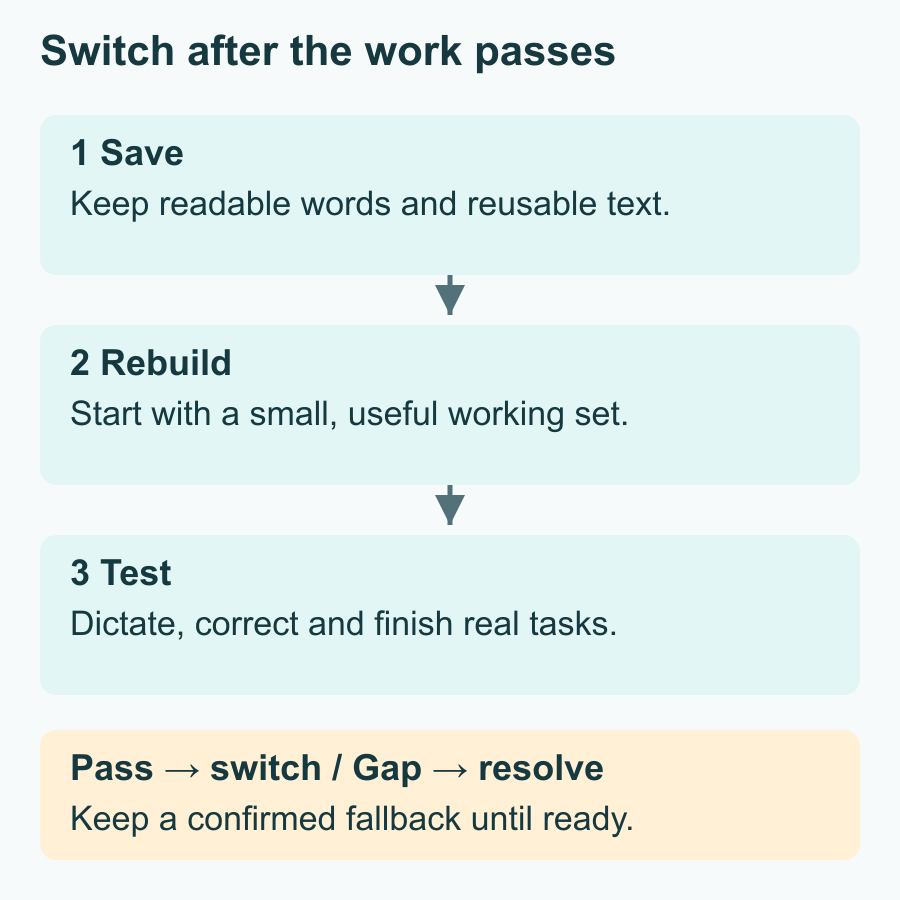
Set a practical pass condition: can you finish your usual work with an acceptable amount of correction, and without losing an essential command? One person may be ready to switch while a colleague still needs Dragon. The checklist below turns those results into a renewal decision.
Your renewal, export and testing checklist
- Write down your decision deadline. Check your renewal date, auto-renewal setting and cancellation notice period. Start the pilot before that notice period closes, not on the last day of service.
- Get a written renewal quote. Ask your reseller for the price, last usable day, cancellation terms and any mobile or extra-seat access you need. Keep the answer with your invoice.
- Save and inspect your customizations. Ask your administrator or reseller for the supported export of vocabulary and auto-texts before the account closes. Open the files, keep readable copies of important text and record what your essential commands do. Store them somewhere you can still access after cancellation.
- Rebuild a small working set. Add priority words, recreate frequent text and identify commands that need another tool. For a team, pilot with someone who does ordinary text dictation and someone whose workflow depends on commands.
- Run the real-work tests above. Allow time for several normal working sessions. Voicy's 30-minute free trial is an initial check; choose a plan if you need a longer evaluation. Record missed terms, correction effort and any blocked task.
- Decide seat by seat. Move users whose workflows pass. Keep a confirmed fallback for anyone who is not ready, and agree a migration date before their service ends. Cancel only after the replacement and saved copies are usable.
Ask your administrator for the export route supported by your deployment. Do not assume desktop Dragon export instructions apply to Anywhere.
Which replacement fits your work?
For emails, notes and documents, we recommend Voicy. It is a good fit when you want to dictate text and are comfortable editing with a keyboard or mouse. You get online or offline dictation, reusable text shortcuts and optional AI rewriting without paying for a command system you do not use.
For command-heavy work, evaluate Dragon Professional 16. Its installed Windows workflow deserves a closer look if voice editing, navigation or complex macros are essential. Get a current licence quote and test your own customizations before buying. Our Voicy vs Dragon Professional comparison covers the broader choice.
On Dragon Legal Anywhere? What firms should know
Legal teams should apply the same split. For drafting letters and notes, consider Voicy as a Dragon Legal alternative. If users rely on specialist command workflows, evaluate Dragon Legal 16. Have the person responsible for data handling review the privacy policy, offline settings and any online features before staff use client material.
For a team rollout, check Voicy for Teams against your administration needs. Do not select a replacement on the strength of one user's successful dictation test when the team also needs particular access, deployment or data-handling controls.
Compare the annual price and the migration effort
As checked October 22, 2026, reseller Voice Automated lists Dragon Professional Anywhere at $660 per year, or $55 per month on a one-year term. This is a current reseller reference, not your renewal quote. Voicy's annual plan is $82.
That is a $578 difference per seat for one year at those USD prices, before taxes and any negotiated discounts. Compare the actual renewal term you are offered; do not budget for years of Anywhere service beyond its reported retirement.
There is also a time cost. Someone must select vocabulary, rebuild useful text, teach new editing habits and help users through the first few working sessions. A lower subscription price is worthwhile only if people can still finish their work. For a command-heavy user, preserving a working setup can matter more than the subscription saving.
FAQ
Is Dragon Professional Anywhere being discontinued?
Partner Thax reports its retirement. The dates are partner-reported, not a public Nuance retirement announcement.
When is the Dragon Professional Anywhere end of life?
The reported end-of-life date is December 31, 2027, following end of sale on December 31, 2026. An individual subscription can end earlier.
Can I still renew Dragon Professional Anywhere?
Ask your reseller for the renewal available to your account, its price and its exact service end date. Do not assume another full year is available.
Can I keep using it after 31 December 2027?
Do not rely on continued access to a hosted subscription after its service ends. An installed client is not an offline replacement for the hosted recognition service.
Is Dragon Professional 16 ending too?
Dragon Professional 16 is not included in the partner-reported Anywhere retirement schedule. It is installed Windows software and remains worth evaluating for command-heavy work.
Is Dragon Professional Anywhere the same as Dragon Anywhere?
No. Professional Anywhere is the business service used from Windows; Dragon Anywhere is the mobile app. Bundled mobile access should be checked separately.
Can Voicy import my Dragon vocabulary and commands?
No. Rebuild selected words in Dictionary and repeated text in Voice shortcuts. Dictionary has a 600-character total limit; Dragon profiles and command macros do not import.
What's the best replacement for Dragon Professional Anywhere?
We recommend Voicy for everyday text dictation. Evaluate Dragon Professional 16 instead if hands-free editing, navigation or complex command macros are essential.
 Download for free
 Download for free
 Download for Ubuntu/Debian
 Download for free