
















4.9/5

+10,000 happy users

AI-powered dictation app
Write with your voice. Everywhere.

  • 3x faster than typing

  • Automatic punctuation and grammar corrections

  • Works in every app on Windows & Mac

Speech-to-text for every text field on every website.

3x faster than typing.

Error-free punctuation and grammar powered by AI.

A GIF of Voicy speech to text being used on a website

On all the websites you use

Microsoft Word Logo indicating microsoft word dictation with Voicy

Word

Microsoft Outlook Logo indicating voice dictation on Outlook

Outlook

Whatsapp logo indicating speech to text on Whatsapp

Whatsapp

Claude Logo indicating speech to text on Claude

Claude

ChatGPT logo indicating speech to text on chatgpt

ChatGPT

Gmail logo indicating speech to text on Gmail

Gmail

Google Docs logo indicating speech to text on Google docs

Docs

And +20,000 more

On all the websites you use

Microsoft Word Logo indicating microsoft word dictation with Voicy

Word

Microsoft Outlook Logo indicating voice dictation on Outlook

Outlook

Whatsapp logo indicating speech to text on Whatsapp

Whatsapp

Claude Logo indicating speech to text on Claude

Claude

ChatGPT logo indicating speech to text on chatgpt

ChatGPT

Gmail logo indicating speech to text on Gmail

Gmail

Google Docs logo indicating speech to text on Google docs

Docs

And +20,000 more

On all the websites you use

Microsoft Word Logo indicating microsoft word dictation with Voicy

Word

Microsoft Outlook Logo indicating voice dictation on Outlook

Outlook

Whatsapp logo indicating speech to text on Whatsapp

Whatsapp

Claude Logo indicating speech to text on Claude

Claude

ChatGPT logo indicating speech to text on chatgpt

ChatGPT

Gmail logo indicating speech to text on Gmail

Gmail

Google Docs logo indicating speech to text on Google docs

Docs

And +20,000 more

Voicy in action

Voicy in action

Voicy in action

Image of reviewer

Nicholas Cino

Truly amazing extension. Works wonders and is really fast! Reduces time of writing complex emails by about 80%!

Image of reviewer

CL Cobb

I've tried other products like it, and, so far, Voicy is the most user-friendly, and it really improves my workflow.

Image of reviewer

Pam Lang

This is the tool that I was looking for. It is amazing. I've gotten so lazy about typing anywhere. Thank you, thank you, thank you for this product!

Image of reviewer

Steve Moore

Voicy is an absolute game-changer! This voice-to-text extension delivers exceptional accuracy, capturing my words perfectly every time. The speed is impressive.

Image of reviewer

Victor Rodriguez

Almost instant replies from the creator, great support great app!

Image of reviewer

Crystal Willis

I love Voicy!! The extension and the desktop app have saved me so much time. I have tried several different voice-to-text apps. None of them compares to Voicy!

Voicy - Speech-to-Text on Every Website | Startup Fame
Featured on Twelve Tools
Image of reviewer

Nicholas Cino

Truly amazing extension. Works wonders and is really fast! Reduces time of writing complex emails by about 80%!

Image of reviewer

CL Cobb

I've tried other products like it, and, so far, Voicy is the most user-friendly, and it really improves my workflow.

Image of reviewer

Pam Lang

This is the tool that I was looking for. It is amazing. I've gotten so lazy about typing anywhere. Thank you, thank you, thank you for this product!

Voicy - Speech-to-Text on Every Website | Startup Fame
Image of reviewer

Nicholas Cino

Truly amazing extension. Works wonders and is really fast! Reduces time of writing complex emails by about 80%!

Image of reviewer

CL Cobb

I've tried other products like it, and, so far, Voicy is the most user-friendly, and it really improves my workflow.

Image of reviewer

Pam Lang

This is the tool that I was looking for. It is amazing. I've gotten so lazy about typing anywhere. Thank you, thank you, thank you for this product!

Works everywhere

Voicy works on all the websites and apps you use daily. This means you can use voice typing to write emails, messages, documents, blog posts, etc.

  • Microsoft Outlook Logo indicating voice dictation on Outlook
  • Microsoft Word Logo indicating microsoft word dictation with Voicy
  • Gmail logo indicating speech to text on Gmail
  • Linkedin logo
  • Substack logo
  • Facebook Messenger logo
  • Notion Logo
  • ChatGPT logo indicating speech to text on chatgpt
  • Claude Logo indicating speech to text on Claude
  • Google Docs Logo
  • Telegram logo
  • Discord Loog
  • Reddit Logo
  • Hubspot Logo
  • EverNote Logo
  • Medium logo indicating speech to text on medium
  • Trello Logo indicating speech to text on trello
  • Asana logo

Privacy First

Nobody sees your transcripts except yourself.
You can read more about our privacy policy here.

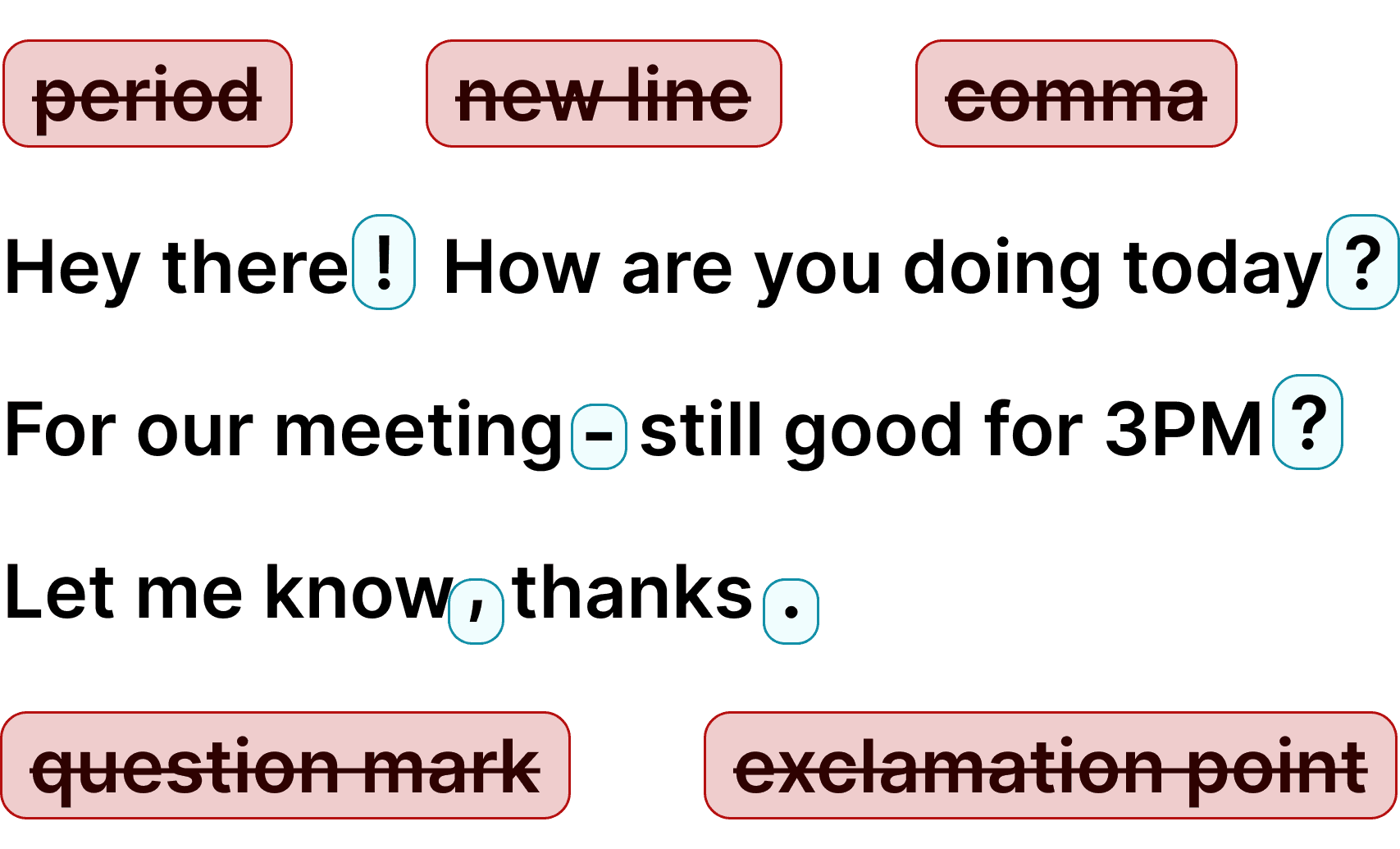
Automatic Punctuation

Voicy automatically adds perfect punctuation to your dictated text. Zero typos, perfect grammar, perfect punctuation.

Image showing a paragraph of text that has been grammar corrected by AI

+50 languages

Voicy gives you over 99% accuracy in more than 50 languages, including speech-to-text in English, German, French, Spanish, Portuguese, Mandarin, etc.

  • 🇵🇹

  • 🇫🇷

  • 🇮🇳

  • 🇷🇺

  • 🇪🇸

  • 🇨🇳

  • 🇩🇪

  • 🇬🇧

  • 🇵🇱

  • 🇰🇷

  • 🇬🇷

  • 🇺🇦

  • 🇸🇦

  • 🇦🇲

  • 🇿🇦

  • 🇮🇷

  • 🇺🇸

  • 🇫🇮

  • 🇱🇺

  • 🇯🇵

  • 🇮🇱

  • 🇸🇪

  • 🇳🇱

  • 🇩🇰

  • 🇨🇿

Works everywhere

Voicy works on all the websites and apps you use daily. This means you can use voice typing to write emails, messages, documents, blog posts, etc.

  • Microsoft Outlook Logo indicating voice dictation on Outlook
  • Microsoft Word Logo indicating microsoft word dictation with Voicy
  • Gmail logo indicating speech to text on Gmail
  • Linkedin logo
  • Substack logo
  • Facebook Messenger logo
  • Notion Logo
  • ChatGPT logo indicating speech to text on chatgpt
  • Claude Logo indicating speech to text on Claude
  • Google Docs Logo
  • Telegram logo
  • Discord Loog
  • Reddit Logo
  • Hubspot Logo
  • EverNote Logo
  • Medium logo indicating speech to text on medium
  • Trello Logo indicating speech to text on trello
  • Asana logo

Privacy First

Nobody sees your transcripts except yourself.
You can read more about our privacy policy here.

Automatic Punctuation

Voicy automatically adds perfect punctuation to your dictated text. Zero typos, perfect grammar, perfect punctuation.

Image showing a paragraph of text that has been grammar corrected by AI

+50 languages

Voicy gives you over 99% accuracy in more than 50 languages, including speech-to-text in English, German, French, Spanish, Portuguese, Mandarin, etc.

  • 🇵🇹

  • 🇫🇷

  • 🇮🇳

  • 🇷🇺

  • 🇪🇸

  • 🇨🇳

  • 🇩🇪

  • 🇬🇧

  • 🇵🇱

  • 🇰🇷

  • 🇬🇷

  • 🇺🇦

  • 🇸🇦

  • 🇦🇲

  • 🇿🇦

  • 🇮🇷

  • 🇺🇸

  • 🇫🇮

  • 🇱🇺

  • 🇯🇵

  • 🇮🇱

  • 🇸🇪

  • 🇳🇱

  • 🇩🇰

  • 🇨🇿

Works everywhere

This means your voice can write emails, messages, documents, blog posts, etc.

  • Microsoft Outlook Logo indicating voice dictation on Outlook
  • Microsoft Word Logo indicating microsoft word dictation with Voicy
  • Gmail logo indicating speech to text on Gmail
  • Linkedin logo
  • Substack logo
  • Facebook Messenger logo
  • Notion Logo
  • ChatGPT logo indicating speech to text on chatgpt
  • Claude Logo indicating speech to text on Claude
  • Google Docs Logo
  • Telegram logo
  • Discord Loog
  • Reddit Logo
  • Hubspot Logo
  • EverNote Logo
  • Medium logo indicating speech to text on medium
  • Trello Logo indicating speech to text on trello
  • Asana logo

Privacy First

Nobody sees your transcripts except yourself.
You can read more about our privacy policy here.

Automatic Punctuation

Voicy automatically adds perfect punctuation to your dictated text. Zero typos, perfect grammar, perfect punctuation.

Image showing a paragraph of text that has been grammar corrected by AI

+50 languages

Over 99% accuracy in more than 50 languages, including speech to text in English, German, French, Spanish, Portuguese, Mandarin, etc.

  • 🇵🇹

  • 🇫🇷

  • 🇮🇳

  • 🇷🇺

  • 🇪🇸

  • 🇨🇳

  • 🇩🇪

  • 🇬🇧

  • 🇵🇱

  • 🇰🇷

  • 🇬🇷

  • 🇺🇦

  • 🇸🇦

  • 🇦🇲

  • 🇿🇦

  • 🇮🇷

  • 🇺🇸

  • 🇫🇮

  • 🇱🇺

  • 🇯🇵

  • 🇮🇱

  • 🇸🇪

  • 🇳🇱

  • 🇩🇰

  • 🇨🇿

How the Voicy Dictation App Works

Step 1

Download the Voicy app here

Voicy is a privacy-focused speech-to-text app.

It adds the most advanced dictation technology to your computer, while keeping your security and privacy in mind.

Step 2

Complete the setup (2-minutes)
and select your keyboard shortcut.

During the Voicy setup, you can select a keyboard shortcut to use to start and stop your recordings.

It's the easiest way to use dictation on your computer.

A gif showing how to set up the Voicy Speech to Text app on Windows

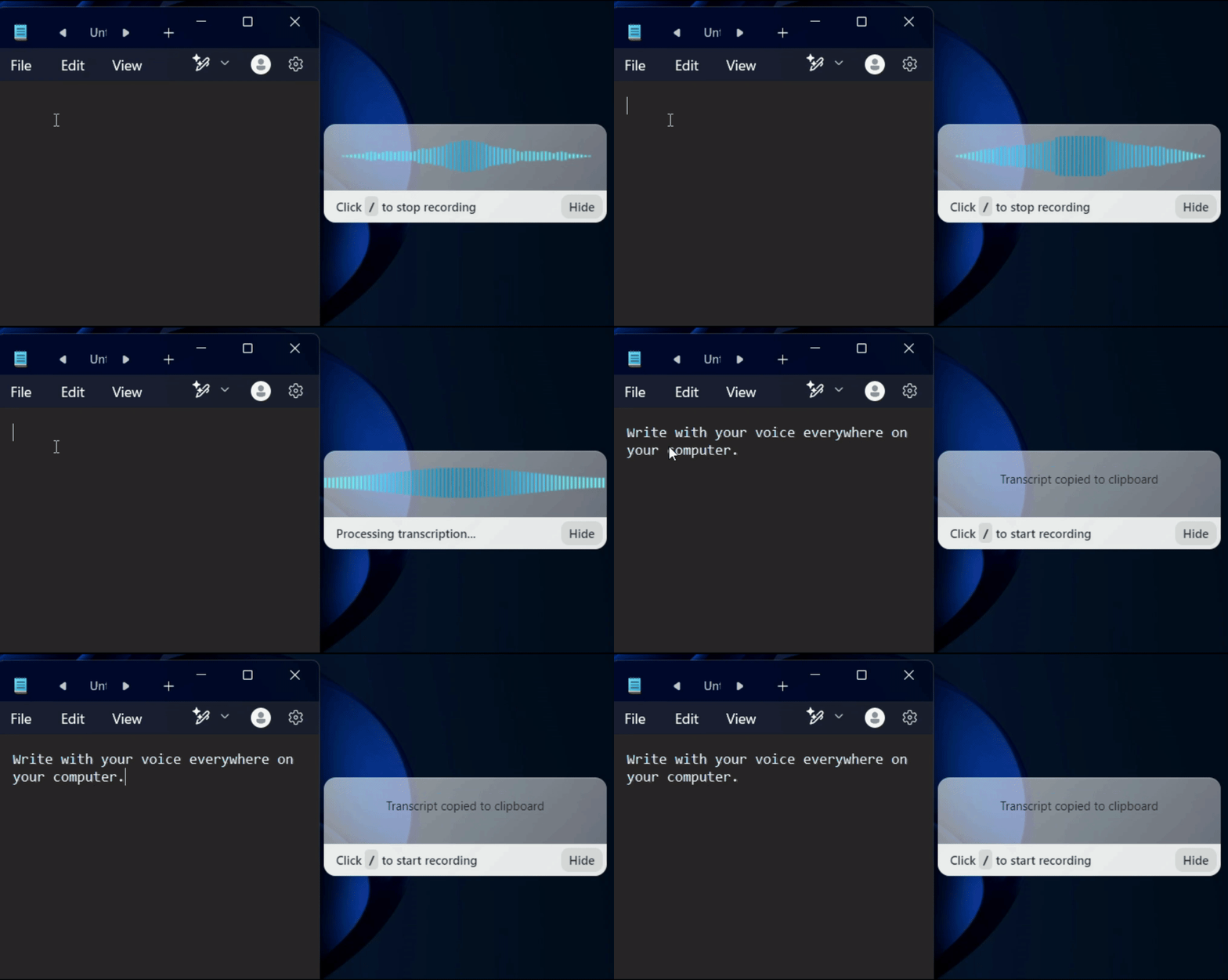
Step 3

Start dictating to Voicy

Once Voicy is installed, you can use talk to text everywhere on your computer.


This includes all of your favourite apps and every website in your browser too!

A gif showing how Voicy's speech to text functionality works on a Windows computer

Voicy vs Windows vs Apple native speech recognition

FeatureVoicy⭐ RecommendedApple DictationWindows Dictation
Accuracy99%+~90%90%
Auto punctuation
Works in any app
Fast Support
AI writing assistant
Offline mode

Privacy FAQs

Voicy is private by design. Here are the answers to your most asked privacy questions.

Can you read what I write with Voicy?

Nobody can read your transcripts or listen to your recordings.

Do you save my recordings and transcripts?

We do not store your transcripts or recordings anywhere in our database.

Where is my dictation stored?

Your transcripts are only stored on your device locally.

Do you use my transcripts for research or to train an AI?

We do not use your recordings to train an AI model or for any other purpose. We do not store your transcripts or recordings at all.
Use cases

Google Docs Logo

Write Google Docs with your Voice

Use Speech-To-Text inside Google Docs to write documents in half the time.

Read More

Gmail Logo

Write emails with dictation in Gmail

Automatic punctuation and formatting help you write perfect emails!

Read More

Microsoft Word Logo

Dictate right in Word - works perfectly

Stuck on that first line to start your doc? Just speak it out and it's there.

Read More

Outlook Logo

Look out, Outlook Voice-to-Text is here!

Voicy works perfectly in all Outlook versions to help you dictate emails.

Read More

Whatsapp Logo

Chat in Whatsapp with Speech to Text

Are you a talker but know that nobody likes voice notes?
Worry not, Voicy's got you!

Read More

Claude/ChatGpt logos

Speech-to-text in Claude and ChatGPT

Give AI the best possible prompt by using your voice. Better input leads to better output!

Read More

Use cases

Google Docs Logo

Write Google Docs with your Voice

Use Speech-To-Text inside Google Docs to write documents in half the time.

Read More

Gmail Logo

Write emails with dictation in Gmail

Automatic punctuation and formatting help you write perfect emails!

Read More

Microsoft Word Logo

Dictate right in Word - works perfectly

Stuck on that first line to start your doc? Just speak it out and it's there.

Read More

Outlook Logo

Look out, Outlook Voice-to-Text is here!

Voicy works perfectly in all Outlook versions to help you dictate emails.

Read More

Whatsapp Logo

Chat in Whatsapp with Speech to Text

Are you a talker but know that nobody likes voice notes?
Worry not, Voicy's got you!

Read More

Claude/ChatGpt logos

Speech-to-text in Claude and ChatGPT

Give AI the best possible prompt by using your voice. Better input leads to better output!

Read More

FAQ

What makes Voicy the best dictation app?

What languages does Voicy's dictation app support?

How much does the Voicy dictation app cost?

Is my dictation private? Do you store what I say?

How does Voicy's dictation app work?

Does Voicy work on both Mac and Windows?

Is Voicy better than Dragon dictation?

Can I use Voicy for dictation in Google Docs, Word, and email?

Is Voicy's dictation app good for people with RSI or arthritis?

Better than Apple's or Microsoft's built-in dictation

Voicy is an AI-powered dictation app for Mac and Windows that lets you write with your voice in every application on your computer. Email, Google Docs, Word, Slack, Notion, ChatGPT, Claude — Voicy works everywhere. With 99%+ accuracy and automatic punctuation, your dictated text comes out clean, properly formatted, and ready to send.

Just press your keyboard shortcut, start talking, and Voicy types for you. It handles accents, technical terms, and fast speech better than any built-in dictation tool. Voicy supports 50+ languages with automatic detection, and includes AI editing commands to rewrite, expand, or translate your text on the fly.

Why Voicy is the best dictation app for Mac and Windows

Apple Dictation and Windows Voice Typing are built into your computer — but they have real limitations. You have to say punctuation out loud, accuracy drops with accents or fast speech, and they don't work well in every app. Voicy solves all of that with AI-powered speech recognition that delivers over 99% accuracy and adds punctuation automatically.

Unlike Dragon (which costs +) or basic free dictation tools (which sacrifice accuracy), Voicy hits the sweet spot: professional-grade accuracy at .49/month. It works in every app, not just selected ones, and runs on both Mac and Windows. For anyone who types a lot, Voicy is the dictation app that actually saves time.

What to look for in a dictation app

A good dictation app needs four things: high accuracy (99%+ so you don't spend time editing), automatic punctuation (no saying "comma" out loud), broad app support (works everywhere, not just in one program), and language support. Voicy delivers all four — plus AI editing features that no other dictation app at this price offers.

Speed matters too. Voice typing is about 3x faster than keyboard typing for most people. That means a 500-word email takes 2 minutes instead of 6. Over a workday, that's hours saved. And your hands, wrists, and fingers get a break from constant keystroke repetition — a real benefit for anyone dealing with RSI, carpal tunnel, or arthritis.

Who uses dictation apps?

Dictation apps aren't just for accessibility — they're productivity tools used by writers, lawyers, doctors, students, developers, and anyone who types extensively. Professionals use dictation to draft emails faster, write reports, take meeting notes, and communicate with AI tools like ChatGPT and Claude.

People with RSI, carpal tunnel, arthritis, or general typing fatigue find dictation apps essential — they let you keep working without the physical strain of constant typing. And with remote work meaning more screen time than ever, voice typing is becoming a mainstream tool, not a niche one.