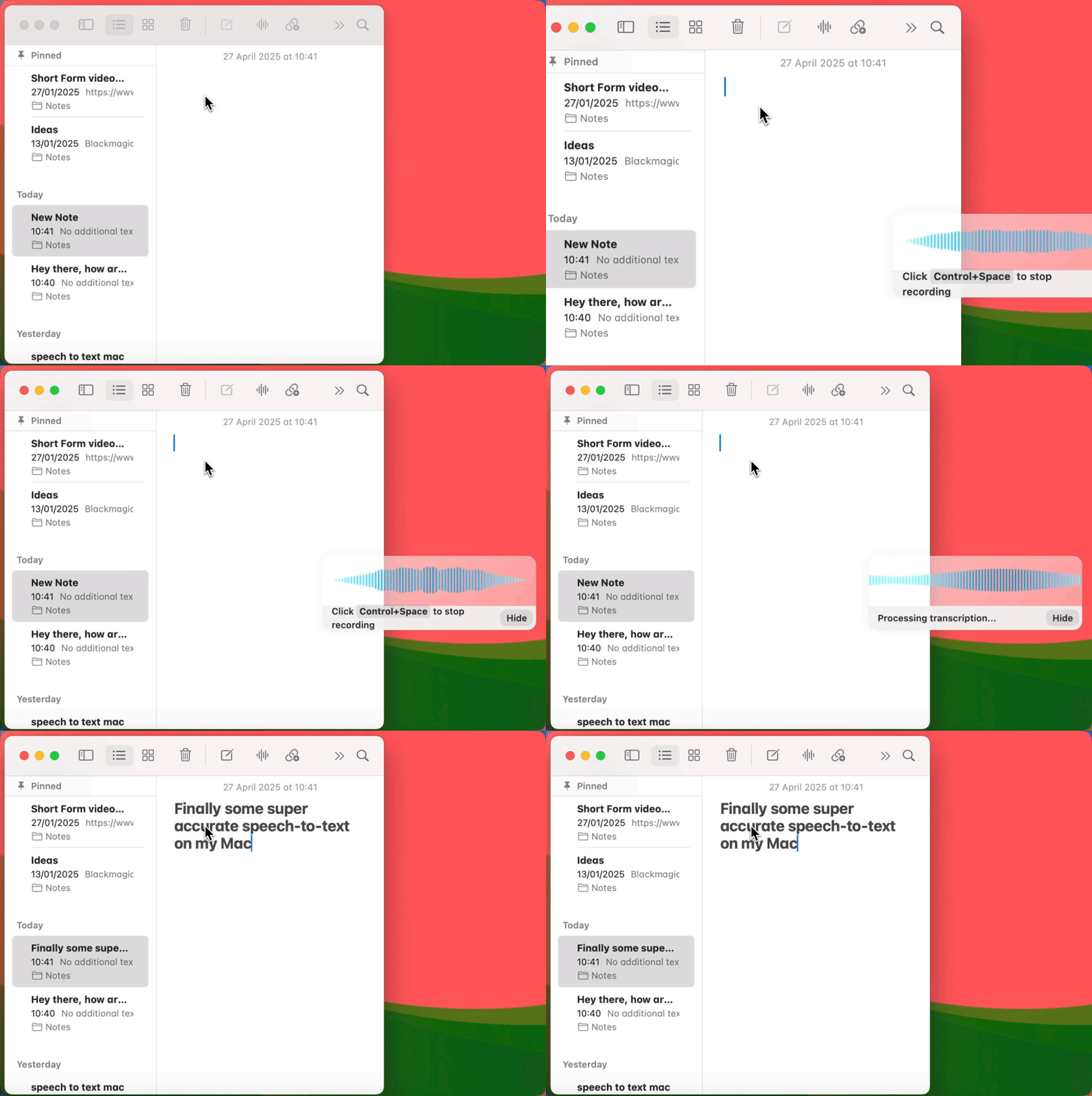






A gif showing how Voicy's speech to text functionality works on a Windows computer

4.9/5

+10,000 happy users

Chrome Store rating

Dictation App for Mac

A better alternative to Apple Dictation for real work on Mac.
Get automatic punctuation, cleaner text, and reliable dictation in every app and text field.

Voice-to-text everywhere on your Mac.
+99 accuracy in over 50 languages.

Automatic punctuation and grammar powered by AI.

Requires MacOS 13 and higher

A gif showing how Voicy's speech to text functionality works on a Mac Computer

How it works

How it works

Works on all the apps & websites you use

On all the websites you use

Works on all the apps & websites you use

Microsoft Word Logo indicating microsoft word dictation with Voicy

Word

Word

Microsoft Outlook Logo indicating voice dictation on Outlook

Outlook

Outlook

Whatsapp logo indicating speech to text on Whatsapp

Whatsapp

Whatsapp

Claude Logo indicating speech to text on Claude

Claude

Claude

ChatGPT logo indicating speech to text on chatgpt

ChatGPT

ChatGPT

Gmail logo indicating speech to text on Gmail

Gmail

Gmail

Google Docs logo indicating speech to text on Google docs

Docs

Docs

And +20,000 more

And +20,000 more

Image of reviewer

Nicholas Cino

Truly amazing extension. Works wonders and is really fast! Reduces time of writing complex emails by about 80%!

Image of reviewer

CL Cobb

I've tried other products like it, and, so far, Voicy is the most user-friendly, and it really improves my workflow.

Image of reviewer

Pam Lang

This is the tool that I was looking for. It is amazing. I've gotten so lazy about typing anywhere. Thank you, thank you, thank you for this product!

Image of reviewer

Steve Moore

Voicy is an absolute game-changer! This voice-to-text extension delivers exceptional accuracy, capturing my words perfectly every time. The speed is impressive.

Image of reviewer

Victor Rodriguez

Almost instant replies from the creator, great support great app!

Image of reviewer

Crystal Willis

I love Voicy!! The extension and the desktop app have saved me so much time. I have tried several different voice-to-text apps. None of them compares to Voicy!

Voicy - Speech-to-Text on Every Website | Startup Fame
Featured on Twelve Tools
Image of reviewer

Nicholas Cino

Truly amazing extension. Works wonders and is really fast! Reduces time of writing complex emails by about 80%!

Image of reviewer

CL Cobb

I've tried other products like it, and, so far, Voicy is the most user-friendly, and it really improves my workflow.

Image of reviewer

Pam Lang

This is the tool that I was looking for. It is amazing. I've gotten so lazy about typing anywhere. Thank you, thank you, thank you for this product!

Image of reviewer

Nicholas Cino

Truly amazing extension. Works wonders and is really fast! Reduces time of writing complex emails by about 80%!

Image of reviewer

CL Cobb

I've tried other products like it, and, so far, Voicy is the most user-friendly, and it really improves my workflow.

Image of reviewer

Pam Lang

This is the tool that I was looking for. It is amazing. I've gotten so lazy about typing anywhere. Thank you, thank you, thank you for this product!

Voicy - Speech-to-Text on Every Website | Startup Fame

Works everywhere

Voicy works on all the websites and apps you use daily. This means you can use voice typing to write emails, messages, documents, blog posts, etc.

  • Microsoft Outlook Logo indicating voice dictation on Outlook
  • Microsoft Word Logo indicating microsoft word dictation with Voicy
  • Gmail logo indicating speech to text on Gmail
  • Linkedin logo
  • Substack logo
  • Facebook Messenger logo
  • Notion Logo
  • ChatGPT logo indicating speech to text on chatgpt
  • Claude Logo indicating speech to text on Claude
  • Google Docs Logo
  • Telegram logo
  • Discord Loog
  • Reddit Logo
  • Hubspot Logo
  • EverNote Logo
  • Medium logo indicating speech to text on medium
  • Trello Logo indicating speech to text on trello
  • Asana logo

Privacy First

Nobody sees your transcripts except yourself.
You can read more about our privacy policy here.

Automatic Punctuation

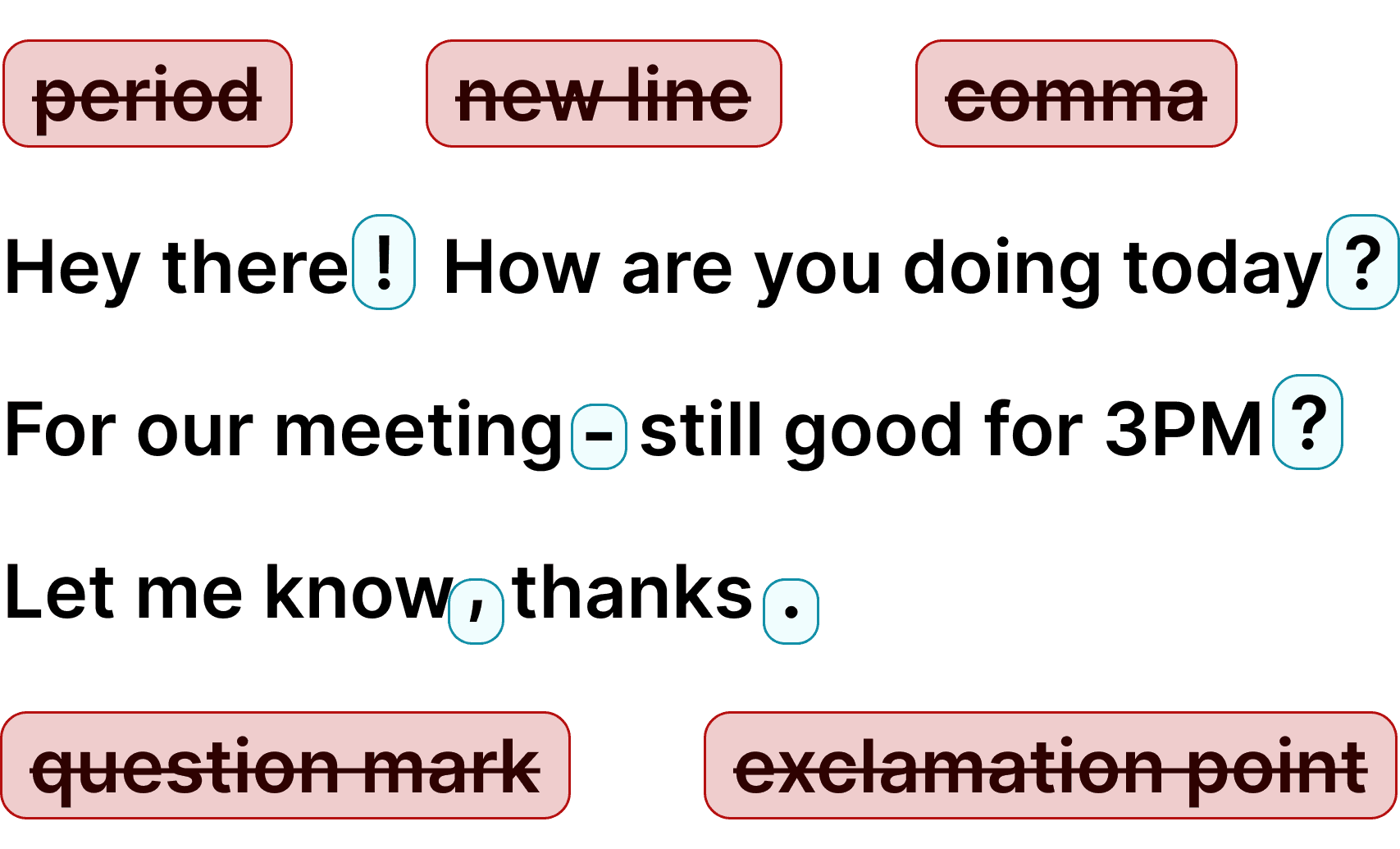
Voicy automatically adds perfect punctuation to your dictated text. Zero typos, perfect grammar, perfect punctuation.

Image showing a paragraph of text that has been grammar corrected by AI

+50 languages

Voicy gives you over 99% accuracy in more than 50 languages, including speech-to-text in English, German, French, Spanish, Portuguese, Mandarin, etc.

  • 🇵🇹

  • 🇫🇷

  • 🇮🇳

  • 🇷🇺

  • 🇪🇸

  • 🇨🇳

  • 🇩🇪

  • 🇬🇧

  • 🇵🇱

  • 🇰🇷

  • 🇬🇷

  • 🇺🇦

  • 🇸🇦

  • 🇦🇲

  • 🇿🇦

  • 🇮🇷

  • 🇺🇸

  • 🇫🇮

  • 🇱🇺

  • 🇯🇵

  • 🇮🇱

  • 🇸🇪

  • 🇳🇱

  • 🇩🇰

  • 🇨🇿

Works everywhere

This means your voice can write emails, messages, documents, blog posts, etc.

  • Microsoft Outlook Logo indicating voice dictation on Outlook
  • Microsoft Word Logo indicating microsoft word dictation with Voicy
  • Gmail logo indicating speech to text on Gmail
  • Linkedin logo
  • Substack logo
  • Facebook Messenger logo
  • Notion Logo
  • ChatGPT logo indicating speech to text on chatgpt
  • Claude Logo indicating speech to text on Claude
  • Google Docs Logo
  • Telegram logo
  • Discord Loog
  • Reddit Logo
  • Hubspot Logo
  • EverNote Logo
  • Medium logo indicating speech to text on medium
  • Trello Logo indicating speech to text on trello
  • Asana logo

Privacy First

Nobody sees your transcripts except yourself.
You can read more about our privacy policy here.

Automatic Punctuation

Voicy automatically adds perfect punctuation to your dictated text. Zero typos, perfect grammar, perfect punctuation.

Image showing a paragraph of text that has been grammar corrected by AI

+50 languages

Over 99% accuracy in more than 50 languages, including speech to text in English, German, French, Spanish, Portuguese, Mandarin, etc.

  • 🇵🇹

  • 🇫🇷

  • 🇮🇳

  • 🇷🇺

  • 🇪🇸

  • 🇨🇳

  • 🇩🇪

  • 🇬🇧

  • 🇵🇱

  • 🇰🇷

  • 🇬🇷

  • 🇺🇦

  • 🇸🇦

  • 🇦🇲

  • 🇿🇦

  • 🇮🇷

  • 🇺🇸

  • 🇫🇮

  • 🇱🇺

  • 🇯🇵

  • 🇮🇱

  • 🇸🇪

  • 🇳🇱

  • 🇩🇰

  • 🇨🇿

Works everywhere

Voicy works on all the websites and apps you use daily. This means you can use voice typing to write emails, messages, documents, blog posts, etc.

  • Microsoft Outlook Logo indicating voice dictation on Outlook
  • Microsoft Word Logo indicating microsoft word dictation with Voicy
  • Gmail logo indicating speech to text on Gmail
  • Linkedin logo
  • Substack logo
  • Facebook Messenger logo
  • Notion Logo
  • ChatGPT logo indicating speech to text on chatgpt
  • Claude Logo indicating speech to text on Claude
  • Google Docs Logo
  • Telegram logo
  • Discord Loog
  • Reddit Logo
  • Hubspot Logo
  • EverNote Logo
  • Medium logo indicating speech to text on medium
  • Trello Logo indicating speech to text on trello
  • Asana logo

Privacy First

Nobody sees your transcripts except yourself.
You can read more about our privacy policy here.

Automatic Punctuation

Voicy automatically adds perfect punctuation to your dictated text. Zero typos, perfect grammar, perfect punctuation.

Image showing a paragraph of text that has been grammar corrected by AI

+50 languages

Voicy gives you over 99% accuracy in more than 50 languages, including speech-to-text in English, German, French, Spanish, Portuguese, Mandarin, etc.

  • 🇵🇹

  • 🇫🇷

  • 🇮🇳

  • 🇷🇺

  • 🇪🇸

  • 🇨🇳

  • 🇩🇪

  • 🇬🇧

  • 🇵🇱

  • 🇰🇷

  • 🇬🇷

  • 🇺🇦

  • 🇸🇦

  • 🇦🇲

  • 🇿🇦

  • 🇮🇷

  • 🇺🇸

  • 🇫🇮

  • 🇱🇺

  • 🇯🇵

  • 🇮🇱

  • 🇸🇪

  • 🇳🇱

  • 🇩🇰

  • 🇨🇿

Voicy vs Apple's native speech recognition

Voicy vs Apple's native speech recognition

FeatureVoicy⭐ RecommendedApple Dictation
Accuracy99%+~90%
Auto punctuation
Works in any app
Fast Support
AI writing assistant
Offline mode
PriceFrom $8.49Free

How to use dictation on your Mac

How to use dictation on your Mac

How to use dictation on your Mac

Step 1

Download the Voicy dictation app for Mac

Download the Voicy
Mac app here

Voicy is a privacy-focused dictation app for Mac. It adds AI-powered voice dictation to every app on your computer — Word, Gmail, Google Docs, Slack, and thousands more. Just press a keyboard shortcut and start talking.

Step 2

Complete the setup (2-minutes)
and select your keyboard shortcut.

Complete the setup (2-minutes) and select your keyboard shortcut.

During the Voicy setup, you can select a keyboard shortcut to use to start and stop your recordings. It's the easiest way to use dictation on your computer.

A screenshot of the voicy see speech to text apps setup page.

Step 3

Start dictating to Voicy

Once Voicy is installed, you can dictate in every text field on your Mac. That includes Word, Gmail, Google Docs, Slack, Notion, ChatGPT, Claude, and other apps you already use every day.

A gif showing how Voicy's speech to text functionality works on a Windows computer
A gif showing how Voicy's speech to text functionality works on a Mac computer
A gif showing how Voicy's speech to text functionality works on a Windows computer

Where do people use Voicy on Mac?

Google Docs Logo

Write Google Docs with your Voice

Use Speech-To-Text inside Google Docs to write documents in half the time.

Read More

Gmail Logo

Write emails with dictation in Gmail

Automatic punctuation and formatting help you write perfect emails!

Read More

Microsoft Word Logo

Dictate right in Word - works perfectly

Stuck on that first line to start your doc? Just speak it out and it's there.

Read More

Outlook Logo

Look out, Outlook Voice-to-Text is here!

Voicy works perfectly in all Outlook versions to help you dictate emails.

Read More

Whatsapp Logo

Chat in Whatsapp with Speech to Text

Are you a talker but know that nobody likes voice notes?
Worry not, Voicy's got you!

Read More

Claude/ChatGpt logos

Speech-to-text in Claude and ChatGPT

Give AI the best possible prompt by using your voice. Better input leads to better output!

Read More

Why Voicy is the best dictation app for Mac

Why Voicy is the best dictation app for Mac

Write 3x faster

Write 3x faster

Dictate 3x faster than typing on Mac

Dictate 3x faster than typing on Mac

On average, writing with your voice increases your typing speed by 3x.


The standard typing speed is 40 words per minute. With speech-to-text, you can easily get to 120 words per minute.

On top of that, Voicy automatically adds punctuation and formatting to your spoken text.

Privacy-first

Privacy-first

Private dictation for all your Mac work

Private dictation for all your Mac work

Voicy does not store your recordings or transcripts, and we do not use your dictation to train AI models. Your speech is processed and immediately discarded, so Mac users can use Voicy for work, personal writing, and sensitive text with much more confidence.

Better than Apple Dictation

Better than Apple Dictation

The best alternative to Apple built-in Mac dictation

The best alternative to Apple built-in Mac dictation

Voicy beats Apple's native Mac dictation on the features that matter most. Voicy is twice as accurate as Apple Dictation, it automatically adds punctuation and grammar corrections, works in every app (not just Apple-native ones), and it's blazingly fast. If you're looking for the best dictation app for Mac, Voicy delivers where Apple falls short.

Privacy FAQs

Voicy is private by design. Here are the answers to your most asked privacy questions.

Can you read what I write with Voicy?

Nobody can read your transcripts or listen to your recordings.

Do you save my recordings and transcripts?

We do not store your transcripts or recordings anywhere in our database.

Where is my dictation stored?

Your transcripts are only stored on your device locally.

Do you use my transcripts for research or to train an AI?

We do not use your recordings to train an AI model or for any other purpose. We do not store your transcripts or recordings at all.

Privacy FAQs

Voicy is private by design. Here are the answers to your most asked privacy questions.

Can you read what I write with Voicy?

Nobody can read your transcripts or listen to your recordings.

Do you save my recordings and transcripts?

We do not store your transcripts or recordings anywhere in our database.

Where is my dictation stored?

Your transcripts are only stored on your device locally.

Do you use my transcripts for research or to train an AI?

We do not use your recordings to train an AI model or for any other purpose. We do not store your transcripts or recordings at all.

Privacy FAQs

Voicy is private by design. Here are the answers to your most asked privacy questions.

Can you read what I write with Voicy?

Nobody can read your transcripts or listen to your recordings.

Do you save my recordings and transcripts?

We do not store your transcripts or recordings anywhere in our database.

Where is my dictation stored?

Your transcripts are only stored on your device locally.

Do you use my transcripts for research or to train an AI?

We do not use your recordings to train an AI model or for any other purpose. We do not store your transcripts or recordings at all.

Mac dictation that actually works

Voicy is a dictation app for Mac that adds AI-powered voice typing to every app on your computer. Whether you are writing in Outlook, Microsoft Teams, Google Docs, Slack, or any other application — Voicy lets you dictate instead of type. It works in every text field on your Mac, including browsers and desktop apps, giving you professional-grade dictation everywhere.

Just start the Voicy Mac dictation app and press your keyboard shortcut to begin recording. Once you are done, your dictated text appears wherever your cursor is — with perfect punctuation and grammar added automatically. No more saying comma or period out loud. Voicy supports over 50 languages with automatic detection, so you can switch between English, Spanish, German, or any language mid-sentence.

Why Apple Dictation is not enough for Mac power users

Apple Dictation is fine for quick notes, but many Mac users outgrow it fast. You still end up saying punctuation out loud, accuracy drops with fast speech, accents, or technical vocabulary, and the experience can feel clunky in browsers and non-Apple apps like Chrome, Slack, and Notion.

These newer AI models have not been adopted by Apple yet, and likely will not be anytime soon. Voicy was built for Mac users who want more accurate, automatic dictation that works in every app — not just Safari and Notes. With Voicy, you get 99%+ accuracy, automatic punctuation, 50+ languages, and AI editing commands that let you rewrite text by voice.

Apple Dictation vs Voicy: what Mac dictation users need to know

Every Mac includes built-in dictation in System Settings, Keyboard, Dictation. It is useful for short messages, but regular dictation users usually hit the same limits: more cleanup, weaker punctuation, and less reliable results once they leave Apple apps.

Voicy is built for people who dictate often on Mac. It types directly into the active text field, works across browsers and desktop apps, adds punctuation automatically, and gives you cleaner text with less editing. If you write long emails, documents, notes, or AI prompts, it feels like a serious upgrade from Apple Dictation.

Who uses dictation software on Mac?

Mac dictation software is not just for accessibility, it is a practical writing tool for people who spend hours at a keyboard. Writers, founders, students, lawyers, support teams, and developers use Voicy to draft emails, documents, notes, and prompts faster than typing.

People dealing with RSI, carpal tunnel, or typing fatigue find Mac dictation especially valuable. It lets you keep working on your MacBook without the physical toll of thousands of keystrokes per day. Many users switch to Voicy specifically to reduce wrist pain while actually increasing their writing output.

FAQ

How is Voicy different from Apple Dictation on Mac?

Is Voicy better than Apple Dictation for Mac?

Does Voicy work with multiple languages on Mac?

What languages does Voicy's Mac dictation app support?

Does Mac dictation work on MacBook Air?

How much does Voicy's Mac speech to text app cost?

Is my Mac dictation private? Do you store what I say?

How do I use dictation on my Mac?

Does Mac have built-in dictation?

What is the best dictation app for Mac?

Can I use Voicy for speech to text in Google Docs and Word on Mac?