




Dictation software for medical professionals: A Clinician's Essential Guide
Article summary
You're busy with patients. We don't want to take more of your time.
Dictation software helps you get accurate notes in a third of the time.
Modern dictation software acts like a personal medical scribe that understands complex medical terms, connects to your EHR, and learns your voice over time.
Essential features to look for:
99%+ accuracy - Built-in medical dictionaries handle drug names, procedures, and specialty terminology
EHR integration - Works directly with Epic, Cerner, or Allscripts (no copy-pasting)
HIPAA compliance - End-to-end encryption and signed Business Associate Agreement (BAA)
Custom voice commands - Create shortcuts for common phrases or entire note templates
Multi-device support - Cloud-based solutions work on desktop, laptop, and tablet
Real ROI benefits:
Faster billing cycles (finish notes same day)
Better quality notes (dictate while details are fresh)
See more patients without working late
Get personal time back and reduce burnout
Getting started: Complete voice profile training (5-10 minutes), add your 20-30 most common medical terms, and practice consistently for a week.
Tool to start with: Voicy
Most clinicians feel comfortable within days. The AI learns from corrections and gets smarter with every use.
If you're tired of spending hours on patient charts after your last appointment, you're not alone. This guide shows you how dictation software for medical professionals can help you get your evenings back and focus on what matters most—patient care.
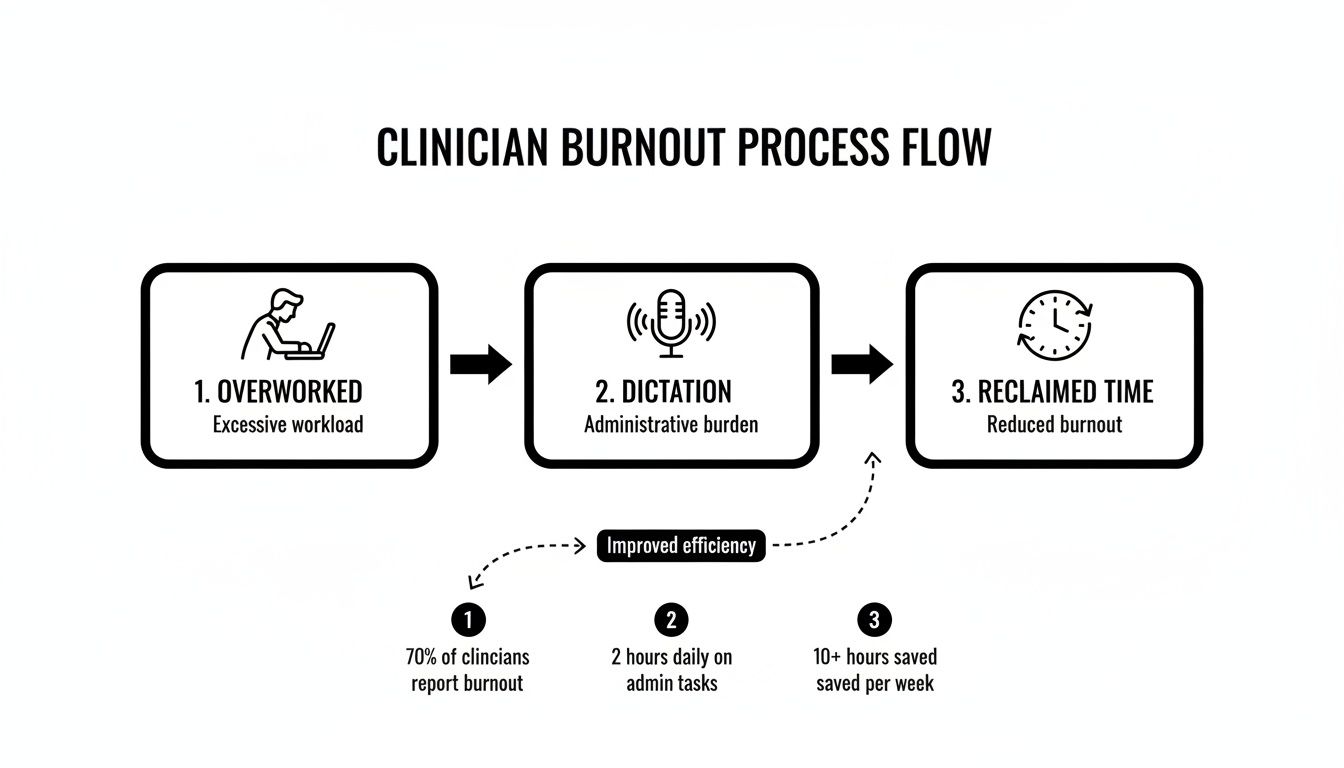
Reclaim Your Hours and Reduce Burnout
You know the drill. You finish seeing patients, then spend another two or three hours on paperwork.
This constant admin work is a major cause of clinician burnout. It steals your personal time and drains your energy.
Modern dictation software was built to fix this problem. It's not just about turning your voice into text—it's about making your clinical notes faster, smarter, and easier.
Beyond Simple Transcription
Think of this technology as your personal medical scribe who never gets tired. It understands complex medical terms, connects to your Electronic Health Record (EHR) system, and learns your voice over time.
You can finish your notes right after appointments when everything is fresh in your mind.
Instead of typing, you can:
Dictate directly into patient charts, progress notes, and referral letters
Use custom voice commands to instantly add templates or common phrases
Navigate EHR fields hands-free, moving between sections without touching your keyboard
This completely changes your workflow. Voice-powered charting removes the typing bottleneck, letting your thoughts flow straight into the patient record.
This technology isn't a luxury anymore—it's essential. By automating tedious documentation, you can cut your admin work, improve work-life balance, and focus on clinical care.
The Growing Demand for Efficiency
Healthcare is catching on fast. The global market for medical transcription software is growing from US$ 2.9 billion in 2025 to a projected US$ 7.6 billion by 2032.
This massive growth is driven by AI breakthroughs and the urgent need to solve the documentation crisis causing burnout.
North America leads with a 35% market share, showing how critical this technology has become. Check out the full analysis on persistencemarketresearch.com.
How Modern Dictation Software Actually Works
Modern dictation software feels almost like magic. It's like having a super-smart medical scribe that understands complex terms, never gets tired, and never needs a break.
The core technology uses Automatic Speech Recognition (ASR) to capture your voice. AI then breaks down these sounds into phonemes and predicts the most likely words.
From Soundwaves to Structured Notes
Regular dictation tools struggle with terms like "myocardial infarction" or "metformin." But medical-grade ASR is trained on massive libraries of clinical language.
It understands the context of patient encounters, which dramatically improves accuracy with medical vocabulary, drug names, and procedures.
The technology uses Natural Language Processing (NLP) to go beyond simple transcription. NLP helps the software understand grammar, punctuation, and your intent.
That's why you can say "period" or "new paragraph" and it formats correctly instead of typing the words.
The medical speech recognition market was valued at USD 1.73 billion in 2024 and is projected to hit USD 5.58 billion by 2035. Northwestern Medicine and Nuance's DAX Copilot show this in action, integrating with Epic EHR to automatically draft clinical notes. Learn more at dittotranscripts.com.
Front-End vs. Back-End Recognition
Medical dictation software works in two main ways. The right choice depends on your work style.
Front-End Speech Recognition: Real-time transcription. You speak, and words appear instantly on screen. Perfect if you like to dictate, edit, and sign off on notes all at once inside the EHR.
Back-End Speech Recognition: You record your dictation, and the audio goes to a server for processing. The transcribed text appears later for review. Great for dictating in batches with an assistant handling final proofreading.
The key is personalization. The AI learns your unique voice, accent, and phrasing over time. Every correction you make teaches the system, making it more accurate for you.
This learning is what makes a good tool indispensable. The more you use it, the smarter it gets, until it feels like a natural extension of your thinking.
What to Look for in Medical Dictation Software
Picking the right dictation software for medical professionals means finding a tool that fits into fast-paced patient care. Generic dictation apps can't handle medical terms and lack the security for patient data.
To save time and reduce stress, look for these essential features. Think of it as a checklist for your documentation workflow.
Unmatched Accuracy with a Built-in Medical Dictionary
Accuracy is everything. The software needs a comprehensive medical dictionary that includes drug names, procedures, and specialty-specific terminology.
Standard dictation tools might give you "95% accuracy," which sounds good until you realize that means one mistake every twenty words. In medical documentation, that's unacceptable.
Medical-grade systems routinely achieve 99%+ accuracy because they're trained on clinical language. This means fewer errors and less time fixing mistakes.
Seamless EHR Integration
Your dictation software should plug directly into your existing EHR system. You don't want to dictate in one place, then copy and paste into another.
Look for software that works with major platforms like Epic, Cerner, or Allscripts. Direct integration lets you dictate straight into the right fields without switching between programs.
This eliminates extra steps and keeps your workflow smooth.
HIPAA Compliance Is Non-Negotiable
Patient privacy is serious business. Any dictation software for medical professionals must be fully HIPAA compliant.
This means:
End-to-end encryption for all data
Secure servers that meet healthcare standards
A signed Business Associate Agreement (BAA) from the vendor
Never compromise on security. Always verify compliance before choosing software.
Customizable Voice Commands
The ability to create custom voice commands is a game-changer. You can set up shortcuts for common phrases, templates, or entire sections of notes.
For example, say "insert normal physical exam" and the software drops in your standard template. This saves massive amounts of time on routine documentation.
The best systems let you customize commands for your specific specialty and practice style.
Multi-Device and Cross-Platform Support
You need software that works everywhere you do. Whether you're on a desktop in the clinic, a laptop at home, or a tablet during rounds, your dictation tool should follow you.
Cloud-based solutions are ideal because they sync across all your devices. You can start a note on one device and finish it on another without missing a beat.
Setting Up Your Practice for Success
Getting the most out of dictation software for medical professionals starts with proper setup. The initial configuration makes all the difference in how well the software works for you.
Voice Profile Training
Most systems ask you to read a short passage aloud when you first start. This teaches the AI your voice, accent, and speech patterns.
Spend the extra 5-10 minutes doing this right. The better your initial voice profile, the more accurate the software will be from day one.
Building Your Custom Dictionary
Add your frequently used terms, patient names, and specialty-specific vocabulary to the software's dictionary.
Start with the 20-30 most common complex terms, drug names, or procedures you use. Teaching the AI your specialty's language early on dramatically improves accuracy.
Training Your Team
If multiple people will use the software, create a shared library of custom voice commands. This keeps everyone working efficiently with the same standards.
Schedule quick training sessions for your team. A 15-minute "lunch and learn" can show everyone how to create voice macros for common notes.
For more tips on using dictation effectively, check out our guide on how to use dictation in Microsoft Word.
Think of training the AI like orienting a new medical scribe. The more feedback you provide upfront, the faster it becomes an indispensable team member.
Getting Your Money's Worth
Successfully using dictation software for medical professionals means making sure it pays off long-term. The technology is powerful, but you need to push through the initial learning curve.
The first hurdle is getting used to the software's quirks. Accuracy might not be perfect at first, or background noise might throw it off.
Be patient. Most systems improve dramatically as they learn your voice. Stick with it for the first few weeks.
Calculating Your True Return on Investment
Real ROI goes beyond saving time on typing. The value touches almost every part of your workflow.
Consider these benefits:
Faster Billing Cycles: Finishing and signing notes the same day as visits means billing starts immediately. This improves cash flow.
Better-Quality Notes: Dictating while details are fresh leads to richer, more accurate records. This improves patient care and provides better legal protection.
More Patients, Same Hours: Cutting documentation time means you can see more patients without working late. One extra appointment per day adds up significantly over a year.
The biggest ROI isn't just money. It's getting your personal time back, ending late-night charting, and reducing the mental fatigue that causes burnout.
The Future Is Voice—And It's Ambient
Clinical documentation is evolving fast. The next big thing is ambient AI scribes.
Imagine this: You talk with your patient like normal, and by the time you leave the exam room, a complete SOAP note is waiting in your EHR.
Ambient scribes listen to conversations, figure out who's talking, and extract clinically important details to build comprehensive notes automatically. This is completely hands-free documentation.
As systems like Voicy become more common, the keyboard will take a backseat. Getting comfortable with dictation software today prepares you for a voice-driven future in healthcare.
Frequently Asked Questions
Let's tackle the most common questions clinicians have about dictation software for medical professionals.
Is Medical Dictation Software Truly HIPAA Compliant?
Yes, but only if you choose a vendor built specifically for healthcare. Real HIPAA compliance isn't just a checkbox—it's a serious security commitment.
The software must use end-to-end encryption for all data. The provider must also sign a Business Associate Agreement (BAA).
This legal contract makes them accountable for protecting patient health information. Always verify security before signing up.
How Long Does It Take to Get Used to Dictation Software?
Most clinicians feel comfortable within a few days to a week of regular use.
The first step is a quick voice training session. This helps the AI learn your voice and speech patterns right away.
After that, use it consistently.
The AI learns from you. It gets smarter and more accurate with every correction. Within a month, dictating becomes faster and more natural than typing.
Can I Use This Software on a Mac and a PC?
Absolutely. The best dictation solutions work on multiple devices and platforms.
Many are cloud-based, so you can log in from a web browser or use dedicated apps on any device.
You can stay productive whether you're:
Charting on a Windows desktop in the clinic
Finishing notes on a MacBook at home
Adding updates on an iPad or smartphone during rounds
Always check system requirements for the specific software you're considering to confirm compatibility.
Ready to stop spending your evenings on charts? See how Voicy can give you back your time with over 99% accuracy and powerful AI commands that cut documentation time. Start dictating smarter, not typing harder. Try Voicy for free today.


